

TL;DR: Blender challenges and competitions turn practice into real progress
Blender challenges and competitions help you get better faster by forcing you to finish work under deadlines, spot weak areas, and build proof you can actually ship. You learn more from timed prompts, public critique, and source-file review than from repeating safe tutorials. If you run a studio, startup, or SME, this also builds cleaner files, better review habits, and safer handling of authorship, licensing, and shared assets.
👉 Want to keep improving after challenges? Read the Blender learning roadmap and start your next training cycle.
How do Blender challenges and competitions build real skill?
Skill building with Blender challenges and competitions starts with a blunt question: are you practicing Blender, or are you just repeating comfortable moves inside the same interface? For designers, engineers, SMEs, and digital creators, a structured challenge can compress months of random effort into a few weeks of focused progress.
A Blender challenge is a time-boxed task, prompt series, or judged contest built around modeling, sculpting, texturing, lighting, animation, compositing, or full scene production. For startups and small studios, it works as a low-cost training system. You get deadlines, peer comparison, visible output, and often public feedback.
Why it matters for your studio or creative business: skill growth in Blender is rarely blocked by software features. It is blocked by weak repetition, unclear standards, and no external pressure. Unlike passive tutorial watching, competitions force decision-making under constraints, which is much closer to client work, marketplace production, and internal design review.
Key takeaway
By the end of this guide, you'll understand:
- How Blender challenges sharpen modeling, texturing, animation, and review discipline
- Which competition formats fit beginners, freelancers, SMEs, and IP-sensitive teams
- What mistakes waste time, expose rights, or produce fake progress
- How Violetta Bonenkamp and Dirk-Jan Bonenkamp would assess challenges through the lens of training, evidence, copyright, and file control
“The fastest Blender artists are often not the most gifted. They are the people who accept constraints, finish on time, and review their own files like a production team.”
Violetta Bonenkamp, CEO and co-founder, CADChain
Enter challenges with proof that the work is yours.
Every public challenge entry is a file you made, posted where strangers can see and copy it. BlendedBoris is a Blender plugin that adds blockchain timestamps to your Blender files, so each version you finish and post carries dated proof of who made it and when.
👉 See how BlendedBoris timestamps your Blender files
Why do Blender challenges matter now?
The challenge for most teams is simple. They own Blender, they watch tutorials, and they still struggle to build portfolio-ready work on schedule. That gap matters in 2026 because hiring, freelance work, marketplace sales, and cross-border digital production in Europe all reward visible proof of execution.
Public communities point in the same direction. The Blender Artists contests area runs a numbered Weekend Challenge, with a new theme roughly every week, entries that close on Monday evening and a member vote; in November 2026 it reached challenge #1221. Next to it sit speed modeling contests, member contests and the yearly 10 Cubes Challenge. Grant Abbitt’s Blender Skill Builder: Modelling Challenges course on GameDev.tv (47 lectures, about 6.5 hours, beginner level) builds a whole course out of small modeling projects, with the stated aim of giving you the independence to model anything you see or imagine. And CG Cookie runs community challenges such as October 2026’s “Scary Soft”: free with a CG Cookie account, open to any Blender medium, with work-in-progress feedback during the month and a live critique at the end.
That pattern matters for business teams too. A Blender artist who can finish a prompt under deadline is easier to trust with a product render, configurator asset, manufacturing visualization, training animation, or marketplace release.
From the point of view of Violetta Bonenkamp, CEO and co-founder of CADChain, the real asset is not the final render alone. It is the repeatable system around it: version history, proof of authorship, licensing clarity, and a habit of producing under constraints. From the legal angle of Dirk-Jan Bonenkamp, CLO and co-founder of CADChain, a competition also creates a moment of risk if artists upload raw files, unclear source material, or derivative work they do not fully control.
What exactly counts as a Blender challenge?
The term can mean different things, so let’s break it down. In this article, a Blender challenge means a structured practice format inside Blender 3D software. It is not a gaming tournament and not a coding hackathon.
Core concept 1: Prompt-based modeling challenge
Definition: a short exercise built around one object, theme, or constraint, such as modeling a prop in 90 minutes or creating a scene from one reference image.
Why it matters for studios and startups: it improves blocking, proportion, topology judgment, and time budgeting without requiring a giant production cycle.
Example: an SME selling industrial furniture can ask junior artists to recreate one chair, clamp, valve, or housing component per week in Blender to train precision before moving to full product scenes.
Related terms: hard-surface modeling, topology, reference matching, speed modeling.
Core concept 2: Community competition
Definition: a public contest with a theme, deadline, judging, voting, and visible entries. Blender Artists has run its Weekend Challenge for more than a thousand rounds, and our Blender Artists forum guide explains how its contest and critique sections work. Larger examples include the Suzanne Awards at the Blender Conference and big community challenges run by well-known artists.
Why it matters for startups: it gives artists external standards and public accountability. That matters when building a team that will later handle client review cycles.
Example: a small Dutch design startup can use one public monthly challenge as internal training, then compare the team’s output against the wider Blender community.
Related terms: public brief, judging rubric, peer review, portfolio benchmarking.
Core concept 3: Production simulation challenge
Definition: a challenge that imitates real pipeline conditions, such as concept to final render in a set time, or asset creation with naming rules, texture limits, and turntable delivery.
Why it matters for engineers and manufacturers: it connects art practice to deliverables that matter in product communication, training content, AR/VR demos, and digital twin presentation.
Example: a German machinery startup may assign artists a 48-hour challenge to rebuild and render one simplified machine subassembly for sales and service documentation.
Related terms: pipeline test, asset QA, render delivery, versioning.
Which Blender challenges and competitions can you join?
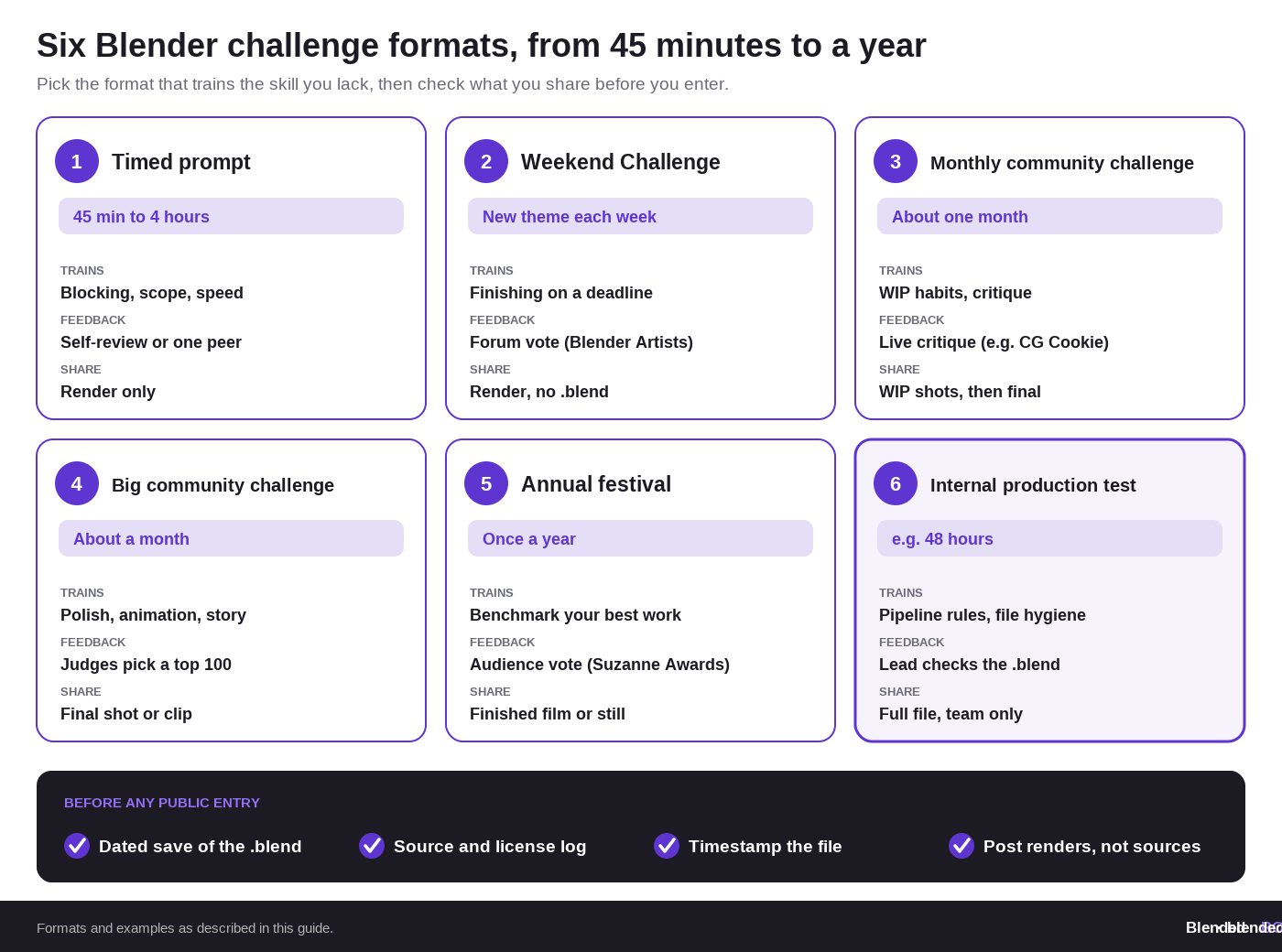
Formats differ in rhythm, the kind of feedback you get and what you have to share. Here is how the main options compare:
Most artists do best with two formats at once: a short weekly prompt for speed and one monthly challenge for depth. For a gentle start, our guide to beginner-friendly render contests lists easier entry points.
How do Blender challenges build skill faster?
Here is why. Most artists improve slowly because they overbuild, restart too often, and hide inside long unfinished scenes. Challenges cut that behavior. You are forced to scope, choose, finish, and review.
- Time pressure trains judgment: you stop polishing invisible details and start making better decisions on silhouette, materials, lighting, and camera placement.
- Repetition trains speed: weekly prop challenges build muscle memory in Blender tools such as bevels, modifiers, UVs, geometry nodes basics, and shader setup.
- Public comparison trains standards: you see what others achieve with the same prompt, which destroys comforting illusions about your own level.
- Feedback trains diagnosis: comments from experienced users reveal recurring faults in composition, edge flow, texel density, rigging, or animation timing.
- Deadlines train professional behavior: finishing under a clock is closer to real commercial work than endlessly tweaking a personal scene.
This is also where many artists get shocked. They discover they are not weak at Blender overall. They are weak at one stage, like references, blockout discipline, UV cleanup, or lighting. Challenges surface the bottleneck fast.
Which Blender skills improve the most through competitions?
Not every competition trains the same thing. You should match the format to the skill gap.
1. Modeling
Modeling challenges are the cleanest way to build form awareness, proportion, topology discipline, and modifier use. This is why courses like the GameDev.tv skill builder focus on repeated modeling prompts. Pair them with our guides to hard surface modeling and clean topology.
2. Texturing and materials
Texture-driven contests force attention to UV layout, PBR logic, wear patterns, roughness variation, and material storytelling. Member contests on Blender Artists, such as a weekly PBR props contest, combine modeling with texturing. Our guide to PBR materials in Blender covers the basics.
3. Lighting and composition
Weekly scene prompts are powerful for product visualization teams because they train camera choice, focal hierarchy, contrast control, and render communication. A mediocre model can still fail commercially if the lighting is dead. Start with three-point lighting in Blender.
4. Sculpting and characters
Sculpting challenges expose anatomy weakness quickly. They also improve observation and form simplification, which feeds back into hard-surface work more than many people expect. See our introduction to sculpting in Blender.
5. Animation
Animation contests train timing, weight, curves, staging, and shot clarity. Even simple object animation challenges can improve product demo work for startups building explainers or industrial visuals. Review the animation principles of timing and spacing before you enter.
6. Production planning
This is the hidden gain. Good competitors learn how much they can finish in four hours, two days, or one week. That planning instinct is commercial gold.
Want an easier entry point into Blender contests?
If you are still building confidence, start with smaller prompts and shorter deadlines before entering tougher judged events.
👉 See beginner-friendly Blender contests
How should a startup or SME implement Blender challenges step by step?
If you run a small design team, maker brand, visualization studio, or product startup, do not wait for a perfect internal academy. Build a challenge system with the tools you already have.
Phase 1: Assessment and planning in weeks 1-2
Step 1.1: Audit your current state
- List the exact Blender tasks your team struggles with, such as clean topology, UVs, geometry nodes setup, rendering, rigging, or animation polish
- Review five recent files and note repeat failures
- Measure average time to finished image, turntable, or animation clip
- Check who can work from reference and who only copies tutorials
Step 1.2: Define your challenge strategy
- Set one training goal per month
- Choose a format: daily mini prompt, weekly asset challenge, or monthly judged scene
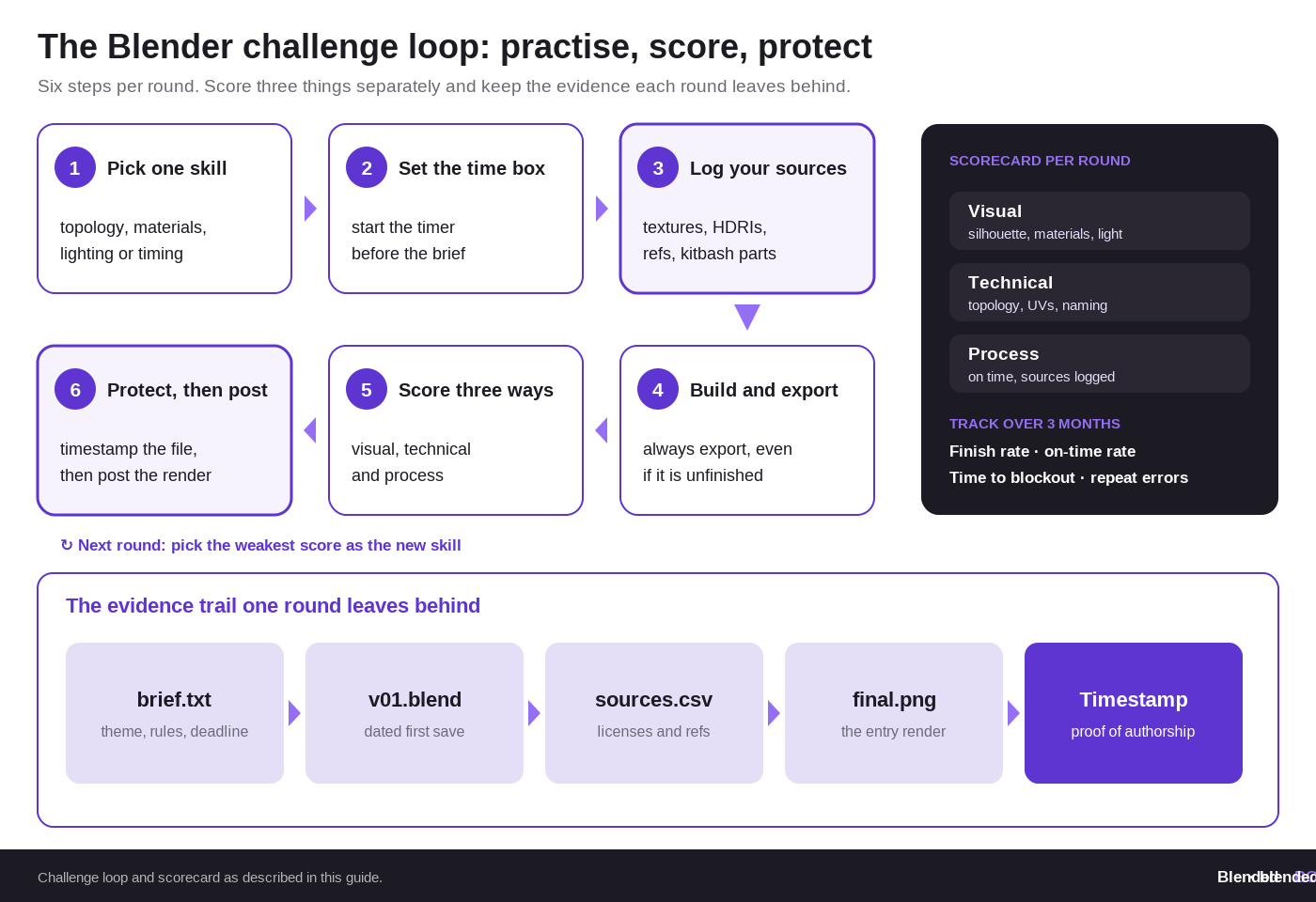
- Create a scorecard covering finish rate, technical accuracy, material quality, presentation, and deadline discipline
- Assign one reviewer, even in a team of two
Step 1.3: Build internal buy-in
- Tell the team this is training, not punishment
- Set file naming, versioning, and submission rules
- Separate private internal drills from public contests
- Agree what may be shared online and what remains confidential
Phase 2: Foundation building in weeks 3-6
Step 2.1: Choose your framework
For beginners, use one object and one material family. For marketplace sellers, use one asset plus listing render set. For product teams, use one component or scene based on real internal products.
Step 2.2: Set up infrastructure
- Use a shared folder or PDM-style structure
- Store reference boards separately from source files
- Track versions and final exports (see auto-save and version control in Blender)
- Document which external textures, HDRIs, or scans are licensed, and under which terms (our list of free CC0 texture resources helps)
- Keep a simple rights register for every challenge output
This is where the CADChain view becomes useful. Violetta Bonenkamp often frames digital creation as an asset flow problem, not just an art problem. If your team cannot tell who authored a file, which version was submitted, and what source materials were used, your training system is weak. Dirk-Jan Bonenkamp would add that weak records also weaken your legal position later.
Implementation checklist
- Documented challenge brief
- Clear deadline and submission channel
- Review rubric
- Source asset log
- Export checklist for images, videos, and blend files
- Backup and access rules
Phase 3: Review and scale in weeks 7-12
Step 3.1: Run early tests
- Start with one short challenge per week
- Cap production time hard
- Review process, not just beauty renders
- Record what caused delays
Step 3.2: Roll out gradually
- Add material-only prompts
- Add scene lighting challenges
- Add team critiques
- Move the strongest work into public competitions
Step 3.3: Build feedback loops
- Run weekly review sessions
- Keep a dashboard for finish rate and average production time
- Log repeated faults per artist
- Archive before-and-after progress quarterly
What best practices actually work in 2026?
Practice 1: Match challenge scope to one measurable skill
What it is: one challenge should test one dominant skill, not twelve unrelated ones.
Why it works: artists can diagnose failure clearly. If the brief is too broad, nobody knows whether they failed because of concept, modeling, lighting, or rendering.
How to do it:
- Set one focus such as topology or lighting.
- Limit external variables.
- Review only against that focus first.
Common pitfall: giving beginners a full cinematic scene challenge too early.
How to avoid it: start with props, then materials, then small scenes.
Metrics to track: finish rate, revision count, review score.
Practice 2: Use strict time boxes
What it is: hard limits such as 45 minutes, 4 hours, or 3 days.
Why it works: the limit forces prioritization. This is close to commercial behavior where budget and deadlines are real.
How to do it:
- Set the timer before the brief starts.
- Require a final export even if unfinished.
- Review what was cut and why.
Common pitfall: extending deadlines because the work looks promising.
How to avoid it: keep the original deadline and allow a post-mortem version separately.
Metrics to track: on-time submission rate, scope discipline, final usable output.
Practice 3: Review source files, not just final images
What it is: judges or leads inspect the blend file, naming logic, modifier stack, UV state, node graphs, and scene organization.
Why it works: beautiful renders can hide messy production habits.
How to do it:
- Ask for packed or cleaned project files.
- Use a short technical checklist.
- Score organization separately from visual impact.
Common pitfall: rewarding style while ignoring technical debt.
How to avoid it: split scores into visual, technical, and process categories.
Metrics to track: file cleanliness score, missing asset count, rework time.
Practice 4: Protect authorship and licensing from the start
What it is: each challenge asset should carry clear proof of source, authorship, and usage rights.
Why it works: public contests and social sharing can blur ownership fast, especially when teams rework templates, scans, or shared base meshes.
How to do it:
- Save creation dates and versions.
- Keep source logs for textures, scans, and references.
- Use copyright notices, certificates, or blockchain timestamps such as BlendedBoris where relevant.
This is one of the strongest crossover lessons from CADChain. The founders have long argued that file-level records matter because once a digital file leaves your direct control, contract language alone is often weak. In the creative sector, the same logic applies to blend files, source textures, and distributed collaborations.
Common pitfall: posting work publicly without a clean record of what is original and what is licensed.
How to avoid it: keep a small authorship dossier for every challenge output.
Metrics to track: rights-complete submissions, missing source records, file provenance completeness.
The legal starting point is simple: Blender’s license page says that what you create with Blender is your sole property. Entering a challenge does not change that, but read each contest’s rules, because some organisers ask for rights to show or reuse entries. Posting work publicly also makes copying easy. If someone later claims your model or render, you have to show who made it and when. That is the gap BlendedBoris fills: it adds blockchain timestamps to Blender files from inside Blender, so each saved version carries dated proof of authorship. Read more in whether 3D models automatically have copyright.
What mistakes do Blender teams and artists make most often?
This is where skill building often breaks. The mistakes are technical, but they are also legal and commercial.
Mistake 1: Mistaking tutorial repetition for skill
Why it happens: tutorials feel productive because they remove uncertainty.
The impact: artists cannot solve unfamiliar problems under pressure.
How to avoid it:
- Switch from guided lessons to prompts fast
- Hide the solution while building
- Repeat the same subject from new references
If you already made this mistake:
- Rebuild three past tutorial objects from memory
- Cut your toolset to what you really understand
- Review where you froze without instructions
Mistake 2: Joining contests that are far above your current level
Why it happens: public challenge culture can trigger comparison and panic.
The impact: artists quit, restart, and collect unfinished files.
How to avoid it:
- Pick contests by skill target, not prestige
- Use shorter briefs first
- Treat strong public contests as benchmarks, not identity tests
Mistake 3: Ignoring IP, copyright, and source rights
Why it happens: artists assume a challenge piece is just practice and carries no legal weight.
The impact: unlicensed kitbash parts, copied references, or unclear textures can make a public entry commercially unusable later.
How to avoid it:
- Use only assets you created, licensed, or can clearly attribute (see Creative Commons vs copyright for Blender assets)
- Keep screenshots, source receipts, and version logs
- Separate internal experiments from public releases
Dirk-Jan Bonenkamp's legal view is practical here. Evidence wins arguments. If you later want to sell, license, defend, or remove infringing copies of a model, you need a clean trail. That matters even more for EU SMEs working with freelancers across borders.
Mistake 4: Sharing raw blend files too early
Why it happens: open communities reward sharing, and artists want feedback.
The impact: once raw files spread, control drops fast. You may keep copyright and still lose practical control.
How to avoid it:
- Share renders first
- Strip unused assets and notes from source files
- Use contracts or platform terms if files must be shared
Mistake 5: Measuring success only by winning
Why it happens: public rankings are visible and addictive.
The impact: artists miss the training value of improved speed, cleaner files, and better critique handling.
How to avoid it:
- Track internal progress metrics
- Save older entries for comparison
- Judge progress by what you can now finish under time limits
How should you measure success from Blender challenges?
A challenge system works when it produces visible improvements in output, speed, and rights hygiene.
Foundational metrics
- Submission rate
- Average time to first workable blockout
- Average time to final render
- Number of finished pieces per month
- Repeat error categories per artist
Advanced metrics after 3 months
- Portfolio-ready outputs created from challenge work
- Marketplace-ready assets generated
- Public engagement on posted challenge pieces
- Reduction in rework hours on client or studio projects
- Percentage of files with complete authorship and source records
Build a simple dashboard
- Track each challenge in one sheet
- Score visual quality, technical quality, and deadline discipline separately
- Record tools used, blockers hit, and source assets used
- Review trends monthly, not emotionally after one bad week
Which challenge approach fits each stage of a creative business?
Solo beginner or pre-revenue freelancer
Your reality: limited time, low confidence, and no stable pipeline yet.
Approach:
- Use short weekly prop challenges
- Focus on modeling and lighting before complex animation
- Post finished work publicly for critique
Prioritize: finish rate and visible progress.
Defer: advanced pipeline polish and team workflows.
Success looks like: 8 to 12 finished pieces in one quarter.
Small studio or seed-stage startup
Your reality: commercial pressure is real, and every training hour must connect to output.
Approach:
- Use challenge prompts related to your actual market, such as product renders, environment assets, or marketing clips
- Score file structure and reuse potential
- Introduce rights logs and source tracking from the start
Prioritize: delivery speed, reusable assets, and internal standards.
Defer: prestige contests with heavy artistic scope that do not map to your business.
Success looks like: challenge work feeding actual portfolio, sales, or marketplace output.
Established SME or Series A+ creative tech company
Your reality: more people, more files, more legal exposure, and higher review costs.
Approach:
- Run internal production simulation challenges
- Measure rework reduction and pipeline quality
- Use authorship records, permissions, and controlled file sharing for public entries
Prioritize: standardization, evidence trails, and quality under deadline.
Defer: casual sharing of source files outside approved process.
Success looks like: challenge-trained teams delivering faster commercial visuals with fewer legal headaches.
What does the CADChain founders' point of view add to this topic?
A lot, actually. Most articles about Blender challenges stop at motivation. That is too shallow for teams handling revenue-bearing 3D assets. Violetta Bonenkamp and Dirk-Jan Bonenkamp would push the discussion further into asset control, digital evidence, and long-term commercial use.
Violetta's deeptech angle is useful because she treats digital files as business assets with lineage. That means a challenge file can become a portfolio piece, marketplace listing, client sample, licensed asset, or evidence of authorship later. If you ignore that chain early, you create friction later.
Dirk-Jan's legal angle is even more direct. Copyright exists automatically in many cases, but proof, scope, and enforceability still matter. In Europe, especially for SMEs working across the Netherlands, Germany, Belgium, France, or Poland, the practical question is not "Do I have rights?" but "Can I prove authorship, versions, permissions, and transfer history without chaos?"
This is why the CADChain philosophy around digital fingerprints, blockchain-anchored certificates, and file event trails matters even in Blender education. The value is not hype. The value is having records that help when a model is copied, resold, disputed, or folded into a commercial project months later.
“Artists often think protection starts after success. In reality, protection starts when the file is created, named, versioned, and shared.”
Violetta Bonenkamp, CEO and co-founder, CADChain
What should your 4-week action plan look like?
Week 1: research and alignment
- Pick one skill gap
- Choose three public challenge sources to observe
- Set your review rubric
- Decide what files may be shared publicly
Week 2: setup and baseline
- Create your folder and version structure
- Set naming rules for blend files and renders
- Create a source rights log
- Run one short baseline challenge
Week 3: execution
- Run two timed prompts
- Review source files, not just renders
- Document blockers and repeated errors
- Select one output for public posting
Week 4: review and next cycle
- Compare baseline to latest output
- Track time saved and quality changes
- Adjust scope for the next month
- Move one challenge result into your portfolio or product pipeline
Glossary of terms used in this guide
- Blender challenge: a structured practice exercise or contest completed in Blender within a defined scope and time.
- Competition brief: the written prompt, rules, constraints, and delivery requirements for a challenge.
- Topology: the edge and polygon structure of a 3D mesh.
- PBR: physically based rendering, a material method using maps and values that mimic real surface behavior.
- Authorship record: evidence showing who created a file, when, and in which versions.
- Digital fingerprint: a cryptographic or geometric signature linked to a file for identification and proof.
- Rights log: a record of references, textures, assets, licenses, and permissions tied to a project.
- Weekend Challenge: the long-running weekly themed contest on Blender Artists, with a short entry window and a member vote.
- Time box: a fixed amount of time for a task that is not extended, even when the work looks promising.
- Blockchain timestamp: a tamper-evident, dated record that a file existed in a given state, which BlendedBoris adds to Blender files.
Closing thoughts: what should readers do after mastering Blender challenges?
Blender challenges and competitions are one of the fastest ways to build real skill because they expose weak spots, force completion, and create visible proof of progress. For engineers, designers, startups, and SMEs, they also train a habit that matters far beyond art practice: delivering quality under constraints.
The deeper lesson from the CADChain founders' perspective is that skill building should not be detached from ownership, traceability, and commercial reality. A finished render is useful. A finished render with a clean source trail, version history, and clear authorship is far more useful.
So start small, finish often, review brutally, and protect what you make. And once your challenge habit is in place, the natural next step is broader career structure: communities, learning paths, and the systems that turn scattered Blender practice into long-term professional growth. That is where Blender community and learning roadmap guidance becomes the logical next read.
Turn every challenge entry into a protected asset.
Challenge pieces often end up in portfolios, client decks and marketplace listings. BlendedBoris adds blockchain timestamps to your Blender files from inside Blender, so the version you entered, and every version after it, carries dated proof that you made it.
👉 Protect your Blender files with BlendedBoris
People Also Ask:
Is Blender harder to learn than CAD?
Blender and CAD software address different needs, making the learning curve subjective to the user's goals. CAD tools like FreeCAD focus on precision and technical design, often perceived as more straightforward for industrial modeling tasks. Blender covers a vast range of functionalities including 3D art, animation, and effects, which might feel overwhelming to newcomers.
Is Blender considered a high-income skill?
Blender can lead to well-paid work, but income depends on niche, portfolio and client type far more than on the software itself. Product visualization, game assets, motion design and 3D printing models all pay differently, and freelancers earn differently from studio staff. Compare the options in our guides to building a Blender freelance career and studio employment vs freelancing. Being free and open source also keeps your software costs at zero, which helps small businesses and independent creators.
Is Blender suitable for children?
Blender can be an excellent way for kids to engage with 3D modeling and STEAM fields. Its wide range of creative tools allows children to explore art, games, and animated storytelling. Supervision and guided tutorials may be required initially to help younger users navigate its robust feature set.
Can you make money using Blender?
Absolutely. Opportunities include freelance projects, creating assets for gaming or animation, selling 3D models, and producing video tutorials. Platforms like YouTube also enable creators to generate income through ads, memberships, and sponsorships by sharing Blender-related content. Our list of proven ways to make money with Blender compares the main routes.
Is Blender adequate for professional use?
Blender has become a robust option for professional work, being used in industries like film, gaming, and architectural visualization. Several studios and independent creators rely on it for its advanced features and continually expanding toolset. Flow, made with Blender and rendered in EEVEE, won the Oscar for Best Animated Feature in March 2025.
What are common challenges when learning Blender?
Beginners often find Blender's interface and sheer breadth of tools challenging to navigate initially. Dedicated practice through tutorials and small projects can significantly ease the learning curve over time.
Is Blender useful for 3D printing?
Yes, Blender is highly effective for creating models compatible with 3D printing. While it lacks built-in CAD-specific precision tools, its modifiers and export settings make it a flexible choice for printable designs. If you sell prints, see our guide to selling STL files on Cults3D, Thingiverse and MyMiniFactory.
Are there competitions for Blender artists?
Yes. Blender Artists runs a weekly Weekend Challenge and member contests, CG Cookie runs community challenges with live critiques, well-known artists run large themed community challenges a few times a year, and the Blender Conference shows the year’s best work in the Suzanne Awards. For an easy start, see our guide to beginner-friendly weekly render contests.
How can Blender help in pursuing a creative career?
Blender equips users with versatile 3D modeling, animation, and visual effects skills, applicable in careers like filmmaking, game development, and digital art. Its growing prominence in professional industries makes it a valuable addition to any creative portfolio.
Do professional studios use Blender?
Many large studios still build their pipelines around Maya or 3ds Max, while indie studios, freelancers and a growing number of larger productions use Blender for its cost and steady feature updates. Flow’s Oscar in 2025 showed that a Blender-made film can compete at the top level. Compare the tools in Blender vs Maya for beginners.
FAQ on Blender Challenges and Competitions
How do Blender challenges differ from traditional 3D tutorials?
Blender challenges emphasize independent problem-solving, deadlines, and practical constraints seen in real client work, while tutorials guide users through set solutions. Challenges build decision-making skills, whereas tutorials focus on software features. Combining both creates a balanced learning approach.
What’s the best way to start participating in Blender competitions?
Start with beginner-friendly prompts on platforms like Blender Artists Community or GameDev.tv. Choose competitions that align with your current skill level and improve gradually. Focus on finishing rather than perfecting your entries. Find more tips in this networking guide for 3D professionals.
How can small studios integrate Blender challenges without overloading their teams?
Limit challenges to short weekly or monthly tasks that align with workflow goals. Focus on skills crucial to your business, and assign a reviewer to provide constructive feedback. Using internal mini-competitions helps build both morale and skills.
Can participation in public challenges improve chances of freelance success?
Yes, public challenges build your portfolio, provide visibility, and show that you can meet deadlines. Clients rarely ask about contest rankings, but they do look at finished, well-presented work, and challenge entries are an easy way to produce it. See how to turn entries into a professional 3D artist portfolio and where to find clients in this guide to freelance platforms for Blender artists.
How do competition deadlines enhance skill development?
Deadlines create time constraints that enforce focus and prioritization. They cultivate professional habits such as finishing projects faster and improving decision-making. Meeting deadlines also simulates client-driven real-world expectations, making artists better prepared for commercial projects.
Are Blender challenges effective for team-building in a studio setting?
Yes, team-wide Blender challenges foster collaboration, improve communication, and align skill levels. They also reveal individual strengths and offer a low-cost training method to prepare for actual project pipelines or client deadlines.
What are the risks of participating in public Blender challenges?
Risks include unintentional sharing of improperly licensed assets, loss of creative control over entered work, and exposing weaknesses publicly. To mitigate these risks, maintain detailed source logs and participate only when ready to meet expected skill standards.
Do challenges help in creating marketplace-ready assets?
Yes, challenges often require high-quality output under constraints, helping refine models suitable for platforms like Cults3D or MyMiniFactory. Read each platform’s upload guidelines before you list a challenge piece there. Explore this marketplace success guide for more insights.
How do Blender challenges support Intellectual Property (IP) best practices?
Challenges reward original work, and a good challenge habit includes a source log and dated versions for every entry. CADChain’s founders recommend tracking creation history from the first save, and BlendedBoris adds blockchain timestamps to Blender files so you can show who made a piece and when if ownership is ever disputed. Start with our copyright basics for 3D artists.
Where can I find structured Blender learning aligned with challenges?
GameDev.tv’s Blender Skill Builder course is built around modeling challenges, and CG Cookie pairs its courses with community challenges and live critiques. For more structured paths, compare CGBoost courses and our Blender community and learning roadmap.
How do Blender competitions prepare for professional certifications?
There is no official Blender user certification to prepare for. The Blender Foundation Certified Trainer programme certified teachers, not users, and it ended when the Blender Network closed in 2021. Competitions still help: they build the technical skills, structured workflows and finished portfolio pieces that course certificates and employers look for. See our overview of advanced Blender courses and certifications.


