

TL;DR: consulting services for Blender pipeline integration
A Blender pipeline consultant connects Blender to the rest of your toolchain: CAD software, game engines, render farms, review tools and file storage. A good project runs in five phases: audit, design, build, pilot and hand over. The goal is a workflow your team owns and can run without the consultant. For startups and SMEs, the biggest wins are usually not exotic tools. They are clear file formats per hand-off, naming and versioning rules, export presets, a shared asset library and written IP terms. Blender itself claims no rights over what you make with it, but contracts, CAD source files, add-on code and third-party assets all have owners. Build those checkpoints into the pipeline, and keep dated proof of authorship for the work your team creates.
💡 New to pipelines? Start with our Blender file management best practices.
Consulting Services for Blender Pipeline Integration in 2026
Blender has moved from hobby tool to production tool. Studios, product companies, game teams and agencies now use it next to CAD packages, game engines and review platforms. That brings a new problem. Each tool works on its own, but the hand-offs between them break. Files arrive at the wrong scale, materials disappear on export, nobody knows which version is final, and a client asks who owns the scripts a freelancer wrote.
This is the work of a Blender pipeline consultant. This guide explains what pipeline integration means, what a consultant actually does, how a typical project runs, what CAD-to-Blender work involves, and how to keep IP traceable from the first file to the final delivery. It is written for founders, studio leads and freelancers on both sides of the deal. Facts were checked in October 2026, when Blender 5.2 LTS was the current long-term support release.
“A pipeline is a set of promises about files: which format, which version, which owner. Write those promises down before you write any code.”
Violetta Bonenkamp, co-founder, CADChain
Make authorship part of your Blender pipeline
BlendedBoris adds a blockchain timestamp to Blender work from inside Blender, so every file your team creates can carry dated proof of who made it and when.
👉 Explore BlendedBoris
What Is a Blender Pipeline?
A pipeline is the path an asset takes from idea to delivery, and the rules that keep it on that path. In a Blender team it usually covers:
- Inputs: CAD models, scans, concept art, purchased assets and client files.
- Work in Blender: modeling, UVs, materials, rigging, animation, lighting and rendering, often in separate files that are linked together.
- Supporting systems: file storage and versioning, a production tracker, an asset library and render machines.
- Outputs: renders, game assets, web and AR models, print files and marketing images.
- Rules: naming, folder structure, formats, units, approvals and who owns what.
Blender ships with importers and exporters for the main exchange formats, including FBX, glTF 2.0, USD, Alembic, OBJ, STL and PLY. Each one carries a different subset of data, which is why format choice is a pipeline decision, not a personal habit. Our guide to the Blender to Unity pipeline shows how much detail goes into getting even one hand-off right.
What Does a Blender Pipeline Consultant Do?
A pipeline consultant is part technical director, part developer and part trainer. Typical services include:
- Pipeline audits: mapping every tool, file and hand-off, and finding where time and quality are lost.
- Workflow design: formats per hand-off, naming conventions, folder structures and version rules.
- Tool development: Python scripts and custom add-ons that automate exports, checks and repetitive tasks. See our primer on Blender scripting with Python.
- CAD integration: getting engineering models into Blender at the right scale and quality for visualisation.
- Engine and web integration: export presets and checks for Unity, Unreal, three.js or AR viewers.
- Render infrastructure: local render nodes, a render manager or a cloud farm. Our overview of render farm options for Blender compares the choices.
- Asset libraries: setting up shared, linked libraries with the Asset Browser.
- Training and documentation: so the team can run and change the pipeline after the project ends.
- IP and data hygiene: licence checks on assets and add-ons, access control, and records of who created what.
When Does a Startup or SME Need Pipeline Consulting?
Small teams often run fine on habit until something changes. These are the common triggers:
- You are moving to Blender from another 3D package, or adding Blender next to it.
- Engineering hands you CAD models every week and someone spends days fixing them for renders.
- Your team grew from two artists to eight and files keep getting overwritten.
- A client or investor asks how you protect source files and who owns the code your freelancers wrote.
- Renders block your machines overnight and deadlines slip.
- The same export mistakes keep reaching clients or the game build.
If only one person feels the pain, a better habit may be enough. Our guides to auto-save and version control in Blender and saving and backing up Blender projects cover the basics. When several people and tools are involved, it is usually time for a pipeline project.
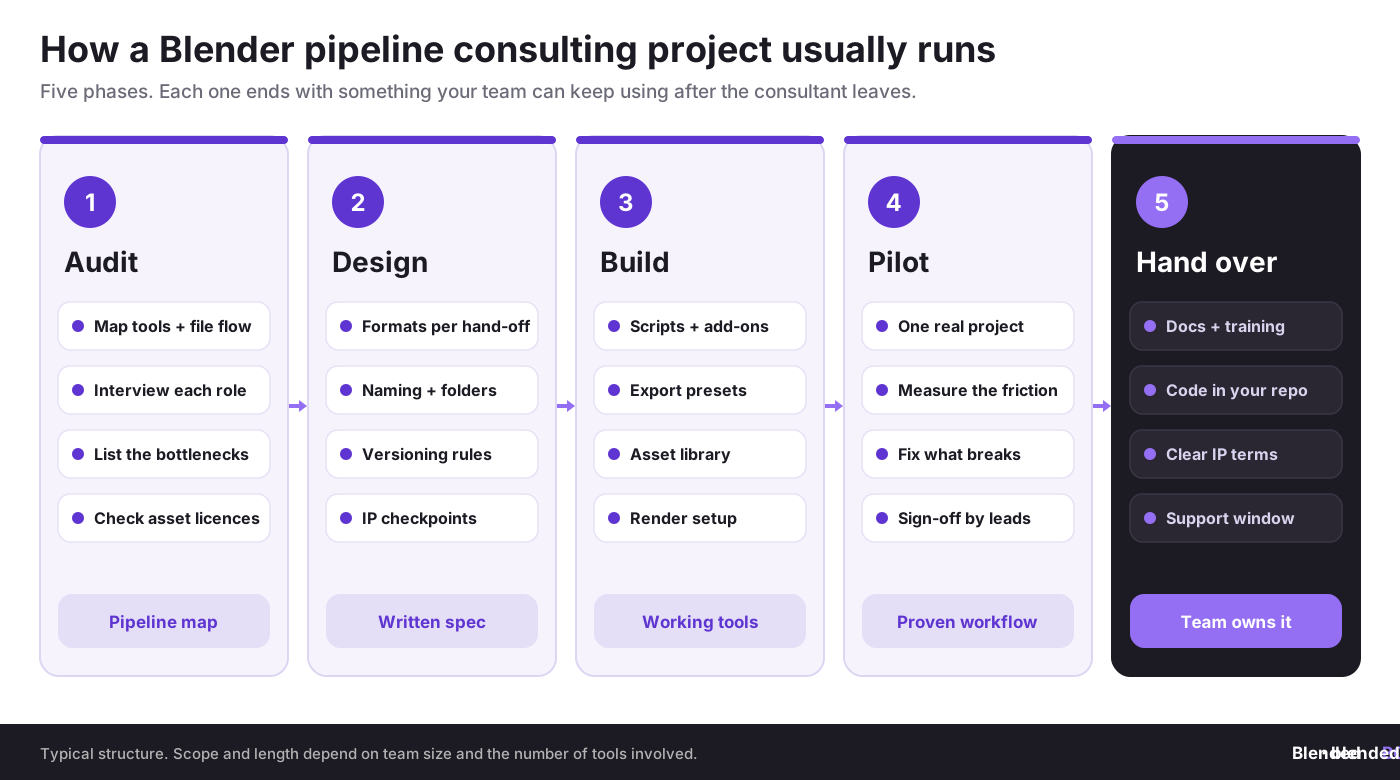
How a Pipeline Consulting Project Runs: Five Phases
- Audit. The consultant interviews each role, maps tools and file flows, and lists the bottlenecks. A licence check on assets, add-ons and fonts belongs here too. Deliverable: a pipeline map.
- Design. Agree the format for each hand-off, units and scale, naming, folders, version rules and where IP checkpoints sit. Deliverable: a short written spec that the team signs off.
- Build. Write the scripts and add-ons, export presets, asset library and render setup. For add-on basics, see creating custom Blender add-ons with Python.
- Pilot. Run one real project through the new pipeline, note every point of friction and fix it. Leads sign off when the workflow holds up under deadline pressure.
- Hand over. Documentation, training sessions, all code in your own repository, clear IP terms in writing and an agreed support window.
Blender Studio, the team behind Blender’s open movies, publishes its own pipeline tools and documentation. It combines Blender add-ons with Kitsu for production tracking and Flamenco for render management, and it is a useful reference for what a mature open source pipeline looks like.
CAD to Blender: The Integration Most SMEs Ask For
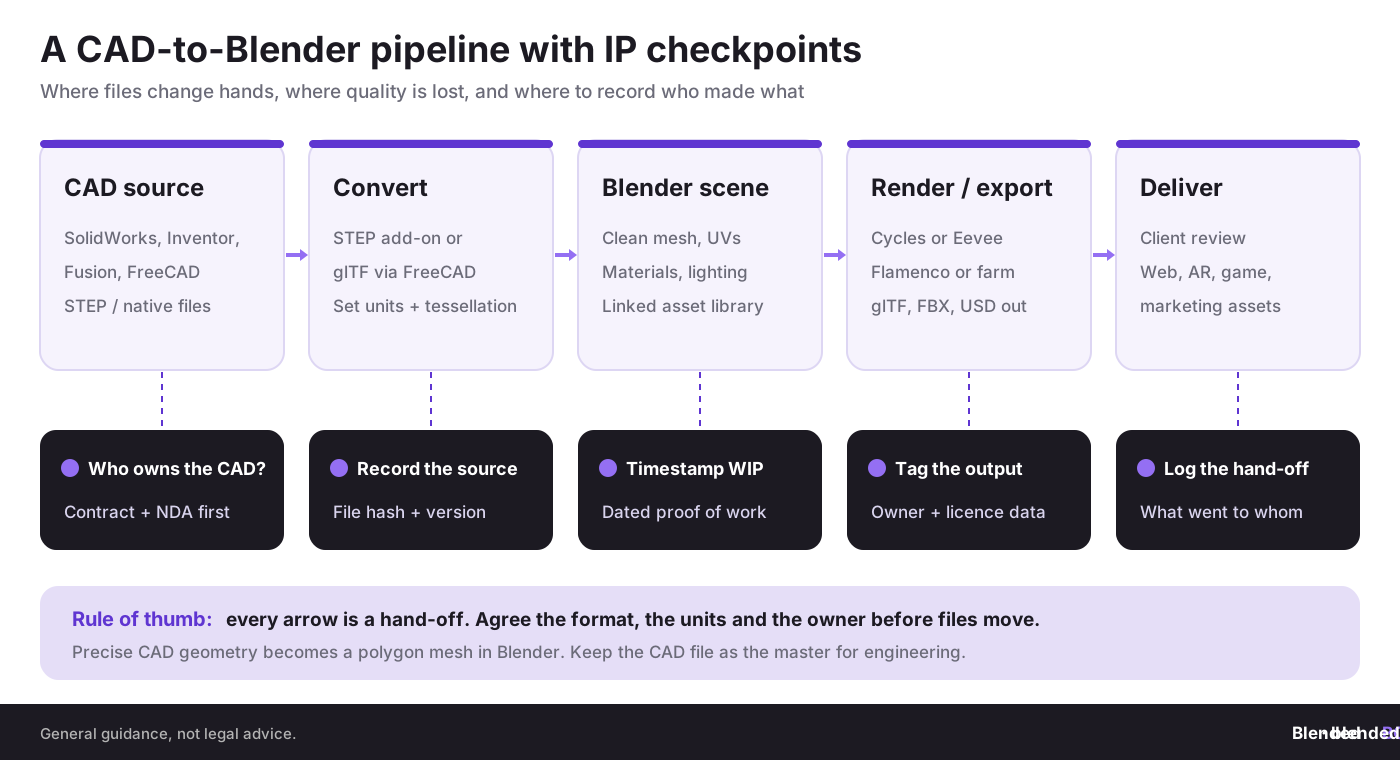
Product companies and hardware startups often want marketing renders, configurators or AR models from their engineering data. The catch is that CAD and Blender describe shapes differently. CAD files such as STEP store precise boundary surfaces (B-Rep and NURBS). Blender works with polygon meshes. Every import is a conversion, and every conversion is a quality and scale decision.
- No native STEP import. Blender has no built-in STEP importer in 2026. Teams use extensions from the Blender Extensions platform, such as STEP Importer or STEPper Reborn, paid add-ons, or a conversion step through FreeCAD to glTF.
- Units and scale. CAD models are often in millimetres, Blender scenes in metres. Decide once, and test it in the pilot.
- Tessellation. Too coarse and curved surfaces facet; too fine and files become heavy. A consultant sets presets per use case.
- Hierarchy and names. Keep assembly structure and part names so updates can replace parts rather than whole scenes.
- One master. The CAD file stays the engineering master. Blender holds a visual copy, never the other way round.
If your engineers use SolidWorks or Inventor, our sister sites SolidBoris and BORIS Inventor cover protecting CAD files on that side of the pipeline.
Consultant, Freelancer, Agency or In-House: Compared
There is more than one way to get pipeline help. This table compares the usual options for a small team.
Many consultants and technical directors find work through freelance platforms. Our list of freelance platforms for Blender 3D artists and our comparison of studio employment vs freelancing show both sides of that market.
IP, File Security and Legal Metadata in the Pipeline
Pipeline work touches valuable files: client CAD, unreleased product designs and your own source assets. Treat IP as a pipeline feature, not a legal afterthought.
- Your Blender output is yours. The Blender license page states that what you create with Blender is your sole property. The GPL covers the software, not your renders or .blend files.
- Add-on code has rules. The same page explains that Python scripts using Blender’s API must be shared under a GPL-compatible licence if they are published. Internal tools you never distribute are a different case, so agree with your consultant who owns the code and how it may be shared.
- Contracts first. Before any CAD file moves, sign an NDA and a contract that states who owns deliverables, scripts and documentation.
- Access control. Give contractors access only to the folders and repositories they need, and remove it at hand-over.
- Records and metadata. Store owner, client, licence and version as custom properties, file names or sidecar data, and log what went to whom. Our guide to file organization for multi-asset packs has practical naming patterns.
- Proof of authorship. In most countries copyright arises automatically, but you still have to prove who made what and when. Read do 3D models automatically have copyright? and our tips to protect Blender models from theft.
Timestamp every pipeline milestone
With BlendedBoris you can register Blender files on the blockchain in a few clicks, so work in progress and final deliveries carry dated, verifiable proof of authorship.
👉 Register your work with BlendedBoris
Questions to Ask a Blender Pipeline Consultant
- Which Blender versions do you support, and how do you handle upgrades between LTS releases?
- Can you show a pipeline you designed, and what the team still uses from it today?
- Which formats do you recommend for each of our hand-offs, and why?
- Will all code, presets and documentation live in our repository, and who owns them?
- How do you handle third-party add-on and asset licences?
- What does the pilot look like, and how do we measure success?
- What training and support do we get after hand-over?
Keep add-ons on the approved list only. Our explainers on what Blender add-ons and extensions are and how to install add-ons safely are useful for the whole team.
Common Mistakes in Blender Pipeline Integration
- Buying tools before mapping the flow. A render farm will not fix chaotic file naming.
- One format for everything. FBX, glTF and USD each carry different data; choose per hand-off.
- Ignoring units. Millimetre CAD in a metre scene causes scale, physics and lighting problems.
- Code that leaves with the consultant. Scripts kept on a freelancer’s machine are a risk, not an asset.
- No pilot. Rolling a new pipeline out to every project at once.
- No IP terms. Unclear ownership of deliverables, scripts and client files.
- Unlicensed assets in the library. One personal-use texture can block a commercial release.
- No proof of authorship. Sharing files with partners without dated records of who created them.
For more ways to automate safely, see our guide to Blender add-ons, automation and productivity systems.
Conclusion
Blender pipeline integration is less about clever software and more about clear agreements: which format, which version, which owner, at every hand-off. A good consultant audits first, designs on paper, builds only what you need, proves it on a real project and leaves your team in control. For startups and SMEs that work with CAD data, client files or freelancers, that structure also protects the business. Keep the CAD file as the engineering master, keep code in your own repository, put IP terms in writing and record proof of authorship as your team creates work.
People Also Ask:
What is Blender pipeline integration?
It is the work of connecting Blender to the other tools and steps in a production, such as CAD, game engines, render farms, review tools and storage, with clear rules for formats, versions and ownership.
What does a Blender pipeline consultant do?
They audit how files move through your team, design a better workflow, build scripts, add-ons and presets, run a pilot and train your team to run the pipeline on its own.
Can Blender import CAD files?
Not STEP files natively. Teams use extensions such as STEP Importer or STEPper Reborn, paid add-ons, or convert CAD to glTF or another mesh format first.
Which file format is best for a Blender pipeline?
It depends on the hand-off. glTF 2.0 suits web and real-time use, FBX is common for game engines, USD and Alembic are used for scene and cache exchange, and STL or OBJ for printing and simple meshes.
Who owns the scripts a consultant writes?
Whoever the contract says. Agree in writing that code and documentation belong to your company or are licensed to it, and note that published Blender add-ons must follow GPL-compatible terms.
Is pipeline consulting worth it for a small team?
It is worth it when several people or tools are involved and hand-off problems keep costing time. A short audit is often enough to show whether a full project makes sense.
FAQ on Blender Pipeline Consulting
How long does a Blender pipeline project take?
It depends on team size and the number of tools. A focused audit can take days; a full design, build and pilot usually runs over several weeks.
Which Blender version should a production pipeline use?
Many teams standardise on the current LTS release, which was Blender 5.2 LTS in October 2026, because it is supported for two years.
Does Blender have production tracking or render management tools?
Blender Studio uses Kitsu for production tracking and its own open source render manager, Flamenco, together with Blender add-ons for its pipeline.
How do I keep client CAD files safe during a Blender project?
Sign an NDA first, limit access to what each person needs, log every hand-off, and remove access when the project ends.
Does Blender claim rights over my work?
No. Blender’s licence page states that what you create with Blender is your sole property. Third-party assets and add-ons keep their own licences.
How can BlendedBoris help a Blender pipeline?
BlendedBoris adds a blockchain timestamp to Blender work from inside Blender, so files at each stage of the pipeline carry dated proof of authorship.


