
TL;DR: Blender documentation in one paragraph
The official Blender documentation is free and lives in a few places: the Blender Manual for every tool and setting, the Python API reference for scripting and add-ons, and the release notes on the developer docs site for what changed in each version. Blender Studio adds paid, guided courses. Always read the manual for the version you actually use: in October 2026 that is usually Blender 5.2 LTS. Right-click any button in Blender and choose Online Manual to jump straight to its page. And remember: Blender is GPL software, but the art you make with it is yours.
💡 New to Blender? Start with the complete Blender guide for beginners.
Blender Documentation: The Official Learning Resources Every Artist Should Know
Most Blender questions already have an official answer. The problem is knowing where to look. YouTube tutorials age quickly, forum threads mix versions, and a shortcut that worked in Blender 4.x may have moved in 5.x. The official Blender documentation is written for the current release, kept up to date by developers and volunteers, and completely free.
This guide maps every official Blender learning resource, explains which question each one answers, and shows how to use them so you find answers in minutes instead of hours. It is written for 3D artists who sell, license or share their work, so we also cover what the documentation and Blender’s license mean for the ownership of your art.
“The fastest Blender artists aren’t the ones who memorise everything. They’re the ones who know exactly where the answer lives.”
Violetta Bonenkamp, co-founder, CADChain
Protect the art you make in Blender
BlendedBoris registers your Blender work with a timestamped proof of authorship, directly from Blender, so you can show what you made and when.
👉 Explore BlendedBoris
What Counts as Official Blender Documentation?
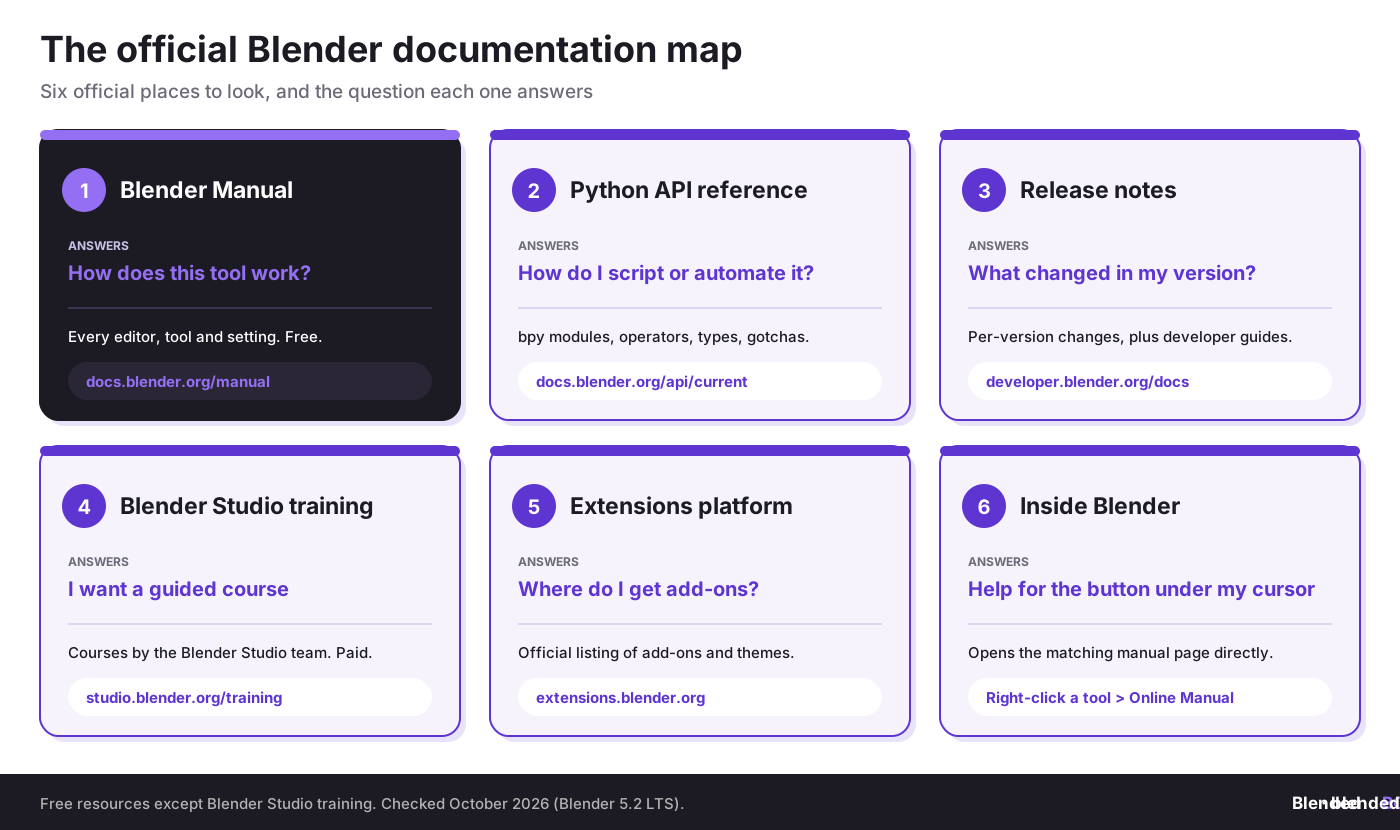
“Official” means published by the Blender project itself, on blender.org domains. Here is what exists and what each resource is for:
How to Use the Blender Manual Effectively
The Blender Manual is the backbone of the official documentation. It is organised like Blender itself: Getting Started, User Interface, Editors, Scenes and Objects, Modeling, Sculpting and Painting, Animation, Rendering, and so on. In October 2026 the latest manual covers Blender 5.2 LTS, and it is updated continuously.
- Open it from inside Blender. Use Help > Manual, or right-click any button or property and choose Online Manual to land on the page for that exact tool.
- Match your version. The manual for older releases stays online, so you can read the version that matches your installation. Behaviour, menus and defaults can change between releases.
- Use search for terms, the sidebar for concepts. Search finds a modifier or setting by name; the chapter tree explains how a whole area such as Geometry Nodes fits together.
- Switch language if it helps. Volunteers translate the manual into several languages, though translations can lag behind the English version.
- Report what is wrong. Every page has a link to report an issue, and the manual is open to contributions from the community.
If you are still learning the layout, pair the manual with our Blender interface tour and the list of essential Blender keyboard shortcuts.
The Python API Reference for Scripting and Add-ons
The Blender Python API reference documents the bpy modules that scripts and add-ons use: context access, data access, operators and types. Start with the Quickstart and API Overview pages, then read the Gotchas section before you write anything that changes mesh data or file paths.
- Turn on Python Tooltips in Edit > Preferences > Interface, so hovering over a button shows the Python property behind it.
- Use the Scripting workspace and the Info editor to see which operator a click runs, then copy it into your script.
- Right-click a button and choose Online Python Reference to jump to the API page for that property.
Our guides to Blender scripting with Python and creating custom add-ons build on this reference.
Release Notes: What Changed in Your Version
When a tool behaves differently after an update, the release notes on the Blender developer documentation are the place to check. They list new features, changed defaults and removed options for every release. Recent versions:
- Blender 5.2 LTS: released 14 July 2026, the current long-term support release.
- Blender 5.1: released 17 March 2026.
- Blender 5.0: released 18 November 2025.
- Blender 4.5 LTS: released 15 July 2025.
LTS releases receive bug fixes for an extended period, which makes them the safer choice for client work and long projects. Download Blender only from official sources: see how to download Blender safely.

Blender Studio Training and the Extensions Platform
Blender Studio is the in-house production team behind Blender’s open films. Its training library offers structured courses and real production files, and it is the one official resource that is paid: in October 2026 a subscription costs €17 a month, or €11.50 a month on the quarterly plan. The money supports Blender’s development and open projects.
The official Extensions platform, built into Blender since version 4.2, is where you find add-ons and themes. Read what Blender add-ons and extensions are and how to install them before you add anything to a production setup.
What Blender’s Documentation and License Mean for Your Art
Two licenses matter here, and they are easy to mix up:
- Blender itself is GPL software, but the Blender license page is clear that what you create with Blender is your sole property. Your renders, models and .blend files are yours to sell and license, including commercially.
- The Blender Manual is licensed CC BY-SA 4.0. If you copy its text or images into your own tutorials, courses or books, you must credit it and share your adapted version under the same license.
Owning your art is one thing; proving it is another. Keeping dated versions of your .blend files and registering your work gives you evidence if someone copies it. Start with copyright basics for 3D artists and our step-by-step guide to registering copyright.
Turn your Blender files into proof of ownership
BlendedBoris adds a blockchain timestamp to your Blender work, so you have dated evidence of authorship before you share, sell or post it.
👉 Register your art with BlendedBoris
Common Mistakes When Learning From Documentation
- Reading the wrong version. A tutorial for an old release can send you looking for menus that have moved.
- Skipping the release notes after an update. Changed defaults explain most “it worked yesterday” problems.
- Installing add-ons from random sites. Use the Extensions platform or the developer’s official page.
- Copying manual content without credit. CC BY-SA requires attribution and share-alike.
- Not keeping dated project files. Without versions, it is harder to prove you created a design first.
Conclusion
The official Blender documentation answers most questions faster than any search engine, as long as you open the right resource for the right version. Use the manual for tools, the Python API for scripts, the release notes for changes and Blender Studio for guided learning. Then protect what you make: your art is yours, and good records make that easy to prove. For a broader learning path, see our review of the Blender Guru donut tutorial.
People Also Ask:
Where is the official Blender documentation?
The official documentation is on docs.blender.org: the Blender Manual at docs.blender.org/manual and the Python API reference at docs.blender.org/api/current. Release notes and developer guides are at developer.blender.org/docs.
Is the Blender Manual free?
Yes. The Blender Manual, the Python API reference and the release notes are free to read online. Only Blender Studio training requires a paid subscription.
Which version does the Blender Manual cover?
The latest manual covers the current release, Blender 5.2 LTS in October 2026. Manuals for older versions remain online, so you can read the one that matches your installation.
How do I open the manual from inside Blender?
Use Help > Manual, or right-click any button or property and choose Online Manual to open the page for that exact tool.
Is the Blender Manual available in other languages?
Yes. Volunteers translate the manual into several languages. Translations may lag behind the English version, so check the English page if something looks outdated.
Where can I learn Blender Python scripting?
Start with the Quickstart and API Overview in the Python API reference, enable Python Tooltips in Preferences, and use the Scripting workspace to see which operators your clicks run.
FAQ on Blender Documentation and Official Learning Resources
Can I use screenshots from the Blender Manual in my own tutorial?
Yes, under the CC BY-SA 4.0 license: credit the Blender Manual and share your adapted material under the same license. Your own screenshots of Blender are a simpler option.
Do I own the art I make with Blender?
Yes. Blender’s license page states that what you create with Blender is your sole property, and you can use your output commercially. The GPL covers the software, not your art.
Is Blender Studio worth paying for?
If you learn best from structured courses and want real production files, it can be. Everything you need to learn Blender’s tools is also in the free manual.
Should I use an LTS version of Blender?
For client work and long projects, an LTS release such as Blender 5.2 LTS is the safer choice because it receives bug fixes for longer. Use the newest release if you need its features.
Where do I report a mistake in the Blender Manual?
Each manual page has a link to report an issue. You can also contribute fixes through the Blender documentation project.
How can I prove I created a Blender model first?
Keep dated versions of your .blend files and renders, and register important work. BlendedBoris adds a blockchain timestamp to your Blender files as evidence of authorship.


