

TL;DR: Creating Virtual Sets for Film Production cuts location costs and gives you more control only if you manage assets, rights, and technical prep from day one.
You can use virtual sets to speed up pre-production, reduce reshoots, reuse environments, and make earlier creative decisions with Blender, tracking, LED walls, green screen, or a mixed setup. The big risk is not the background quality. It is weak file history, messy licensing, poor camera prep, and unclear ownership when freelancers, vendors, and clients all touch the same scene. For SMEs and studios in Europe, the smart move is to treat every digital set like a business asset with version records, access control, and proof of authorship. If you want stronger scene-building skills, check this advanced Blender techniques guide and start building safer, sharper virtual production workflows today.
Creating virtual sets for film production with Blender: stack, workflow, costs and proof of ownership
Creating Virtual Sets for Film Production starts with a blunt question: are you building cinematic freedom, or are you just moving location costs into a riskier digital pipeline? For film teams, digital artists, SMEs, and technical founders, a virtual set is a digitally built environment used during shooting through LED walls, green screen, real-time rendering, camera tracking, and in-camera visual effects. In startup and production terms, it is a way to compress set construction, location travel, previs, and post into one controllable workflow.
Why it matters for your business: a well-built virtual set can cut reshoots, tighten pre-production, protect IP-heavy assets, and help teams make decisions earlier. Unlike a traditional physical set pipeline, Creating Virtual Sets for Film Production gives producers, environment artists, VFX supervisors, and legal teams a shared source of truth. That matters even more in Europe, where cross-border crews, tax incentive structures, GDPR duties, and contractor-heavy productions create extra friction.
From the point of view of Violetta Bonenkamp, co-founder of CADChain, and Dirk-Jan Bonenkamp, CLO of CADChain, the hard part is not rendering a pretty background. The hard part is proving who created what, who edited what, who had access to it, and which party owns the final production asset when ten vendors touch the same environment pack. That legal question is where many virtual productions stay surprisingly immature.
By the end of this guide, you will understand how virtual sets work in modern film production, what tools matter most, how Blender fits into the pipeline, which mistakes cause budget leaks, and how EU SMEs can protect digital scene assets before those assets become a dispute.
Virtual production works best when the team treats digital environments like production assets with chain of custody, not like disposable background files.
Violetta Bonenkamp, CEO and co-founder, CADChain
Protect your 3D work before it leaves your studio.
If you create Blender scenes, environments, or marketplace assets, ownership records and file history matter long before a dispute starts. BlendedBoris is a Blender plugin that adds blockchain timestamps to your Blender files from inside Blender, so every approved version of a set carries dated proof of who made it.
👉 Protect your Blender work with BlendedBoris
What is a virtual set in film production?
A virtual set is a digital environment used in place of, or together with, a physical set during filming. The environment may appear on LED walls in an LED volume, or it may be added through chroma key and compositing. In both cases, the set must respond correctly to camera movement, lens data, perspective, lighting direction, parallax, and actor placement.
This topic often gets confused with pure post-production VFX. That is too narrow. On-set virtual production moves more creative choices into principal photography. The crew sees more of the final frame earlier, and that can change blocking, cinematography, art direction, and budget control.
For startups and SMEs, the immediate value is simple:
- Lower location dependency: fewer travel days, fewer weather delays, fewer permit problems.
- Better previs-to-shoot continuity: the environment can move from concept art into live production with fewer interpretation gaps.
- Stronger client communication: agencies, investors, and producers can approve scenes before expensive shoot days.
- Reusable scene libraries: one city street, lab, corridor, or alien planet can be adapted across campaigns or episodes.
- Tighter IP control: if handled properly, digital files are easier to version, watermark, register, and trace than painted flats and temporary physical builds.
Why does Creating Virtual Sets for Film Production matter more in 2026?
The challenge is not whether virtual sets are real. That argument ended years ago. The challenge in 2026 is that more studios can now afford parts of the workflow, but many still run them with weak governance. A lot of mid-size teams can buy LED time, use Unreal Engine or Blender, and hire freelancers across Europe. Far fewer can document asset provenance, rights splits, version control rules, and contractor permissions with discipline.
Frame.io’s virtual production essentials guide (Noah Kadner, 2021, updated 2023) stresses that the size and shape of an LED volume change how much interactive light reaches the actors: side walls and a ceiling add emitted light, while a single flat wall gives far less. Teams that skip technical planning end up with flat lighting, broken reflections, and expensive fixes. That is a production issue. It is also a contract issue when vendors disagree about who failed to meet spec.
Here is why this matters now for EU SMEs and technical founders:
- Cross-border production is normal. A Dutch studio may source environments from Poland, previs from Spain, compositing from Germany, and actors in Belgium.
- File-based creation dominates value. The environment pack, scanned textures, HDRIs, camera data, and lighting setup can hold more long-term value than a single shoot day.
- Clients expect faster approvals. Agencies and streaming platforms want near-final visuals during production.
- Legal exposure is bigger. Asset theft, unlicensed kitbashing, and unclear authorship can poison a marketplace listing or a client handoff.
- Blender has matured. Blender is now a serious environment, previs, tracking, layout, and look-dev tool inside many real-world pipelines, especially for lean teams.
The impressive shot is never the hard part. The hard part is the audit trail.
Violetta Bonenkamp, CEO and co-founder, CADChain
That view fits the legal-tech angle CADChain has pushed for years in engineering, and it now applies just as sharply to film-grade 3D assets.
Which technologies make virtual sets possible?
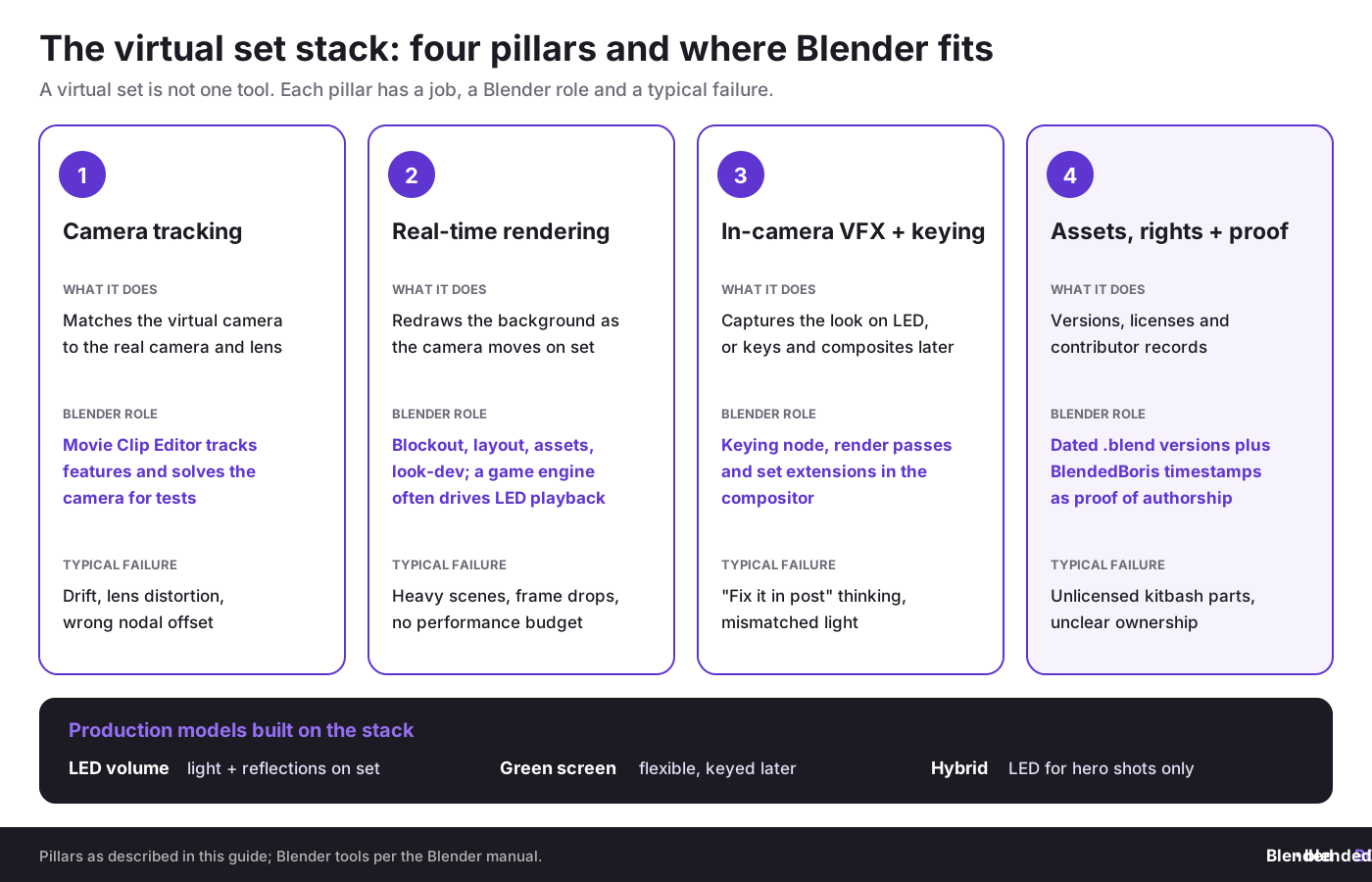
A virtual set is not one tool. It is a stack. AVIXA’s introduction to the virtual set lists the same core pillars: camera tracking, real-time rendering and compositing, supported by lighting, computing hardware and a team that plans the workflow together.
Core concept 1: camera tracking
Camera tracking means measuring the exact movement, position, and lens behavior of the physical camera so the virtual camera matches it. If this sync fails, parallax fails, and the shot feels fake instantly. Blender’s Movie Clip Editor can track features in your footage and solve the camera motion, so for Blender users building proof-of-concept virtual sets, accurate tracking is the bridge between a static render and a believable live-action composite. If you want the Blender side explained in practical detail, see this guide on camera tracking in Blender.
Why it matters for startups: you do not need a giant stage to learn the discipline. A small team can test marker tracking, lens calibration, and matchmove workflows in Blender before paying for a volume shoot.
Core concept 2: real-time rendering
Real-time rendering generates the background image fast enough to react to camera movement during the shot. Unreal Engine is widely used here, but Blender still matters for asset creation, previs, layout, texture prep, look development, geometry cleanup, and sometimes final rendered plates. For real-time previews inside Blender, see our guide to EEVEE real-time rendering performance. Real-time does not mean careless. It means the environment must be built with sensible topology, texture budgets, light strategy, and scene management.
Why it matters for startups: faster visual feedback cuts approval loops. That saves cash, especially when a founder-led studio is balancing client revisions, crew fees, and rented stage time.
Core concept 3: in-camera VFX and compositing
In-camera VFX means capturing more of the final look on set. Green screen compositing means replacing the background later, or mixing both methods in one production. Many teams still need Blender for cleanup, roto, keying, relighting, set extension, and shot polishing: its compositor includes a Keying node for green screen plates, and render passes let you adjust the set separately from the actors. For Blender-specific workflow help, see compositing basics in Blender and render layers and passes for compositing.
Why it matters for startups: the false choice between LED and green screen wastes money. Most smaller productions need a hybrid model, not ideology.
Core concept 4: digital asset management and legal traceability
This is the part many film articles barely touch. A virtual set contains 3D meshes, textures, scans, animations, HDRIs, matte paintings, lens profiles, LUTs, and often marketplace content. Each element may carry separate rights and restrictions. Violetta Bonenkamp has argued for years that file-level proof and event logs matter because contracts alone do not stop downstream leakage. Dirk-Jan Bonenkamp takes the legal side further: if you cannot show file history, verified ownership, and transfer records, your claim weakens fast once collaborators change or a dispute starts.
How do successful teams create virtual sets step by step?
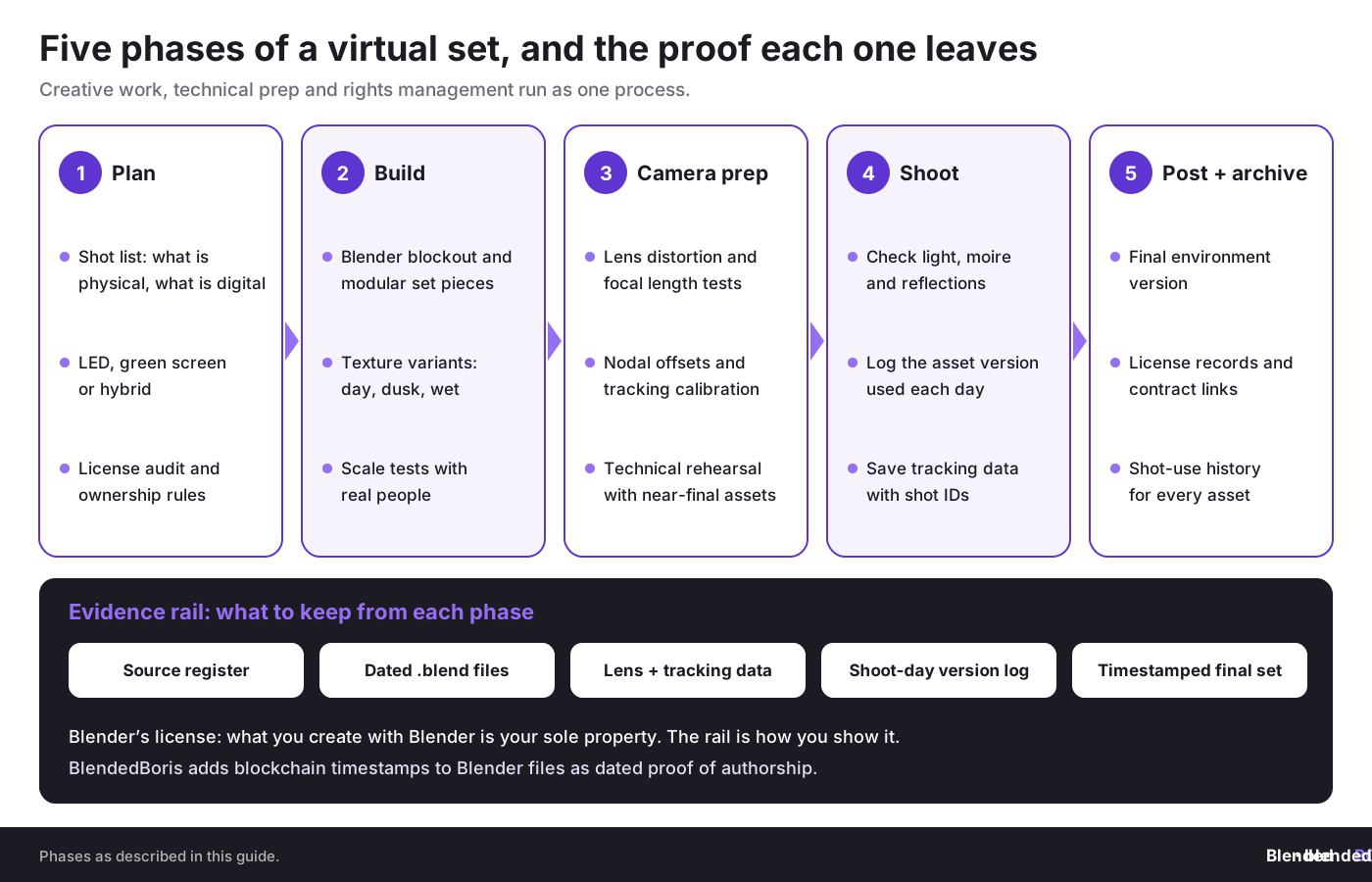
Let’s break it down. The strongest virtual set pipelines treat creative work, technical prep, and rights management as one process.
Phase 1: assessment and planning
- Define the shot list and separate what must be physical from what can be digital.
- Decide whether the production needs LED volume, green screen, set extension, or a hybrid setup.
- Audit licensing on every source asset, including kitbash packs, scans, purchased models, and HDRIs.
- Set performance targets for frame rate, resolution, lens package, and lighting behavior.
- Assign ownership rules before production starts. This includes employee work, freelancer contributions, client-paid assets, and archive rights.
European example: a Dutch automotive ad agency producing a future-factory scene for a German manufacturer may need to keep some plant references secret, use outsourced environment art from Romania, and render a sanitized digital twin for on-set playback. That scene is not just art. It is also confidential industrial information.
Phase 2: environment creation
This is where Blender shines for many lean teams. Use Blender for blockout, camera tests, asset cleanup, modular set pieces, geometry dressing, previs animatics, and style alignment. Grease Pencil can also help directors and art teams annotate spatial ideas directly in the scene. For previs, set up named shot cameras early, as shown in our guide to setting up multiple cameras in Blender scenes.
During this stage, build for the camera, not for abstract perfection. That means:
- Model to shot need: high detail where the lens will see it, lower detail where it will not.
- Use modular assets: repeatable walls, floors, foliage clusters, debris groups, and props cut scene build time.
- Prepare texture variants: day, dusk, wet, damaged, branded, unbranded.
- Test scale with real humans: wrong scale destroys realism faster than many lighting errors.
- Name and version everything: scene chaos becomes legal chaos later. Our guide to auto-save and version control in Blender covers the basics.
Phase 3: camera and lens prep
Lens distortion, focal length behavior, nodal offsets, and tracking volume calibration all need testing before the shoot. Match Blender’s camera to the real lens and sensor (see camera settings in Blender). Teams often underestimate how much time this takes. A camera package that works for traditional cinematography can still create painful tracking drift in a virtual production setup if prep is weak.
Next steps: run a technical rehearsal with final or near-final assets. If your background breaks during a rehearsal, that is a cheap lesson. If it breaks during talent time, it becomes an invoice.
Phase 4: on-set execution
For LED shoots, check interactive light, moire risk, screen color response, reflections, and exposure strategy. As the Frame.io guide notes, LED side walls and ceilings throw emitted light onto the subject, while a single flat wall can leave people looking dark against the screen. For green screen shoots, make sure the actors still receive believable light direction and reference.
This is also where production discipline must include data discipline. Log which asset pack version was used on which shoot day. Save camera tracking data with shot IDs. Keep change notes. If the client later asks why the city skyline changed between approvals, you need more than memory.
Phase 5: post, archive, and proof
After the shoot, archive the final environment version, all licensed source records, contract links, and shot-use history. This is the point where the CADChain mindset becomes useful even for creative teams: treat digital files as assets with a recorded life cycle. Hashes, certificates, timestamps, and controlled access logs can help show authorship and sequence of changes if a marketplace copy, client disagreement, or contractor dispute appears later.
Blender’s license page is clear on ownership: what you create with Blender is your sole property. That covers your set models, textures, layouts and scene files, but it does not prove who made them when a vendor, client or marketplace copy is disputed. BlendedBoris adds a blockchain timestamp to your Blender files from inside Blender, so each approved version of a virtual set carries dated evidence of who made it and when. For the legal background, read copyright basics for 3D artists and whether 3D models automatically have copyright.
Need a stronger ownership trail for Blender assets?
Digital artists and small studios often discover too late that layered scene files are hard to defend without dated records and version history. BlendedBoris adds blockchain timestamps to your Blender files from inside Blender, so each saved milestone of a virtual set has dated proof of authorship.
👉 Start protecting your Blender sets with BlendedBoris
What are the main production models for virtual sets?
You do not need one rigid template. Different productions need different models.
1. LED volume model
This model places the digital environment on LED walls during filming. It gives actors visual context and creates practical reflections and interactive light. High-end examples often point to ILM’s StageCraft volume and The Mandalorian, which many sources still use as the reference case. In Europe, Netflix’s series 1899 was shot on the Dark Bay LED volume at Studio Babelsberg near Berlin, where a large turntable rotated the modular sets inside the volume.
Good fit for: premium ads, sci-fi, automotive, controlled dialogue scenes, reflective surfaces, and clients who need high confidence on the day.
Risk: stage cost can tempt teams to skip proper asset prep, which is like renting a Formula 1 car to drive on flat tires.
2. Green screen virtual set model
This model captures actors or foreground action against green screen and composites the environment later. Perforce’s overview of virtual set software points out the familiar tradeoff: a green screen stage is cheaper and easier to change, but it does not give actors and surfaces the same natural environmental light and reflections as LED-based work.
Good fit for: early-stage studios, commercials, social content, modular educational video, and productions where post pipelines are already strong.
Risk: teams assume they can fix everything later. Later is expensive.
3. Hybrid model
This is usually the smartest route for SMEs. Use LED for shots that need interactive light, reflections, or actor orientation. Use green screen or partial physical builds for the rest. Blend final extensions in Blender or another compositing pipeline, and match the light with HDRI lighting in Blender when the set must sit behind real actors.
Good fit for: budget-sensitive productions that still want premium-looking hero shots.
4. Pre-production cave and immersive review model
Some teams use immersive review spaces, such as CAVE-style projection rooms, to test sets before principal photography. Used this way they are a pre-production planning tool, especially useful for location substitution, period environments, and action staging.
Good fit for: productions with expensive location uncertainty, period detail, or heavy set-build risk.
Here is how the main virtual set models compare:
Which mistakes cause the most damage?
The film world often talks about pixels and gear, but the biggest damage usually comes from planning failures.
Mistake 1: treating virtual sets as a VFX-only department problem
Why teams make this mistake: they assume the environment is just a background deliverable. The impact: art, camera, lighting, post, and legal all end up solving incompatible versions of the same problem.
How to avoid it:
- Put production design, cinematography, VFX, and rights management in the same review cycle.
- Lock environment objectives before final asset build.
- Document approved versions and owners.
Mistake 2: weak asset licensing hygiene
Why teams make this mistake: kitbash culture feels fast and harmless. The impact: one bad model, texture, or scan can contaminate a whole scene package, block client transfer, or expose a marketplace seller to takedown risk.
How to avoid it:
- Keep a source register for every imported asset.
- Save license terms with the project files.
- Separate internal test assets from commercial production assets.
Mistake 3: ignoring chain of custody for digital scene files
Why teams make this mistake: digital files feel easy to duplicate, so teams behave as if ownership remains obvious. The impact: years later, no one can prove who created the original scene, whether the contractor assigned rights properly, or which file version became final.
From Dirk-Jan Bonenkamp’s legal angle, this is where evidence matters. Courts and counterparties care about dates, identity, access logs, and file history, not creative memories.
Mistake 4: building environments with no performance budget
Why teams make this mistake: artists build for still beauty rather than on-set playback needs. The impact: stutter, lighting mismatch, frame drops, delayed approvals, and stage overtime.
How to avoid it:
- Set polygon, texture, and draw-call targets early.
- Test scenes on the actual playback hardware profile.
- Build hero and non-hero variants of the environment (see render optimization for large Blender scenes).
Mistake 5: no legal split between creator, commissioner, and owner
This one hits SMEs hard. A production company may pay for a scene pack, a freelancer may create it, and a client may believe payment equals full ownership. In many European contexts, that assumption is dangerous if assignment language is missing or vague. For freelancers, building a Blender freelance career covers the contract side.
If you already made this mistake, do three things fast:
- Audit all contributors and files.
- Backfill assignment or license agreements where possible.
- Register or timestamp final deliverables and archive correspondence.
What does a strong Blender-based virtual set workflow look like for SMEs?
A practical SME workflow does not need endless tools. It needs clear stages, clear owners, and a predictable handoff path.
Suggested stack for a lean team:
- Blender: blockout, previs, environment modeling, asset cleanup, UVs, look-dev, set extension renders, and compositing support.
- Real-time engine: live environment playback when LED or interactive previs is needed.
- Tracking system: optical or mechanical camera tracking linked to lens data.
- Version control and archive: not glamorous, but mandatory.
- Rights and proof layer: certificates, timestamps, access controls, hashes, and contributor records.
A founder-friendly checklist for the first 30 days:
- Pick one test scene with business value, such as a car interior, virtual showroom, sci-fi corridor, or branded studio.
- Build a rough version in Blender and test camera moves.
- Decide which assets are original, licensed, scanned, or outsourced.
- Run a compositing or LED proof-of-concept.
- Write down ownership and delivery terms before hiring outside artists.
- Archive the test properly so you can reuse it or defend it later.
How should EU SMEs handle IP, security, and data sharing?
This is where the CADChain founders’ angle becomes unusually useful. Violetta Bonenkamp has consistently pushed the idea that digital design files need file-level protection, verifiable ownership records, and machine-readable licensing. That logic applies to film assets too. A virtual set scene file may not be an industrial CAD assembly, but it still carries authorship, licensing, trade secret, and transfer problems.
For EU SMEs, the legal and operational baseline should include:
- Contributor mapping: know every human and company that touched the asset.
- Assignment language: separate work-for-hire assumptions from actual written transfer terms.
- Access control: do not hand full scene packages to everyone who needs only previews.
- Proof of creation: preserve timestamps, exports, drafts, and certificates.
- Client delivery boundaries: define whether clients receive final shots, editable scenes, or limited-use packages.
- Privacy checks: if scans, plates, or metadata contain personal data, GDPR duties may apply.
Dirk-Jan Bonenkamp’s legal line is very practical for startups: combine contracts with technical controls. Contracts tell people what they should do. Technical controls help show what they actually did.
What metrics should producers and founders track?
Virtual set projects often fail because teams track only render quality and ignore business health. Measure both.
Foundational metrics:
- Pre-production approval rounds per scene
- Asset reuse rate across projects
- Tracking calibration failure rate
- Shot fix rate after principal photography
- Average scene prep hours per final usable minute
- Licensed asset documentation completeness
Advanced metrics after three months:
- Cost difference between virtual and physical location alternatives
- Client approval speed
- Revenue from reused virtual environments
- Dispute frequency tied to authorship or licensing
- Time to prepare marketplace-safe derivative assets
If you sell some environment components on a marketplace, add one more metric: proof readiness. That means how fast you can assemble evidence that you made the asset, when you made it, and which sources were legally included.
How does Creating Virtual Sets for Film Production change by company stage?
Pre-seed or very small studio
Your reality: limited budget, small team, high need to prove capability.
Approach:
- Start with Blender previs and green screen composites.
- Build one reusable hero set rather than ten weak ones.
- Use contracts and asset logs from day one, even if the team is tiny.
What to prioritize: proof of concept and rights hygiene. What to defer: expensive stage rental before you have client demand.
Growing SME or Series A style production company
Your reality: more clients, more collaborators, more risk from chaos.
Approach:
- Standardize scene naming, storage, and approval workflows.
- Build a modular virtual set library by sector, such as automotive, medtech, corporate, sci-fi, or education.
- Pilot hybrid LED shoots only for shots where the economics make sense.
What to prioritize: repeatability and legal clarity. What to defer: vanity experimentation with tools nobody on the team can maintain.
Large studio or enterprise content division
Your reality: heavier vendor networks, bigger asset libraries, stronger risk exposure.
Approach:
- Formalize contributor identity, access permissions, and asset certificates.
- Separate confidential client environments from general reuse libraries.
- Treat virtual set assets like a managed IP portfolio, not just project files.
What should your action plan look like this month?
Week 1
- Pick one business-relevant virtual set concept.
- Map the likely camera moves and shot list.
- Decide which elements must be original and which may be licensed.
Week 2
- Build the Blender blockout.
- Test scale, perspective, and lighting.
- Create an asset source register.
Week 3
- Run a tracking or compositing test.
- Measure where realism breaks.
- Fix the environment for actual production conditions, not portfolio vanity.
Week 4
- Archive final files and proofs.
- Write contractor and client delivery rules.
- Decide if the set can become a repeatable service or marketplace product.
Glossary of terms you should not confuse
- Virtual set: A digital environment used during or around filming as a replacement or extension of a physical set.
- LED volume: A stage setup with LED walls, and sometimes ceiling panels, displaying digital environments during shooting.
- Camera tracking: Measurement of physical camera movement and lens behavior so a virtual camera matches it.
- In-camera VFX: Visual effects captured during principal photography instead of being built fully later in post.
- Chroma key: Green or blue screen replacement process used to composite subjects into a digital background.
- Asset provenance: Recorded origin and source history of a digital file or scene element.
- Chain of custody: A documented history of who created, accessed, edited, transferred, or approved a file.
- Digital certificate: A record that can support proof of authorship, timestamp, ownership claim, or file identity.
Closing thoughts
Creating Virtual Sets for Film Production is no longer just a prestige workflow for blockbuster studios. It is a practical production method for European SMEs, design-heavy agencies, and technical founders who want more control over cost, approvals, and visual consistency. But the strongest teams do one extra thing: they treat digital environments as business assets with traceable ownership, controlled sharing, and preserved proof.
That is the CADChain-style lesson Violetta Bonenkamp and Dirk-Jan Bonenkamp bring into this conversation. The scene file matters. The authorship trail matters. The transfer terms matter. If your studio ignores those layers, the most beautiful environment in the project can become the weakest legal point in the company.
For Blender users, the next logical step is getting sharper at image quality and shot credibility. Once your virtual set structure is working, lighting becomes the factor that separates a passable composite from a frame that feels physically present. That is why your next read should be Blender rendering and lighting masterclass, where the focus moves from building the set to making the final image carry cinematic weight.
People Also Ask:
What is a virtual set in film production?
A virtual set is a digitally constructed environment used in film and video production that replaces traditional physical sets. These digital environments allow filmmakers to create any desired scene dynamically, using computer graphics and various software tools.
How do filmmakers use virtual sets?
Filmmakers use virtual sets by blending live-action footage with digital environments in real-time or during post-production. LED walls, green screens, and motion tracking are often employed to render virtual backgrounds seamlessly while actors perform.
What equipment is needed for a virtual set?
The basic equipment is a green screen or LED wall, a good camera with known lens data, a camera tracking system, lighting, and software to build and play back the environment: Blender for modeling, layout and compositing, and a real-time engine such as Unreal Engine when the set must react live on an LED wall. Larger stages add robotic camera rigs and dedicated playback servers.
Can a virtual set be created at home?
Yes, you can build a small virtual set at home with a camera or smartphone, a green screen, even lighting, and free software such as Blender. Shoot a handheld plate, track and solve the camera in Blender’s Movie Clip Editor, put your 3D set behind the actor, and key the green screen in the compositor. Our guide to camera tracking in Blender walks through the tracking part.
Why are virtual sets becoming popular?
Virtual sets are gaining popularity because they offer cost savings, flexibility, and creative possibilities that are challenging to achieve with traditional sets. They allow for immediate environment changes, minimize travel, and offer higher visual precision.
What software is best for designing virtual sets?
Popular software includes Unreal Engine, Unity, Blender, and Maya. Unreal Engine is particularly favored for its advanced real-time rendering capabilities, widely used in both independent productions and big studios.
What are the challenges of using virtual sets?
Challenges include the learning curve of mastering technical tools, ensuring proper lighting for seamless integration, high initial setup costs for advanced equipment, and the need for skilled personnel to manage 3D animations and motion tracking systems.
Can virtual sets match real-world locations in realism?
Yes, with advancements in rendering technology and techniques like photogrammetry, virtual sets can accurately mimic real-world locations. Tools like 3D scans combined with texture mapping make these environments visually convincing.
What is the difference between a green screen and a virtual set?
A green screen is one way to build a virtual set: the background is replaced later in compositing, or live with a real-time keyer. An LED-wall virtual set shows the environment during filming itself, so actors see it and reflective surfaces pick up its light. Many productions combine both.
What are examples of virtual sets in blockbuster films?
"The Mandalorian" is the best-known example: it was shot largely on ILM’s StageCraft LED volume, so actors performed inside environments that moved with the camera. In Europe, Netflix’s "1899" was filmed on the Dark Bay LED volume at Studio Babelsberg. "Dune" (2021) is a useful counter-example: its team considered LED screens but chose sand-coloured screens instead, because LED walls could not match the harsh desert light it needed.
FAQ on Creating Virtual Sets for Film Production
How do LED wall setups differ from green screen workflows?
LED walls provide interactive lighting, reflections, and real-time spatial feedback, enhancing on-set realism. Green screens, while cheaper, rely on post-production for compositing and lack natural environmental light. Both have pros and cons depending on production scale and creative needs. For the Blender side of green screen work, see compositing basics in Blender.
What are the cost differences between traditional sets and virtual production?
Virtual production reduces travel, weather delays, and physical builds. Initial investment in real-time engines and LED setups can be high, but long-term costs drop with reusable digital assets and streamlined workflows. Before you commit, compare the stage quote with the location days, travel and set builds it actually replaces.
Can freelance teams effectively use virtual sets?
Yes, freelance teams can leverage tools like Blender and Unreal Engine for virtual set creation. Scalable workflows allow testing and production without extensive resources. Collaboration tools and clear asset licensing make it easier to manage smaller budgets and cross-border crews.
How does camera tracking improve virtual production quality?
Camera tracking ensures physical camera movements sync with virtual environments, maintaining perspective and realism. Poor tracking leads to parallax errors and fake visuals. Testing lens data and tracking in pre-production, for example with Blender’s camera solver on test footage, helps minimize issues on the shoot.
What are the most common mistakes during virtual set creation?
Teams often underestimate preparation for tracking, licensing, and scene management. Weak legal and asset governance causes disputes. Overdesigning environments without performance budgets leads to frame drops. Cross-department alignment mitigates such risks effectively.
Can SMEs afford to invest in virtual set technology?
Absolutely. Modular tools like Blender and scalable LED rentals allow SMEs to adopt virtual production without large upfront costs. Build reusable asset libraries to maximize returns. Hybrid setups with green screens can reduce reliance on expensive LED volumes.
What role does real-time rendering play in virtual sets?
Real-time rendering allows the virtual environment to adapt to camera movements, providing immediate visual feedback and reducing post-production time. Tools like Unreal Engine dominate this space but integrate well with creation platforms like Blender.
How can virtual sets improve creative flexibility?
Virtual sets enable teams to explore diverse environments with minimal constraints, crafting worlds precisely as envisioned. Real-time adjustments during filming save time and expand creative possibilities. Concept validation is faster, reducing risks tied to physical builds.
How can digital asset management prevent legal disputes?
Maintaining a chain of custody for files with timestamps, contributor logs, and assignments reduces ownership disputes. Timestamp assets during creation, for example with BlendedBoris for Blender files, and control access permissions. Proper documentation supports proven authorship and strengthens legal claims if needed.
What measurable benefits do virtual sets offer producers?
Virtual sets cut reshoots, improve approval cycles, and lower set construction costs. Efficient workflows lead to faster turnarounds and enhanced visual quality. Producers can track metrics like asset reuse rates and client approval speeds to demonstrate ROI.


