
TL;DR: the Blender YouTube channels worth following
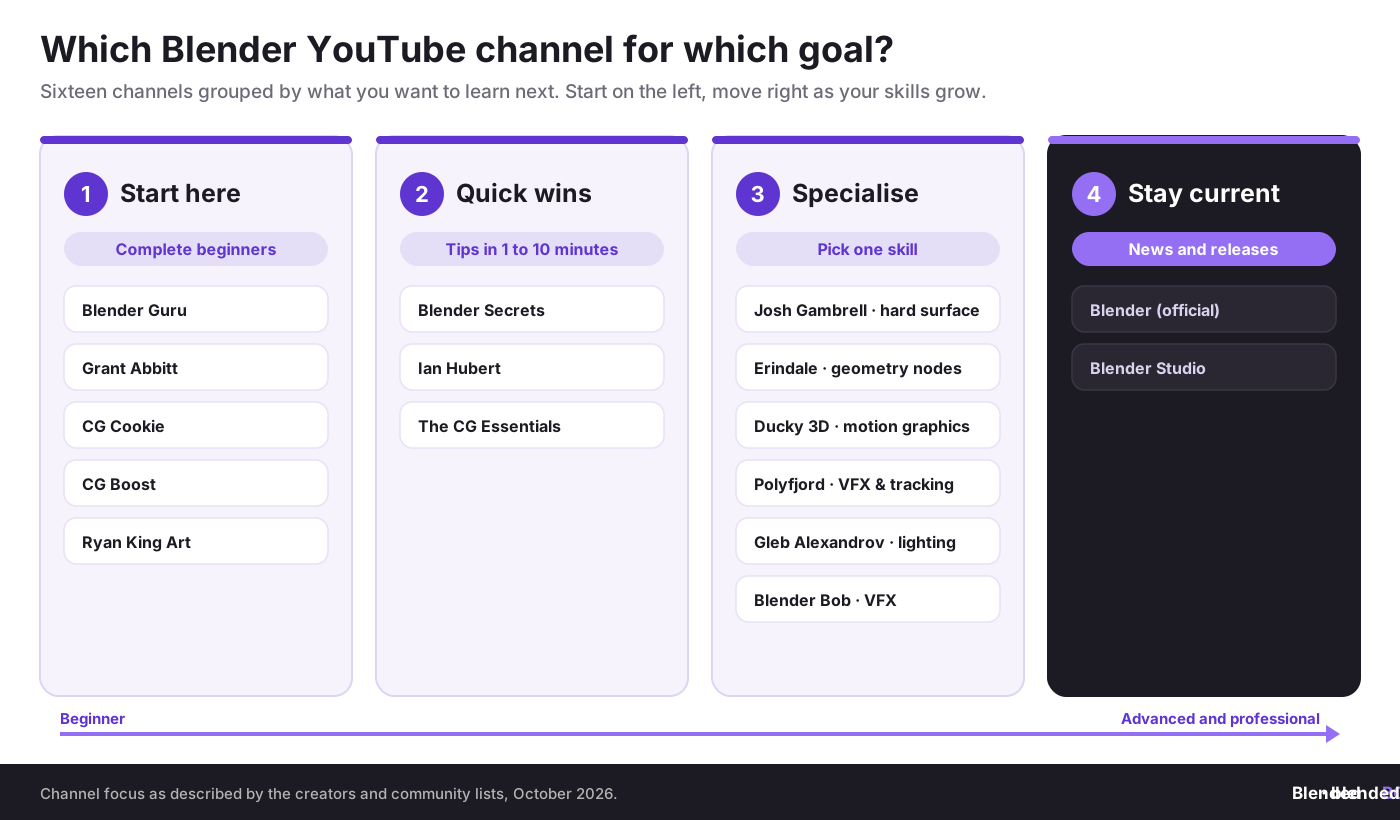
You can learn almost all of Blender for free on YouTube if you follow the right channels in the right order. Start with one structured beginner series (Blender Guru’s donut, Grant Abbitt, CG Cookie, CG Boost or Ryan King Art), add short-tip channels such as Blender Secrets and Ian Hubert’s Lazy Tutorials, then pick one specialist for the skill you want to master: Josh Gambrell for hard surface, Erindale for geometry nodes, Ducky 3D for motion graphics, Polyfjord for VFX and tracking, Gleb Alexandrov for lighting. Keep the official Blender channel for release news. Follow along in the same Blender version as the video, then change what you made until it becomes your own work. What you create in Blender belongs to you, so keep dated proof of your original pieces before you share them.
💡 Brand new to Blender? Start with our complete Blender guide for beginners.
Top Blender YouTube Channels to Follow in 2026
Blender is free, and so is most of the teaching around it. YouTube holds thousands of Blender tutorials, from ten-second tips to full multi-hour courses. That is great news and a real problem: beginners lose weeks jumping between videos made for different versions, styles and skill levels, and never finish anything.
This guide sorts the most useful Blender YouTube channels by what you actually want to learn. It explains who each channel suits, what format to expect and where to start, then shows how to turn tutorial projects into original art you own. The channels listed were checked as active teaching channels in October 2026, when Blender 5.2 LTS was the current long-term support release.
“Tutorials teach you the tools. Your own projects teach you to be an artist. The sooner you move from copying to creating, the sooner your work is worth protecting.”
Violetta Bonenkamp, co-founder, CADChain
Learn from tutorials, own what you create
BlendedBoris adds a blockchain timestamp to your Blender work from inside Blender, so the original pieces you build after your tutorials have dated proof of authorship.
👉 Explore BlendedBoris
How We Chose These Channels
There is no official ranking of Blender channels, and subscriber counts change every week, so we did not rank by numbers. Instead, each channel here meets four tests:
- It teaches. The channel publishes tutorials or explanations, not only showreels.
- It is consistent. The creator has a long back catalogue and a clear focus that the community recognises.
- It suits a stage. Every channel fits a learning stage: first steps, quick wins, specialisation or staying current.
- It is respected. The channel is regularly recommended in community lists, forums and Blender news coverage.
If you want a wider overview, BlenderNation shared a video that explains dozens of Blender channels in under 30 minutes, made by the cgfocus channel. Our guide to BlenderNation news and updates explains how to follow that site.
Best Blender YouTube Channels for Complete Beginners
Pick one of these and finish its beginner series before you open anything else. Switching teachers halfway is the most common reason beginners stall.
- Blender Guru (Andrew Price). The home of the famous donut tutorial, the series that has introduced a huge number of people to Blender. The latest version of the beginner series was published in November 2023 for Blender 4.0, and its core lessons on modeling, materials, lighting and rendering still apply. Andrew Price is also behind the texture site Poliigon. Read our Blender Guru donut tutorial review before you start.
- Grant Abbitt. Calm, clear teaching and a very large library of tutorials, including a full beginner series and many small, complete projects. A good fit if you want to make game-style assets and learn by finishing lots of short pieces.
- CG Cookie. A Blender-focused education company since 2019. Its YouTube channel offers free lessons and tips, while its full courses, such as its geometry nodes and modeling tracks, sit behind a membership on its own site.
- CG Boost (Zach Reinhardt). Beginner-friendly tutorials, plus interviews and news from the Blender community. CG Boost also sells structured courses; see our CGBoost courses review.
- Ryan King Art. Beginner-friendly tutorials and project walkthroughs with a strong focus on making scenes look good quickly, which keeps motivation high in the first weeks.
Before your first video, learn the Blender interface and the essential keyboard shortcuts. Most beginner tutorials assume you can move around the viewport.
Channels for Quick Tips and Fast Wins
Once you know the basics, short videos are the fastest way to fill gaps. Watch them in a spare five minutes, then try the trick in your own file.
- Blender Secrets. Very short, to-the-point tips, most of them only one or two minutes long. Great for discovering tools and settings you did not know existed.
- Ian Hubert. Filmmaker and VFX artist best known for the Lazy Tutorials, roughly one-minute videos that show quick “cheats” for building convincing sci-fi and city scenes. They assume you already know the basics and skip many steps, which is part of their charm.
- The CG Essentials. Modeling tutorials and tips that run from beginner to expert, with a lot of practical advice on add-ons and clean workflows.
Specialist Channels: Pick the Skill You Want to Master
Specialist channels go deeper than general tutorials. Follow one or two that match the work you want to do, and ignore the rest for now.
- Josh Gambrell (hard surface). Hard surface modeling: weapons, vehicles, products and mechanical parts. Josh Gambrell also teaches through Blender Bros. Pair it with our guide to hard surface modeling in Blender.
- Erindale (geometry nodes). Procedural tutorials, with a focus on Geometry Nodes and the Sverchok add-on and more than 100 tutorials in the back catalogue. Start with our introduction to geometry nodes.
- Ducky 3D (motion graphics). Nathan Duck’s channel covers shaders, geometry nodes and abstract, neon and futuristic looks. Useful if you want loops for social media or music visuals; see also motion graphics in Blender.
- Polyfjord (VFX and tracking). VFX tutorials such as camera tracking and a free photogrammetry tracking workflow built on COLMAP. Read our step-by-step guide to camera tracking and matchmoving in Blender alongside it.
- Gleb Alexandrov (lighting). Gleb Alexandrov of Creative Shrimp makes lighting and rendering tutorials with high production value. Pair them with lighting basics in Blender.
- Blender Bob (VFX and hard surface). Hard surface modeling and VFX techniques explained by a veteran CG supervisor, with a production mindset rather than quick tricks.
Official Channels to Stay Current
Tutorials age as Blender changes. The official Blender channel covers release overviews, conference talks and news from the Blender project, and it is the fastest way to see what changed in a new version. Blender 5.2 LTS came out on 14 July 2026 and is supported until July 2028, according to the Blender 5.2 release page.
Blender Studio, the in-house team behind Blender’s open movies, shares production videos and training through the Blender channels and studio.blender.org, where its full training library needs a paid subscription. For the official written resources, see our guide to Blender documentation.
Blender YouTube Channels Compared
Use this table to choose a starting channel and a specialist. Formats describe the typical video, not every upload.
How to Learn From YouTube Without Getting Stuck
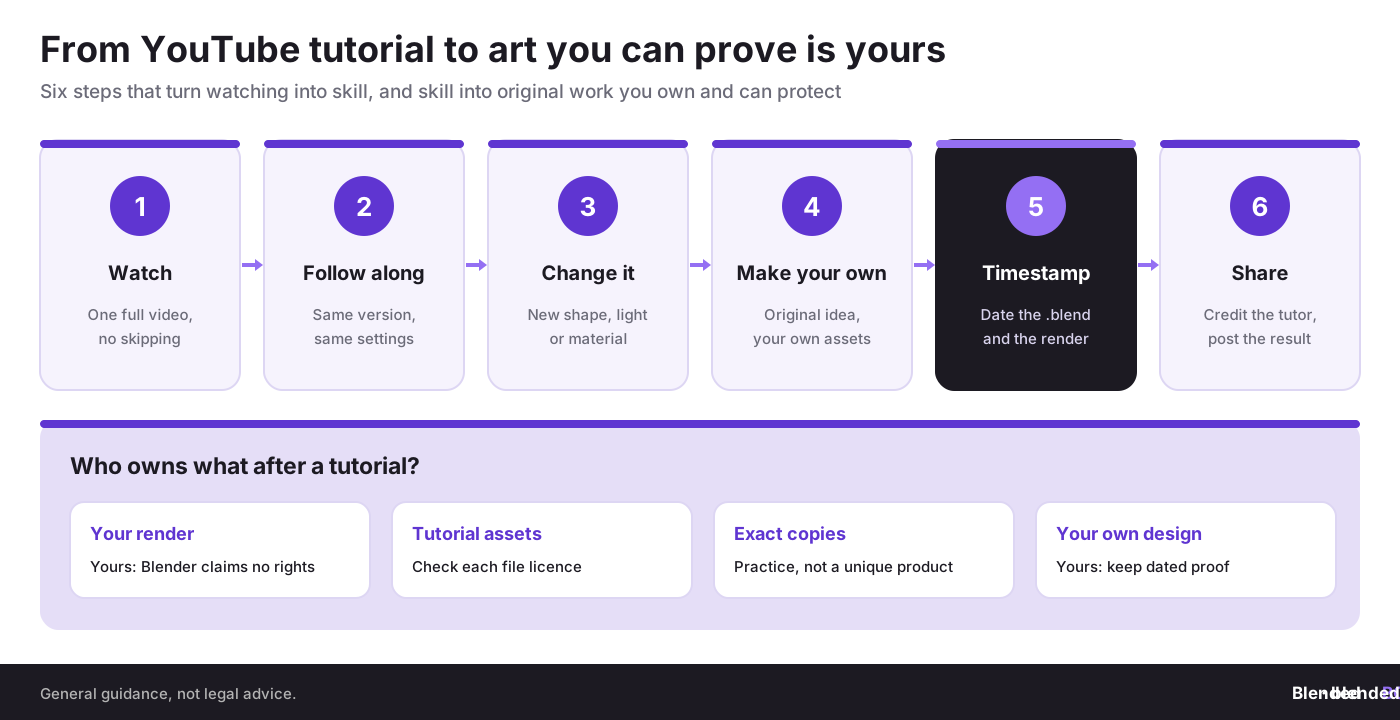
- Match the version. Check which Blender version the video uses. Menus and defaults move between releases, especially across the 4.x to 5.x change.
- Finish one series. Complete a whole beginner series before starting another. Finishing teaches more than starting.
- Pause and repeat. Watch a step, pause, do it yourself, then continue. Do not just watch.
- Change something. After each project, change the shape, lighting or materials. This is where real understanding starts.
- Make an original piece. Every few tutorials, make something of your own using only the skills you learned.
- Join a community. Share your results and ask questions in Reddit communities, on Discord servers or on the Blender Artists forum, and test yourself in weekly render contests.
When free videos are not enough, structured courses can fill the gaps: compare options in our guides to Udemy Blender courses and advanced Blender courses and certifications.
Who Owns the Art You Make From a Tutorial?
This question comes up as soon as learners start posting or selling their work. The short answer has four parts:
- Blender claims nothing. The Blender license page says that what you create with Blender is your sole property. Blender’s GPL licence covers the software, not your renders or .blend files.
- Tutorial assets have their own licences. Textures, HDRIs, models or project files linked from a video belong to their creators. Many are free for personal use only, while others are CC0. Check each file, and see our list of free texture resources.
- Exact copies are practice, not products. A donut or a scene that copies a tutorial step by step is great training, but it is not a unique design. Selling it as your own original work, or as a stock asset, invites disputes and rejections.
- Your own designs are yours. Once you design something original, it is protected by copyright automatically in most countries. Read do 3D models automatically have copyright? and keep dated evidence that you made it first.
If you share your work on YouTube yourself one day, the same rules apply in reverse: decide what viewers may do with your project files, and protect the originals. Our guides to creating Blender online courses and passive income with Blender cover the business side.
Timestamp your original Blender work
With BlendedBoris you can register your Blender files on the blockchain in a few clicks, so the original pieces you create after your tutorials carry dated proof that you made them.
👉 Register your art with BlendedBoris
Common Mistakes When Learning Blender on YouTube
- Tutorial hopping. Starting five beginner series and finishing none.
- Ignoring the version. Following a video made for an old release and getting lost when menus differ.
- Only watching. Watching at 2x speed without doing the steps teaches very little.
- Never going off-script. Repeating tutorials forever instead of making original work.
- Selling tutorial copies. Uploading near-identical tutorial results to marketplaces as original assets.
- Skipping asset licences. Using textures and models from video descriptions in client or commercial work without checking their terms.
- Keeping no proof. Posting original work without dated files or other evidence of when you created it.
Conclusion
The best Blender YouTube channel is the one that matches your next step. Start with one beginner series and finish it. Add quick-tip channels to fill gaps, then choose a specialist for the skill you want to be known for, and keep the official Blender channel for news. Follow along in the right version, then change and remix what you made until it is truly yours. When it is, treat it like real work: credit your teachers, check every asset licence, and keep proof that the original is yours before you share it.
People Also Ask:
What is the best YouTube channel to learn Blender?
For complete beginners, Blender Guru’s donut series is the most popular starting point. Grant Abbitt, CG Cookie, CG Boost and Ryan King Art are strong alternatives. Pick one and finish its beginner series.
Can you learn Blender only from YouTube?
Yes. Many artists have learned Blender entirely from free YouTube tutorials. Structured courses and the official Blender Manual help fill gaps, but they are optional.
Is the Blender Guru donut tutorial still worth it in 2026?
Yes, for learning the fundamentals. The latest series was made for Blender 4.0, so some menus differ in Blender 5.x. Check the comments or the Blender Manual when something has moved.
Which Blender YouTube channel is best for geometry nodes?
Erindale is a well-known channel for procedural work and geometry nodes. Ducky 3D also uses geometry nodes for motion graphics, and CG Cookie offers structured geometry nodes courses.
Which Blender YouTube channel is best for hard surface modeling?
Josh Gambrell is one of the best-known hard surface teachers, and Blender Bob covers hard surface and VFX techniques from a production point of view.
Can I sell art I made following a YouTube tutorial?
Selling an exact copy of a tutorial result as an original product is risky. Learn from the tutorial, then create your own design, and check the licence of any assets the tutorial provided.
FAQ on Blender YouTube Channels
How many Blender YouTube channels should I follow?
Start with one beginner channel, one quick-tip channel and, later, one or two specialists. Following too many at once leads to tutorial hopping.
What Blender version should I use to follow tutorials?
Ideally the same version as the video. If that is not possible, use the current LTS release, Blender 5.2 LTS in October 2026, and check the release notes when something looks different.
Are there short Blender tutorials for busy people?
Yes. Blender Secrets publishes tips that usually run one to two minutes, and Ian Hubert’s Lazy Tutorials are around a minute long.
Where can I follow Blender release news?
The official Blender channel and blender.org publish release overviews, and BlenderNation covers community news and new tutorials every day.
Do I own the renders I make in Blender?
Yes. Blender’s licence page states that what you create with Blender is your sole property. Third-party assets you use keep their own licences.
How can BlendedBoris help artists who learn on YouTube?
BlendedBoris lets you add a blockchain timestamp to your Blender work from inside Blender, so the original art you create after your tutorials has dated proof of authorship.


