
TL;DR: what is Blender MCP, and why is it in the news?
Blender MCP lets an AI agent work inside a running copy of Blender, and on 18 November 2026 Google's Gemini 4 Neon launch post showed the model using Blender MCP in Google Antigravity to build a photorealistic 3D lab bench. Two projects carry the name: a community add-on (MIT licence) and Blender Lab's official server (GPL-3.0). To try it with Neon you need Google AI Pro or Ultra or the paid Gemini API. Work on a copy of your file, keep the socket on localhost and read every script before you approve it.
Here is what happened with Gemini 4 Neon: Google released its new mid-tier model on 18 November 2026, and one launch demo was a Blender scene built by an AI agent through Blender MCP. Below: what Blender MCP is, how an agent controls Blender with it, what it costs, a safe first setup and a 5-step test.
What did Google show with Blender MCP?
The line in Google's Gemini 4 Neon announcement reads: "Driving Blender MCP in Google Antigravity, Gemini 4 Neon used /swarm to build a photorealistic 3D lab bench". The same post shows a WebGL2 ski simulator on real Mont Blanc elevation data and a 3D recreation of Alan Turing's 1936 study.
Treat these as Google's own demos. Google does not say which Blender MCP project it ran, how long the bench took or what it cost, and it publishes no .blend file. None of the benchmarks Google lists for Neon measures 3D modelling.
What is Blender MCP?
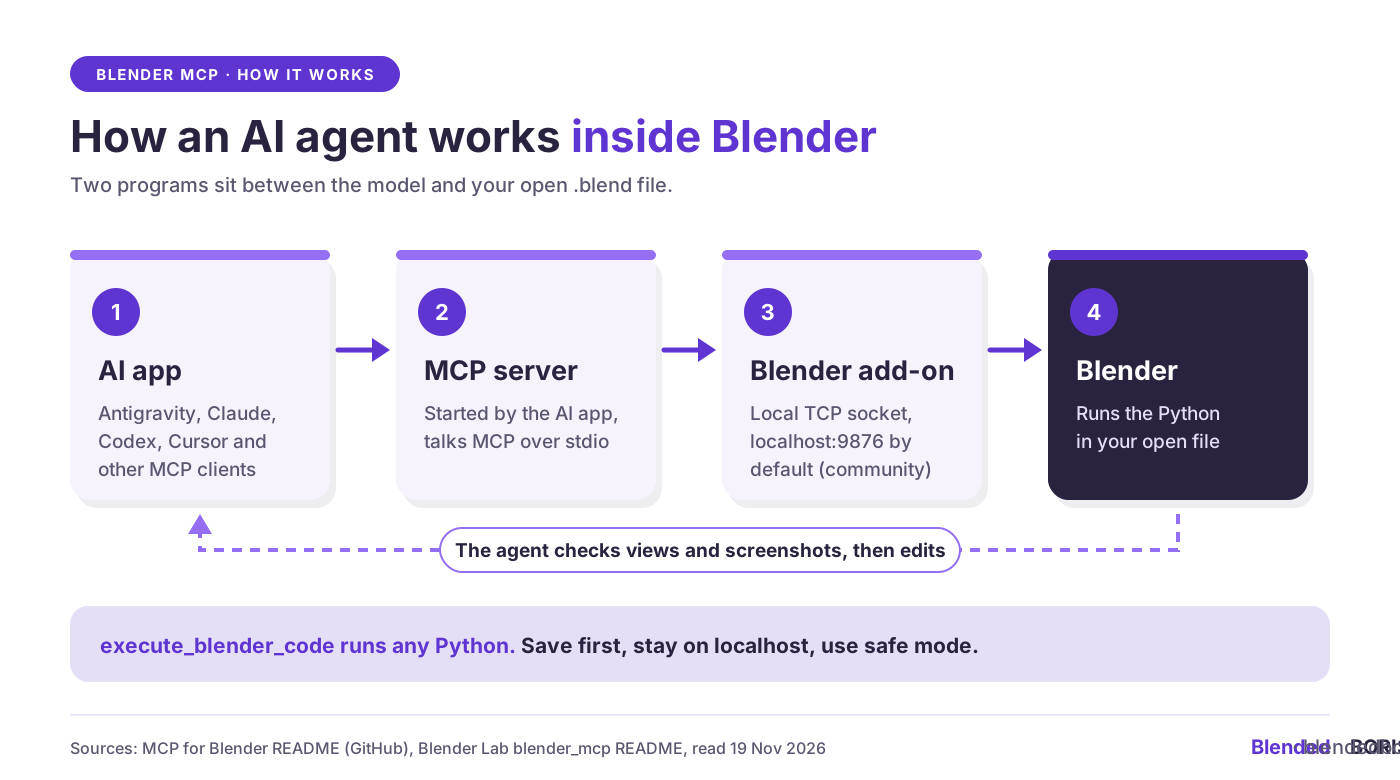
MCP stands for Model Context Protocol, the protocol AI apps such as Claude, Codex, Cursor and Google Antigravity use to call outside tools. A Blender MCP setup has two parts: a Blender add-on that opens a small TCP socket server inside Blender, and an MCP server, started by your AI app, that passes the agent's requests to it.
Two projects use the name. MCP for Blender (formerly blender-mcp) is a community project by Siddharth Ahuja, and its README says it is not made by Blender. Blender Lab's Blender MCP comes from the Blender project's own space for future-facing work.
The community add-on has 34,985 GitHub stars (19 November 2026) and ships an Antigravity config, so it is the likelier match for Google's demo, though Google hasn't confirmed it.
How does an AI agent control Blender through MCP?
- You ask, such as "Create a sphere and place it above the cube" (a prompt from the community README).
- The agent writes Blender Python and sends it with execute_blender_code.
- The MCP server relays it over the local socket (port 9876 by default in the community add-on).
- Blender runs it in your open file, live.
- The agent checks its work with viewport views, renders or screenshots, then edits again.
The agent can do anything Blender's Python API can do, including deleting objects and overwriting files. Our guide to Blender scripting with Python shows what these scripts look like, so you can follow what the agent sends.
What do you need to try Blender MCP with Gemini 4 Neon?
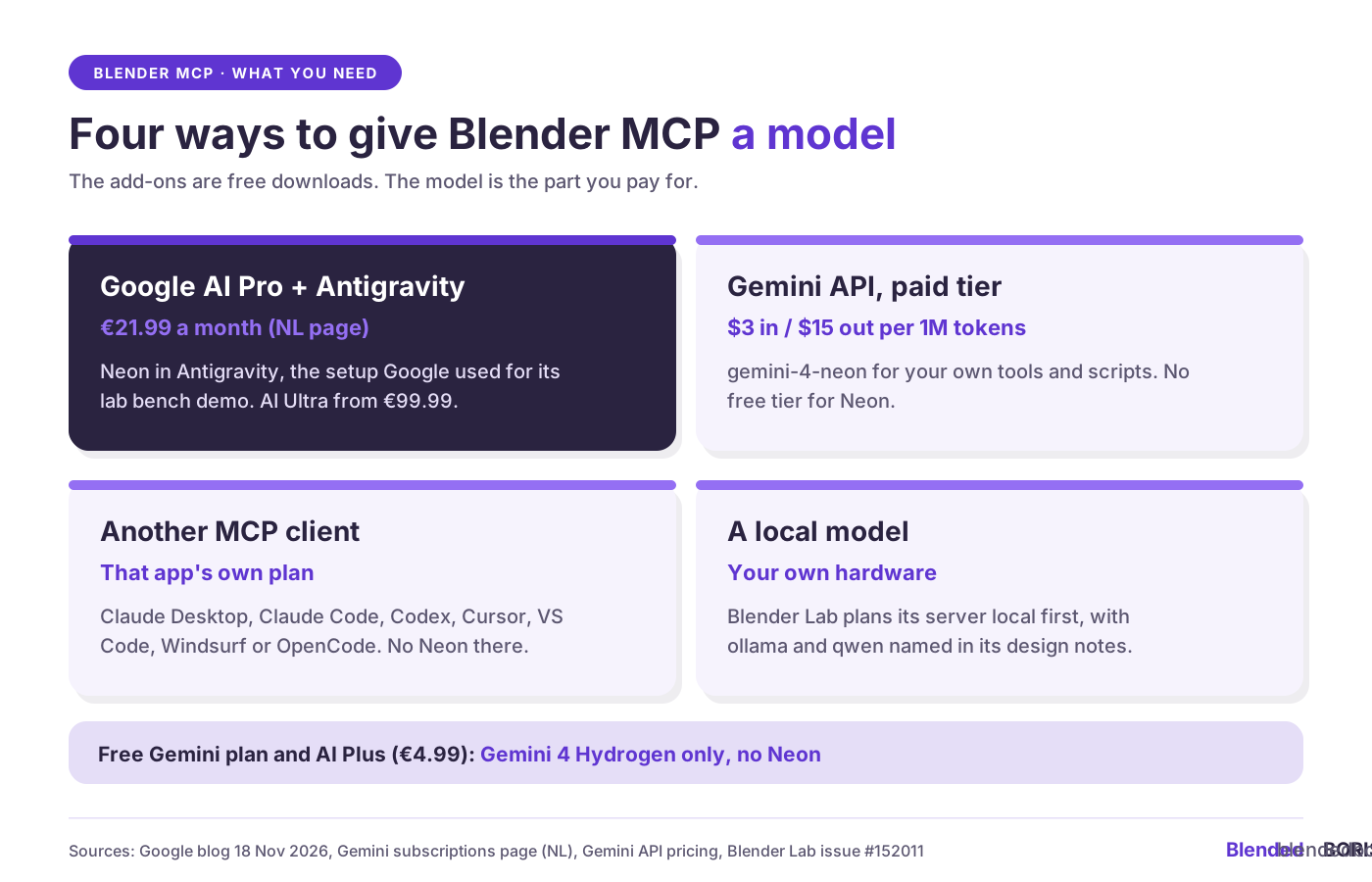
Both projects are free downloads (the community one offers an optional Premium tier for AI model generation). The model is the part you pay for. The Gemini subscriptions page lists Neon under AI Pro, and Google rolls it out in Antigravity for paid AI Pro and Ultra subscribers.
API prices are on the Gemini API pricing page. Free users get Gemini 4 Hydrogen, and Ultra adds Gemini 4 Carbon. Blender Lab's design notes are blunt: "You will still need a local or SaaS LLM to connect to the MCP server."
How do you set up Blender MCP safely the first time?
The community README puts it in capitals: "ALWAYS save your work before using it." Here is a first setup that keeps mistakes small:
- Back up first. Save, save a copy under a test name, close the original. See our guide to saving and backing up Blender projects.
- Use an empty test file. Keep client work and linked libraries out of the first sessions.
- Stay on localhost. The socket "has no authentication or encryption, so anyone who can reach that port can run Python inside Blender".
- Turn on safe mode. BLENDER_MCP_SAFE_MODE=1 blocks scripts that read or write files directly, run other programs or access the network.
- Keep approvals on. Antigravity runs MCP tools you haven't configured in Ask mode, which asks before each call (Antigravity MCP docs). Reject scripts you can't follow.
- Decide on telemetry. The community add-on sends an anonymous usage record by default; prompts, code and screenshots go only if you opt in. DISABLE_TELEMETRY=true turns it all off.
- Run one server and connect one AI app at a time, as the README asks.
Where does Blender MCP help, and where does it fall short?
- Helps with blockouts and layout: the community README demos a low-poly dungeon from one prompt and a scene built from a reference image.
- Helps with lighting: "Make the lighting like a studio", plus Poly Haven HDRIs.
- Helps with file chores: Blender Lab's use cases include fixing typos in data-block names and "Which objects are using this material?".
- Struggles with complex jobs: the README says to break complex operations into smaller steps and simplify requests that time out.
- Unproven on final quality: Google shows one render, with no topology, UVs or source file. Judge agent output in your own pipeline first.
- Risky for NDA work: prompts and screenshots go to your model provider, so read its data terms first.
Who owns a scene that Blender MCP builds?
Neither project says who owns the output, so start with what you can trace. Imported assets keep their licences:
- Poly Haven: CC0, no credit needed.
- Poly Pizza: about 69% is CC-BY and needs a credit, which the add-on stores in the polypizza_attribution custom property. Keep it.
- AI generators (Meshy, Tripo, Hyper3D Rodin, Hunyuan3D): each service's terms apply. See our pieces on Meshy's AI part-editing and open-source AI 3D model generators.
On AI output and authorship, read what the Frankfurt 'it was AI' ruling means for Blender artists, and keep dated proof of what you made by hand.
Protect the human part of your Blender work. BlendedBoris records your .blend files and versions with a timestamp nobody can change, so you can show which edits came from you and which came from an agent. Start protecting your Blender art
How do you test Blender MCP in 5 steps?
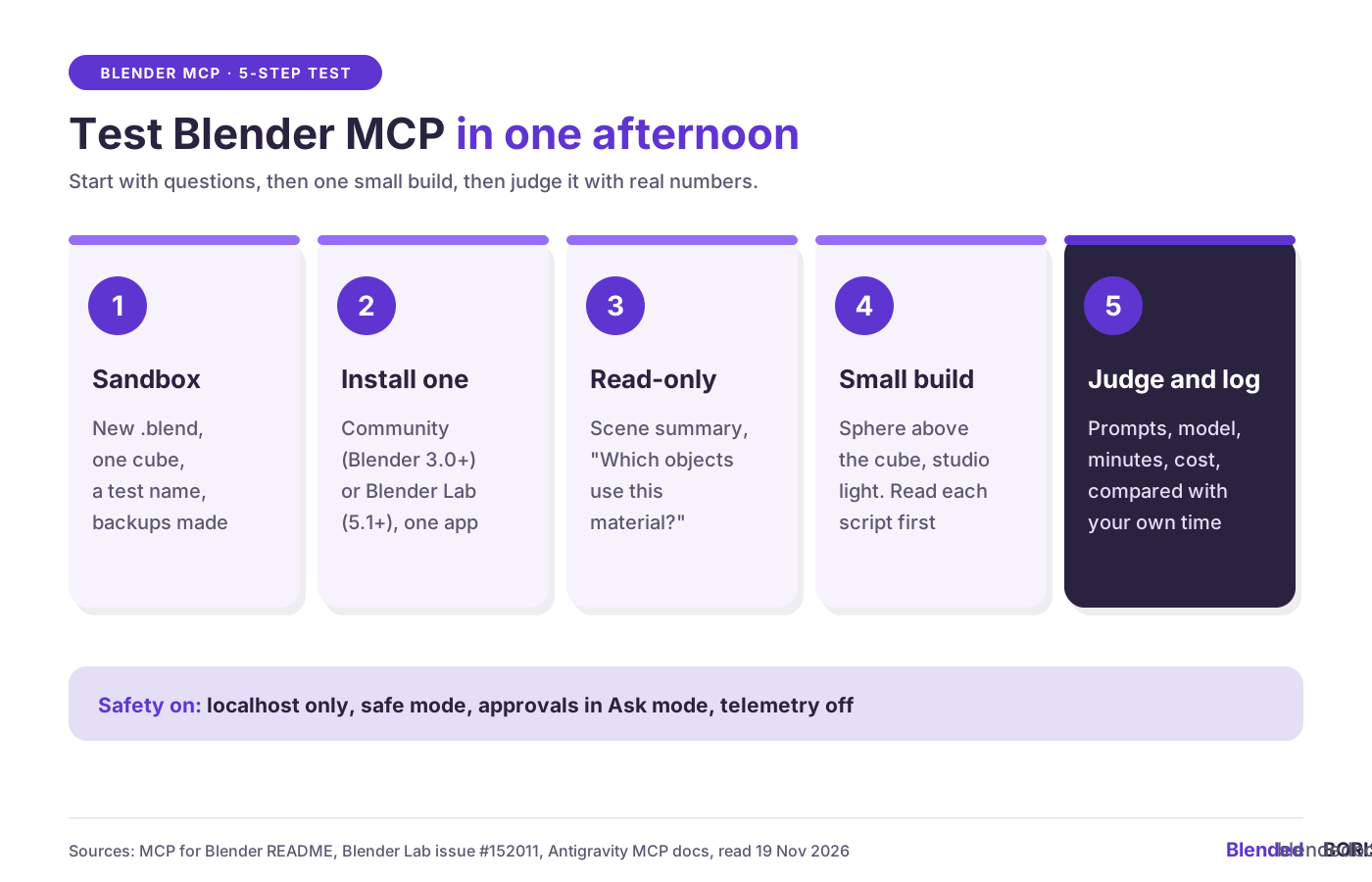
- Sandbox: a new .blend with one cube, saved under a test name.
- Install one Blender MCP (our guide to installing Blender add-ons covers Preferences) and add it to one AI app. In Antigravity: the ... menu in the agent panel, MCP Servers, Manage MCP Servers, View raw config.
- Start read-only: ask for a scene summary to prove the connection.
- One small build: a sphere above the cube, then studio lighting. Read each script and time the run.
- Judge and log: note prompts, model, minutes and cost, and compare with doing it by hand.
What don't we know yet?
- Which Blender MCP project Google ran, and how long the lab bench took.
- Whether Google will publish a Blender guide for Antigravity.
- Whether Blender Lab ships its server as one all-in-one add-on, an idea in its design issue.
- Independent tests of Neon on 3D work.
What does this mean for Blender artists and small 3D studios?
Google picked a Blender scene to sell its new model, and Blender's own developers now ship an MCP server. Start with chores and blockouts in a sandbox, log what the agent did, keep dated versions of your own work, then decide with real numbers whether €21.99 a month pays off in your studio.
FAQ: Blender MCP
What is Blender MCP?
A bridge between an AI agent and a running copy of Blender: the agent sends Blender Python through a local socket that an add-on opens.
Is Blender MCP made by Blender?
There are two. MCP for Blender is a community project by Siddharth Ahuja with no ties to the Blender Foundation. Blender Lab, part of the Blender project, publishes its own Blender MCP under GPL-3.0.
Can I use Blender MCP with Gemini 4 Neon for free?
The add-ons are free, Neon is paid: Google AI Pro or Ultra for Antigravity, or the paid Gemini API at $3 / $15 per million input / output tokens. Free and AI Plus users get Gemini 4 Hydrogen.
Is Blender MCP safe?
It runs Python in your open file, which the community README calls potentially dangerous. Back up, use a test file, turn on safe mode and read each script first.
Which Blender version does Blender MCP need?
Blender 3.0 or newer for the community add-on (plus Python 3.10 and uv), and Blender 5.1 or newer for Blender Lab's.
Does Blender MCP work with Claude or Codex?
Yes. The community setup tool covers Claude Desktop, Claude Code and Codex, plus Cursor, VS Code and Antigravity.


