

TL;DR: Upwork and Fiverr for Blender work, from both sides
On Upwork, clients post a job and Blender artists send proposals; on Fiverr, artists list ready-made Gigs and clients order them. Artists pay a variable 0% to 15% service fee on Upwork and 20% on Fiverr, so price with the fee in mind. Clients pay their own service fee on both platforms. To hire a Blender artist, write a clear brief, check wireframes and similar past work, agree in writing on source files and commercial rights, and pay through the platform. On both platforms the copyright passes to the client once the work is paid for, unless the Gig, offer or contract says otherwise.
💡 Comparing more platforms? See the top freelance platforms for Blender artists.
Upwork and Fiverr for Blender Artists: Selling Gigs and Hiring a Blender Artist
Upwork and Fiverr are where many Blender jobs start: a product render for a web shop, a game-ready prop, a rigged character, an architectural walkthrough. For artists they are a way to find paying clients without building an audience first. For clients they are the fastest way to find someone who can actually model, light and render in Blender.
This guide covers both sides. The first half is for Blender artists who want to sell their work on Upwork or Fiverr: how each platform works, what it costs, and how to keep control of your files until you are paid. The second half is for clients: how to hire a Blender artist on Fiverr or Upwork, what to put in the brief, and how to make sure you end up owning what you paid for. Fees and terms below were checked on the platforms’ own pages in October 2026.
“The best freelance projects are decided before anyone opens Blender: a clear brief, a clear price and a clear answer to who owns the files.”
Violetta Bonenkamp, co-founder, CADChain
Prove which renders and models are yours
BlendedBoris registers your Blender work with a timestamped proof of authorship, directly from Blender, so you have dated evidence before you send previews to a client.
👉 Explore BlendedBoris
Upwork vs Fiverr: How Each Platform Works
The two platforms work in opposite directions. On Upwork, the client describes a project and freelancers apply with a proposal, which costs Connects. Work runs as an hourly contract or a fixed-price contract split into milestones. On Fiverr, the artist describes a service as a Gig with set packages and prices, and the client orders it, or asks for a Custom Offer. The table sums up what matters for Blender work.
Upwork’s fees come from its own pricing breakdown. Fiverr’s seller fee is its standard 20% commission; check the current buyer fee at checkout before you order.
Which Blender Services Sell Well as Gigs?
Blender work sells best when the deliverable is easy to describe and easy to check. Services that suit both platforms include:
- Product renders for web shops and crowdfunding pages, from the client’s CAD file or photos.
- Game assets: low-poly props, environment pieces and characters, delivered as FBX or glTF with textures.
- 3D printing models: miniatures, replacement parts and figurines, delivered as checked STL files.
- Character modeling, rigging and animation, including Rigify rigs and walk cycles.
- Architectural visualization: interiors, exteriors and walkthrough animations.
- Technical help: fixing topology, UV unwrapping, baking, converting files for Unity or Unreal.
Broad offers such as “any 3D work” are hard to price and hard to deliver on time. Narrow ones, such as “a game-ready prop under 5,000 triangles with PBR textures”, set expectations for both sides. For more ways to earn from Blender, see how to make money with Blender.
For Blender Artists: Selling Your Work on Upwork and Fiverr
Setting Up Upwork for Blender Jobs
Upwork rewards a focused profile. Lead with the kind of Blender work you want more of, and fill your portfolio with finished renders plus the process behind them: wireframes, clay renders and turntables show clients that the model is clean, not just the lighting.
- Connects: a Freelancer Basic account includes 10 Connects a month, and each proposal costs a number of Connects that depends on the job. Extra Connects cost $0.15 each. Freelancer Plus costs $19.99 a month and includes 100 Connects.
- Service fee: Upwork charges freelancers 0% to 15%, depending on the contract type and on supply and demand. You see the exact fee before you submit a proposal or accept an offer, and it stays fixed for that contract.
- Direct contracts: with clients you bring yourself, the fee is 5% on Basic and 0% on Freelancer Plus.
- Badges: Rising Talent, Top Rated and Top Rated Plus appear on profiles and help clients shortlist.
Spend Connects on jobs where your portfolio shows the same kind of work, and answer the client’s actual question in the first two lines of the proposal. Our guide to finding clients as a Blender artist has more on writing proposals that get replies.
Creating Fiverr Gigs for Blender Work
A Fiverr Gig is a product page for your service. Define three packages that differ in something the client can see, such as the number of objects, the render resolution or the number of revisions. For each package, state:
- What is delivered: renders, animation, or the model itself, and in which formats (.blend, FBX, glTF, OBJ, STL).
- Limits: polygon budget, number of materials, render size, animation length.
- Revisions and delivery time.
- What is extra: source files, rush delivery, and a Commercial Use License if you sell one as a Gig Extra.
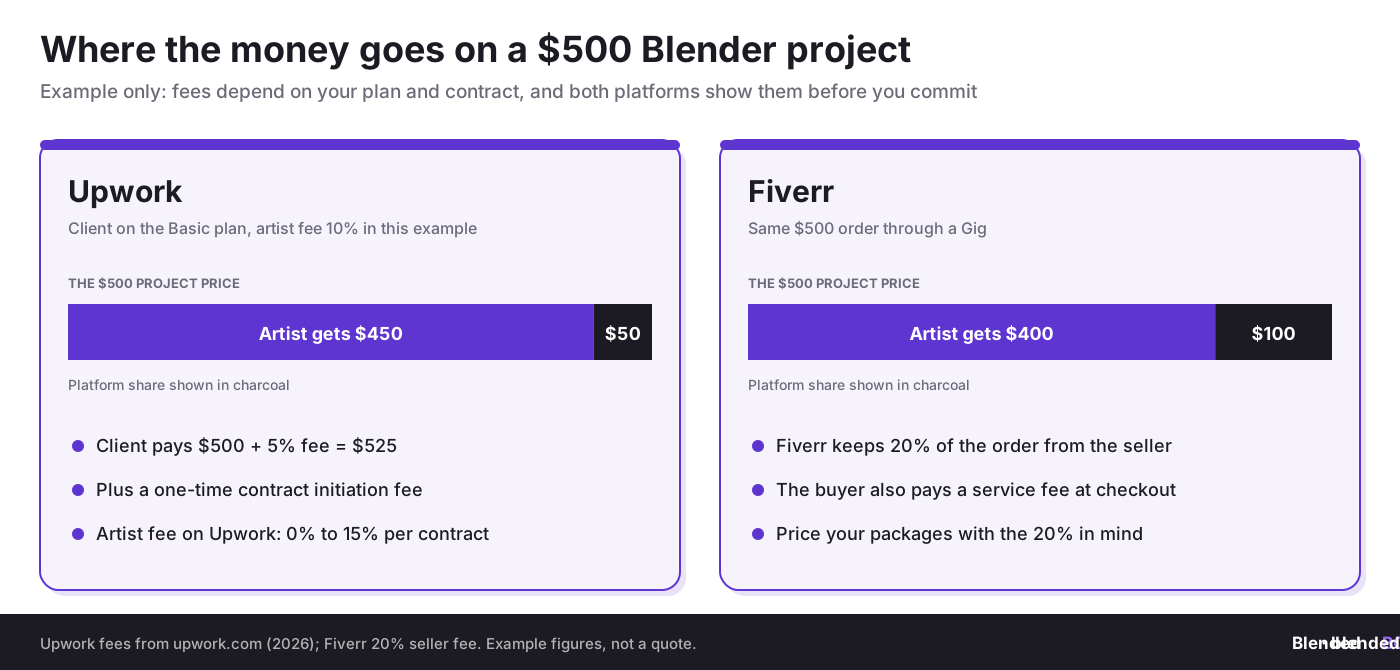
Fiverr keeps 20% of each order, so a $100 package pays you $80 before any withdrawal costs. Build that into your package prices from the start rather than raising them later.
Pricing Your Blender Work After Fees
The fee comes off your price, so compare platforms by what you take home. On a $500 project with a 10% Upwork fee, you keep $450; the same $500 order on Fiverr pays $400. The client also pays a platform fee on top, which affects how your price compares with other offers.
Work out an hourly target first, estimate the hours for each package honestly, then add the platform fee. Our pricing guide for professional 3D work and strategies for pricing your 3D work cover hourly versus project rates in detail.
Protecting Your Files Until You Are Paid
On both platforms, the rights to your work pass to the client when the work is paid for, so it pays to control what leaves your computer before that point:
- Send previews, not source files. Watermarked or low-resolution renders and screen recordings are enough for feedback.
- Deliver the .blend and full-resolution files with the final delivery, inside the platform.
- List third-party assets. Upwork’s standard terms ask you to disclose any “Background Technology” you build into the work. Free CC0 textures, such as those on Poly Haven, are safe to use; paid add-on assets may not be licensed for resale.
- Keep everything on the platform. Fiverr’s Terms of Service forbid taking payment outside the site, and Upwork has similar rules. Off-platform payments also lose you the platform’s payment protection.
- Keep dated records. Save your project files and early versions with dates. They are your evidence if a client disputes who made the work, or if someone else posts it as their own.
Your portfolio is your sales page on both platforms, so make sure you keep the right to show client work there. Ask before you post, or agree on it upfront. See how to build a professional 3D portfolio.
How to Hire a Blender Artist on Fiverr or Upwork
Hiring a Blender artist goes well when you decide the details before you start looking. The same five steps work on both platforms.
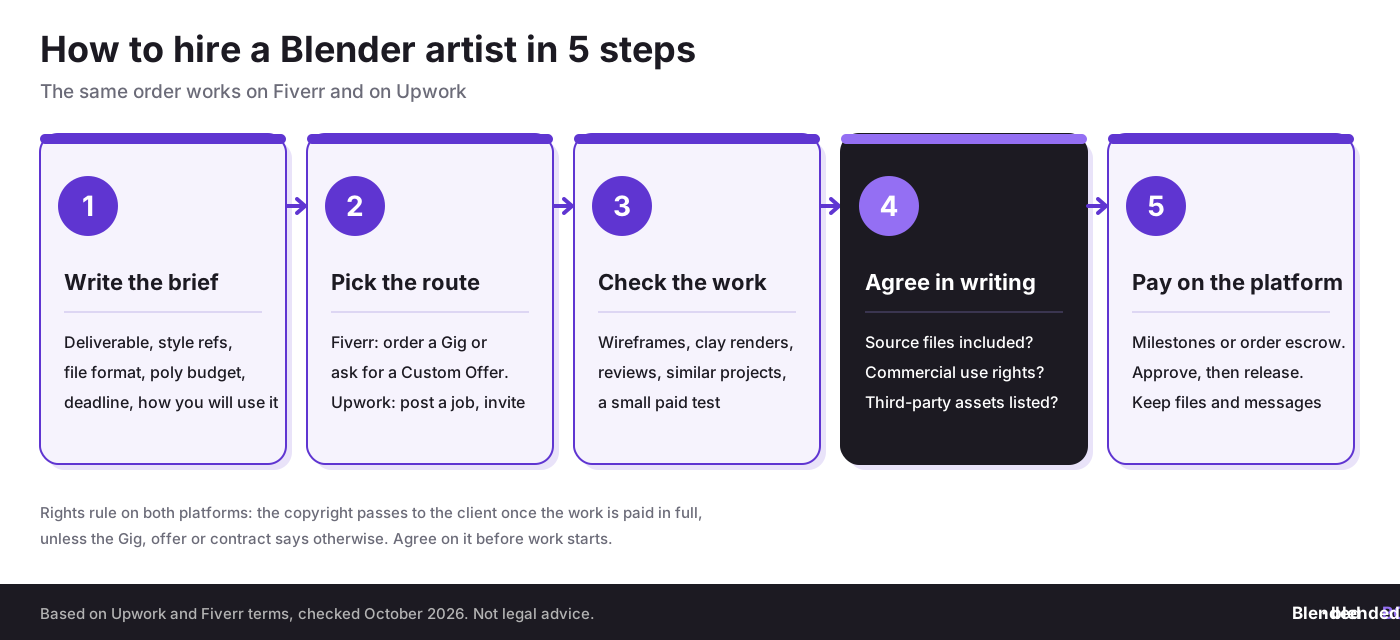
Step 1: Write a Clear Brief
A good brief saves days of back and forth. Include:
- The deliverable: still renders, an animation, a 3D model for a game engine, or a print-ready STL.
- References: photos, sketches, CAD files and two or three examples of the style you want.
- Technical requirements: file formats, polygon budget, texture resolution, render size and frame rate.
- Deadline and budget, including how many revision rounds you expect.
- How you will use the work: personal use, a product launch, an ad campaign, a game you will sell. This decides which rights you need.
Step 2: Choose Fiverr or Upwork
On Fiverr, search for the service (for example “Blender product render” or “low poly game asset”), compare Gigs and packages, and either order a package or message the seller for a Custom Offer if your project does not fit one. Fiverr suits clearly defined jobs with a fixed price.
On Upwork, post a job with your brief and budget, then invite artists whose portfolios match, or browse Blender talent and invite them directly. Upwork suits larger projects, ongoing work and jobs where you want to discuss the scope first. Choose hourly for open-ended work, or fixed price with milestones for defined deliverables.
Step 3: Check the Artist’s Work
Beautiful renders can hide messy models. Before you hire:
- Look for past work that matches your project type, not just good-looking images.
- Ask for wireframes or clay renders of one or two portfolio pieces, especially for game or print work.
- Read reviews from clients with similar projects. On Upwork, check the Job Success Score and badges; on Fiverr, check ratings and seller level.
- For a larger project, start with a small paid test, such as one asset or one camera angle.
Step 4: Agree on Files, Rights and Revisions in Writing
Most freelance disputes come from things that were never written down. In the order, offer or contract, confirm:
- Source files: whether the .blend file, textures and rig are included, or only the renders.
- Commercial use: on Fiverr, some Gigs sell a Commercial Use License as an extra. Fiverr’s terms say that if you buy for personal use you have the rights you need for that, but using the work commercially may require the license.
- Third-party assets: which purchased models, textures or add-ons are in the file, and under which licenses.
- Revisions and timing: how many rounds, and what counts as a change of scope.
- Portfolio use: whether the artist may show the work, and from when.
Step 5: Pay Through the Platform
Keep payment on the platform. On Upwork, fixed-price contracts are paid by milestone: you fund a milestone, the artist delivers, you approve and the payment is released. Hourly contracts are billed for tracked time. On Fiverr, you pay when you order and the seller is paid when the order is completed. Keep all files and messages in the platform’s order or contract, so there is a record if anything goes wrong.
How Much Does It Cost to Hire a Blender Artist?
Rates vary widely with experience, the type of work and the artist’s location, so compare several offers for the same brief rather than relying on an average. On top of the artist’s price, budget for the platform’s client fee:
- Upwork: 3% or 5% on the Basic plan, or 8% or 10% on Business Plus, on payments to freelancers. U.S. clients paying by bank account may get the lower rate. Contract initiation fees may also apply to a new contract.
- Fiverr: a buyer service fee is added to the order total at checkout.
A detailed brief usually lowers the price, because the artist does not need to pad the quote for unknowns. Simple product renders and single props cost far less than rigged, animated characters, so split big projects into milestones you can approve one by one.
Who Owns the Work? Rights on Upwork and Fiverr
Both platforms transfer ownership to the client after payment, unless the parties agree otherwise:
- Upwork: under Upwork’s Optional Service Contract Terms, which apply when client and freelancer have not agreed other terms, the work product and its intellectual property become the client’s sole property once the freelancer receives full payment. Background Technology the freelancer disclosed is excluded.
- Fiverr: Fiverr’s terms say that, unless the Gig page or Custom Offer clearly states otherwise, the buyer gets all intellectual property rights, including copyright, in the delivered work once it is delivered and paid for.
For artists, that means anything you deliver and get paid for is usually no longer yours to resell. For clients, it means you should check the Gig description or contract for exceptions before you pay. Either way, the rules only work if you can show what was created and when. Start with copyright basics for 3D artists. Our guides to the most common copyright issues and how to register copyright cover the details.
Timestamp your Blender work before you share it
BlendedBoris adds a blockchain timestamp to your Blender files, so artists and clients have dated proof of who created a model or render, and when.
👉 Register your art with BlendedBoris
Common Mistakes on Upwork and Fiverr
Artists:
- Pricing without the platform fee, then working for less than planned.
- Spending Connects on every Blender job instead of the ones that match your portfolio.
- Sending the .blend file before the order is paid.
- Using paid assets whose license does not allow client delivery.
- Moving a client to off-platform payment and losing the platform’s protection.
Clients:
- Hiring from renders alone without seeing wireframes or similar work.
- Leaving out file formats and technical limits, then receiving a model that will not work in the engine or printer.
- Forgetting to buy the Commercial Use License or to ask for source files.
- Paying for a whole complex project upfront instead of by milestone.
Conclusion
Upwork and Fiverr both work well for Blender projects, in different ways. Upwork fits larger projects you scope together with the client; Fiverr fits clearly defined services with a fixed price. Artists should price with the fee in mind and keep source files until the order is paid. Clients should write a precise brief, check the artist’s real modeling work and get source files and commercial rights in writing. Whichever side you are on, keep dated records of the work, because proving who made what is what protects both of you. For the bigger picture of freelance work, see how to build a Blender freelance career and remote work options for 3D artists.
People Also Ask:
How do I hire a Blender artist on Fiverr?
Search for the service you need, compare Gigs, packages and reviews, and order a package or ask the seller for a Custom Offer. Before ordering, check what the package includes, such as source files, formats, revisions and a Commercial Use License if you will use the work commercially.
Is Upwork or Fiverr better for Blender artists?
Upwork suits larger and ongoing projects where the scope is discussed with the client. Fiverr suits clearly defined services with a fixed price. Many artists use both: Fiverr for small repeatable jobs, Upwork for bigger contracts.
How much does Fiverr take from Blender artists?
Fiverr keeps 20% of each order, so a $100 order pays the seller $80 before withdrawal costs. Buyers pay a separate service fee at checkout.
How much does Upwork charge freelancers?
Upwork’s freelancer service fee ranges from 0% to 15% per contract. You see the exact fee before you submit a proposal or accept an offer, and it stays fixed for that contract. Proposals also cost Connects.
Who owns the 3D model I pay for on Fiverr or Upwork?
By default, the client does once the work is paid for. Fiverr transfers the rights on delivery and payment unless the Gig or offer says otherwise, and Upwork’s standard terms transfer them on full payment unless the contract says otherwise.
Can I ask a Blender artist for the .blend file?
Yes, but agree on it before the order starts. Many artists include source files only in higher packages or as an extra, because the .blend file contains their full work.
FAQ on Upwork and Fiverr for Blender Work
What should a brief for a Blender artist include?
The deliverable, reference images, file formats, polygon budget, texture and render resolution, deadline, budget, number of revisions and how you will use the work.
How do I check a Blender artist’s skills before hiring?
Look for similar past projects, ask for wireframes or clay renders, read reviews from comparable clients and start a larger project with a small paid test.
What are Upwork Connects?
Connects are credits you spend to submit proposals on Upwork. Basic accounts include 10 a month, Freelancer Plus includes 100, and extra Connects cost $0.15 each.
Can I take a Fiverr or Upwork client off the platform?
Fiverr’s terms forbid arranging payment outside the site for clients found there, and Upwork has similar rules. Breaking them can get your account restricted, and you lose the platform’s payment protection.
Can I show client work in my portfolio?
Only if the client agrees. Because the rights pass to the client after payment, ask for permission in writing before you post client work.
How can Blender artists prove they made a piece of work?
Keep dated project files and early versions, and register important pieces. A BlendedBoris timestamp gives you dated proof of authorship from inside Blender.


