
TL;DR: Combining 2D and 3D Art with Grease Pencil helps you create faster, clearer visuals in one Blender scene while keeping authorship, versions, and confidential details easier to track.
You can use Grease Pencil to place 2D strokes inside 3D space for storyboards, product explainers, stylized ads, technical overlays, and animation without juggling separate apps. The article shows how to plan your scene, split layers and materials, test camera-based line weight, protect IP from the sketch phase, and avoid messy handoffs that cause version mix-ups or rights disputes.
If you want hybrid visuals that look good and hold up in team production, start with one proof shot, set naming and ownership rules early, and review what should stay public or confidential. For more advanced Blender workflows, check this Geometry Nodes guide and then test your own Grease Pencil pipeline this month.
Combining 2D and 3D art with Grease Pencil: what changes when strokes live in 3D space
Combining 2D and 3D Art with Grease Pencil starts with a simple question: why keep your linework trapped on a flat canvas when Blender lets it live inside space, motion, and camera depth? For artists, design teams, and EU SMEs, Grease Pencil is Blender’s drawing and animation system that places 2D strokes in a 3D viewport, so sketches, motion graphics, storyboards, technical callouts, and stylized animation can sit next to meshes, lights, rigs, and cameras in one workflow.
For startup teams and production-minded creators, that matters because one toolchain means fewer file handoffs, fewer approval delays, and better control over ownership records. Violetta Bonenkamp often frames this in a blunt way from the CADChain side: every extra export, messenger upload, or unmanaged asset copy is not just a creative nuisance. It is an IP event. If your hybrid 2D and 3D scene can be built, versioned, and reviewed inside Blender, you cut risk at the same time that you speed up production.
Why it matters for your business: a hybrid Grease Pencil workflow helps you pitch products faster, storyboard campaigns cheaper, produce NPR visuals without a giant studio stack, and keep authorship clearer from draft to final. Unlike a split workflow across separate 2D and 3D apps, Blender gives teams one scene file, one camera system, one timing reference, and a cleaner audit trail.
Blender’s own Story Artist page lists the features that make this work: 2D combined with 3D right in the viewport, full animation support with onion skinning, layers and colors for stroke and fill, sculptable strokes, and parenting to 3D objects. That is why Grease Pencil keeps showing up in hybrid production, previs, motion graphics and stylized product storytelling.
By the end of this guide, you will understand what Grease Pencil is in production terms, how to combine 2D and 3D art with it inside Blender, which mistakes cause delays and legal headaches, and what a sane workflow looks like for solo artists, engineering marketers, startups, and manufacturing companies that need visual communication with IP discipline.
Protect your Blender work before it spreads beyond your team.
Hybrid 2D and 3D scenes move fast across freelancers, clients and marketplaces, so proof of creation, version history and rights clarity matter from day one. BlendedBoris is a Blender plugin that adds blockchain timestamps to your Blender files from inside Blender, so every sketch pass and approved version carries dated proof of who made it.
👉 Protect your Blender work with BlendedBoris
What is Combining 2D and 3D Art with Grease Pencil, really?
In Blender, Grease Pencil is a special object type for drawing strokes that exist in 3D space. That sounds simple, but the practical effect is big. A character outline can sit in front of a 3D environment. A hand-drawn annotation can stick to a product prototype. A 2D effect can track a moving camera without manual compositing tricks.
This is where the term needs disambiguation. Grease Pencil is not a raster paint layer like in Photoshop, and it is not a CAD sketch tool even though engineers may find the framing familiar. It is Blender-native stroke-based drawing and animation inside the same scene graph as your 3D objects. Blender’s Story Artist feature page highlights that you can combine 2D with 3D in the viewport, animate with onion skinning, sculpt strokes, and parent drawings to objects.
That makes it useful for more than indie animation. It also helps with product explainers, industrial concept pitches, technical overlays, design reviews, stylized ads, architecture mood pieces, and educational content where a clean hand-drawn layer makes a complex 3D form easier to understand.
Why does Grease Pencil matter more in 2026?
Teams now need more content with less time, and they need assets that can move across social video, investor decks, product demos, e-learning, and marketplace previews. A hybrid 2D and 3D style solves a real problem: pure photoreal 3D often takes too long, while pure 2D can struggle with camera moves, product accuracy, and spatial consistency.
Grease Pencil sits in the middle. You keep the speed and charm of hand-drawn marks, and you borrow camera, lighting, rigging, and staging from 3D. That is why training providers, art educators, and studio blogs keep pushing it as a hybrid system. Blender Studio showed the range early: Hero (2018), a short made with a Barcelona team led by Daniel Martínez Lara, was the first Blender open movie created with Grease Pencil, with hand-drawn animation inside a full 3D pipeline.
There is also a business angle. Violetta Bonenkamp and Dirk-Jan Bonenkamp have spent years arguing that digital creation workflows should be seen through an IP lens, not just a software lens. In creative teams, people still treat sketches as disposable and final renders as valuable. Legally, that can be a mistake. Early concept frames, rough Grease Pencil animatics, and scene revisions can all become evidence of authorship, chronology, and creative contribution in a dispute.
Here is why. Under EU practice, copyright protection does not wait for a grand final render. Original creative expression can be protected from creation, but proof still matters when conflict starts. If your team cannot show who made the scene, which version came first, and what changed over time, your legal position gets weaker. Dirk-Jan’s legal view at CADChain has been consistent on this point: courts and counterparties care about evidence, timestamps, identity, and file history.
Blender itself puts no claim on your work: its license page says that what you create with Blender is your sole property, including the .blend files. The open question is proof. Copyright arises automatically, but when a dispute starts you still have to show who made the scene and when. That is the gap BlendedBoris fills: it adds blockchain timestamps to Blender files from inside Blender, so each saved version carries dated proof of authorship.
What challenge do startups, SMEs, and creative teams face with hybrid artwork?
The hard part is not making one beautiful shot. The hard part is making hybrid content repeatably, with team handoffs, client feedback, export control, and rights clarity. Most small teams still run into the same four problems:
- Fragmented production: storyboard in one tool, animate in another, render in a third, and lose context between files.
- Version confusion: the client comments on an MP4, the artist edits an older .blend, and nobody knows which stroke layer is current.
- Weak ownership records: drafts travel by chat, cloud folders, and email without a reliable chain of custody.
- Style inconsistency: 2D strokes do not match 3D lighting, camera focal length, or motion timing.
For manufacturing companies and engineering marketers, there is a fifth issue. Product visuals often include confidential geometry. A stylized Grease Pencil overlay can hide sensitive details while still communicating function. That is useful, but it only works if teams understand what to expose, what to abstract, and what to keep internal.
"Every file handoff is a rights handoff unless you define it better."
Violetta Bonenkamp, CEO and co-founder, CADChain
That instinct, common in CADChain’s approach to IP, applies to Blender scenes too. A Grease Pencil draft shared carelessly can become the version that circulates furthest.
What are the fundamentals you need before mixing 2D and 3D in Blender?
Core concept 1: Strokes are spatial, not flat decoration
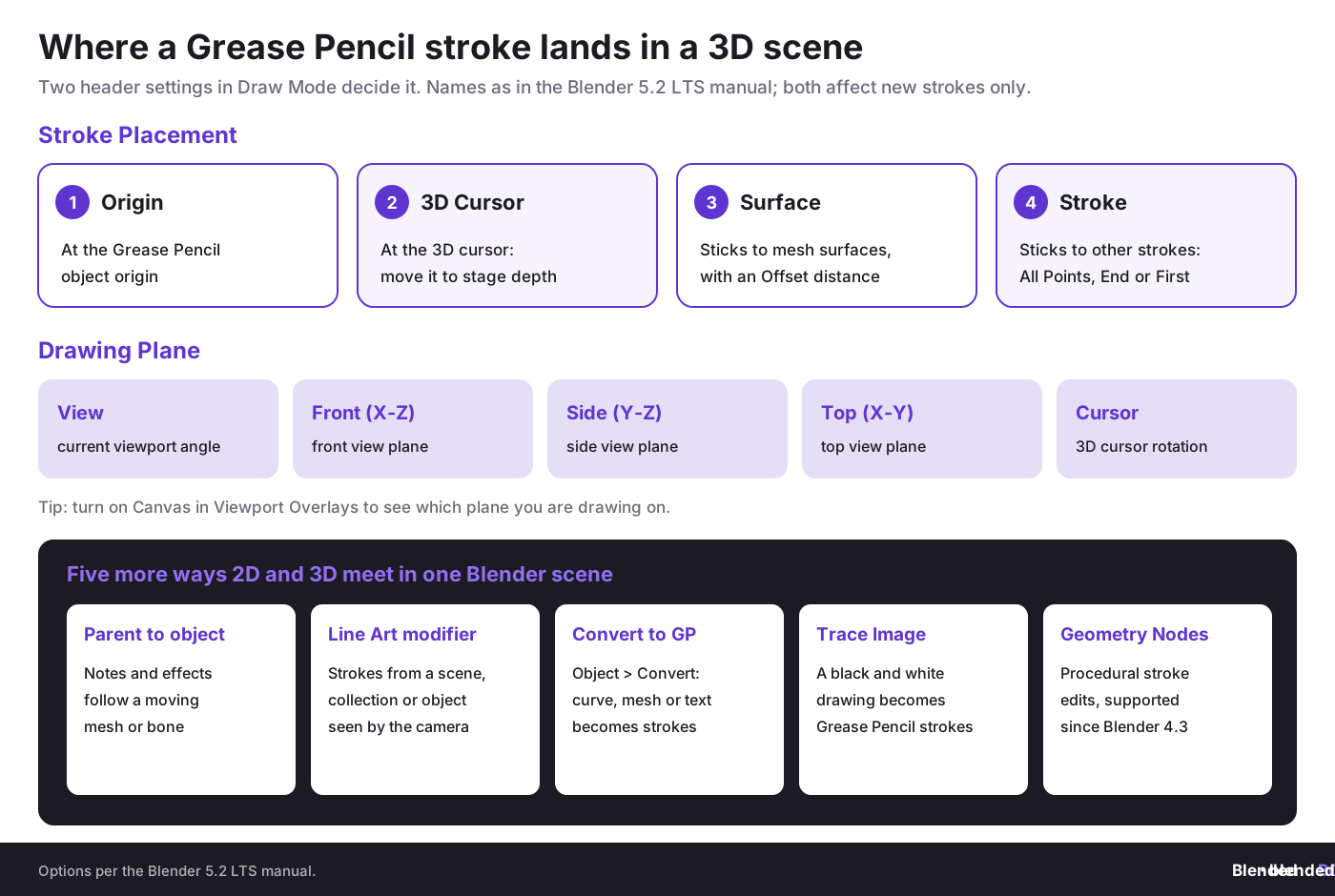
Where a new Grease Pencil stroke lands depends on two settings in the Draw Mode header. Stroke Placement puts it at the object Origin, at the 3D Cursor, on a mesh Surface (with an Offset distance) or on other Strokes, and the Drawing Plane sets the plane it is drawn on: View, Front (X-Z), Side (Y-Z), Top (X-Y) or Cursor. Both settings affect new strokes only. That means perspective and placement matter. If you understand this early, you stop fighting the tool. If you ignore it, your lines float, slide, or break camera continuity.
For startups building explainers or product demos, this matters because a hand-drawn arrow, label, or effect can stay locked to a moving object or scene area instead of being re-drawn in post. Draw it with Surface placement so it sticks to the product mesh, then parent the Grease Pencil object to that mesh or to a bone so the note follows every move.
Core concept 2: Layers, materials, and timing are your control system
Grease Pencil projects get messy fast when artists draw everything onto one layer with one material. Separate line art, fills, shadows, effects, technical notes, and client markup. Then match those layers to shot purpose. A marketing teaser needs different grouping from a rigged short or a product annotation sequence.
This is not just visual housekeeping. It helps with licensing and review. If one contractor only created effects strokes and another created character keys, layer separation supports cleaner attribution and clearer deliverables. That can matter in freelancer agreements across the EU, where ownership transfer is often not as automatic as clients assume. If you need the basics first, read copyright basics for 3D artists.
Core concept 3: Hybrid style works when camera logic is shared
The strongest Grease Pencil scenes do not look hybrid by accident. They use one camera language. A 3D set with a 2D character works if focal length, staging, parallax, and line thickness are planned together. The same goes for a technical product shot with hand-drawn explanatory callouts. If you are still choosing lenses, start with camera settings in Blender and, for multi-angle pieces, setting up multiple cameras.
If you want a stylized look, connect Grease Pencil to the broader NPR side of Blender. A good next reference is this article on NPR rendering styles in Blender, because hybrid scenes look stronger when linework, materials, and render style belong to the same visual system.
Which Blender tools combine 2D and 3D in one scene?
Grease Pencil is one of several ways to put 2D and 3D in the same Blender scene. Each tool solves a different part of the job:
How do you implement Combining 2D and 3D Art with Grease Pencil step by step?
Let’s break it down into a production path that works for artists and for business teams.
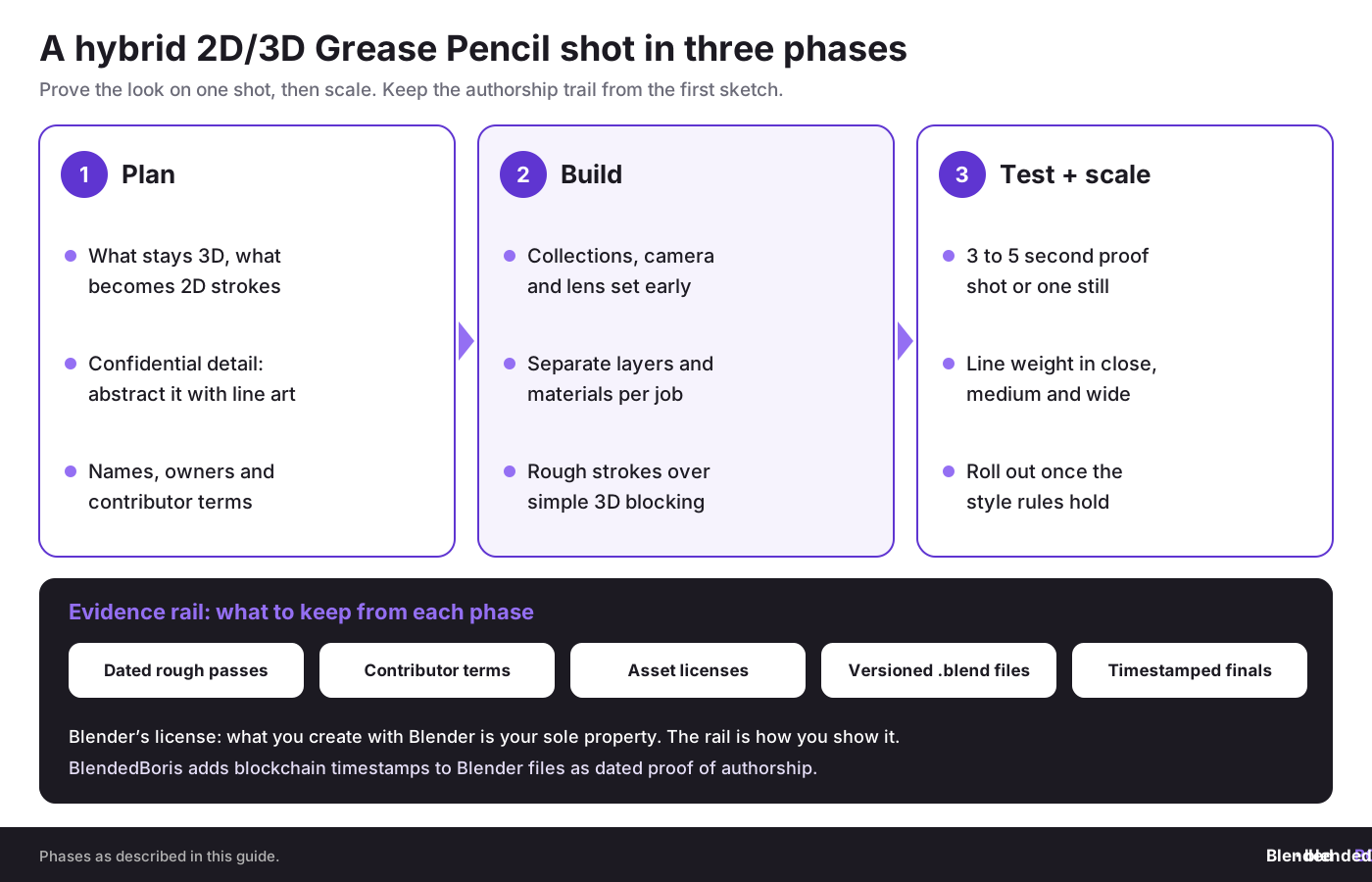
Phase 1: Assessment and planning
Step 1.1: Audit your current scene and asset needs
- List what must be true 3D geometry and what can remain 2D strokes.
- Identify confidential product details that should be abstracted with line art rather than shown directly.
- Decide whether the output is a still, loop, short film, storyboard, ad, or technical explainer.
- Check which assets come from staff, freelancers, or marketplace licenses.
Step 1.2: Define visual and legal boundaries
- Choose a style target with references for line weight, fill behavior, shadows, and motion.
- Write down authorship and ownership assumptions before work starts.
- Set naming rules for .blend files, shot versions, and exported previews.
- Decide which previews can be shared externally and which stay internal.
Step 1.3: Build internal buy-in
- Show stakeholders one test scene that proves the hybrid look.
- Explain time savings versus separate 2D compositing.
- Explain IP and confidentiality rules in plain language.
- Assign one scene owner who approves version changes.
Useful tools in this phase include Blender itself, a shared asset register, a version-controlled storage workflow, and a basic rights log for contracts, licenses, and contributor names.
Phase 2: Foundation building inside Blender
Step 2.1: Choose your hybrid framework
Most teams fall into one of these models:
- 2D-first: hand-drawn characters or notes supported by 3D cameras and sets.
- 3D-first: product or environment geometry enhanced by 2D effects, labels, and line accents.
- Balanced hybrid: both layers share equal visual weight, common in music videos, stylized ads, and anime-influenced scenes.
Step 2.2: Set up your scene
- Create collections for geometry, Grease Pencil objects, cameras, lights, and references.
- Set a camera early and avoid endless focal-length changes later.
- Add a Grease Pencil object and test stroke placement modes.
- Create separate materials for outlines, fills, highlights, effects, and notes.
- Turn on onion skinning and timeline markers if animation is involved.
- Name objects and layers with shot-based logic.
Step 2.3: Build your foundation elements
- Create a rough Grease Pencil pass for composition.
- Block simple 3D forms to establish depth and collision.
- Parent any persistent annotations or effects to moving objects where needed.
- Set basic lighting and render tests so your strokes read well against geometry.
Phase 3: Testing, revision, and scale
Step 3.1: Run an early proof shot
- Render 3 to 5 seconds or one still frame before building the full sequence.
- Check line thickness under camera movement.
- Check if 2D elements feel anchored in space.
- Review whether any visible geometry reveals confidential design details.
Step 3.2: Roll out carefully
- Expand from one shot to the full scene only after the style rules hold.
- Train additional artists on naming, layering, and export policy.
- Store approvals alongside version numbers, not in scattered chat threads.
- Keep a rights register if outside contributors are involved.
Step 3.3: Build feedback loops
- Weekly scene review for style consistency.
- Simple dashboard tracking shot status, approver, and export date.
- Monthly archive of final approved files and source assets.
- Post-project review of what was easy to track and what was lost.
Stylized scenes need a coherent rendering language.
If your Grease Pencil strokes feel disconnected from your 3D materials, the issue is often shading design rather than drawing skill.
👉 Study toon shading in Blender
Which Grease Pencil workflows work best in 2026?
Practice 1: Use 3D geometry as a spatial scaffold, not as the final visual answer
What it is: build simple geometry first to lock perspective, scale, and camera movement, then let Grease Pencil carry the expressive surface layer.
Why it works: you avoid perspective drift and keep layout changes cheap. This is especially useful for architecture, factory interiors, and product demos where accuracy matters but photoreal detail may be unnecessary.
How to apply it:
- Model only the structural forms needed for staging.
- Set cameras and motion paths early.
- Draw linework and graphic emphasis over the scaffold.
Common pitfall: overbuilding the 3D scene until the Grease Pencil layer becomes decorative noise. How to avoid it: ask in each shot whether geometry is serving depth, collision, or readability. If not, remove it.
Metrics to track: time to first preview, revision count per shot, and percentage of geometry visible in final output.
Practice 2: Treat line weight as part of cinematography
What it is: adjust stroke thickness, opacity, and material behavior based on focal length, shot distance, and scene mood.
Why it works: hybrid scenes break when line density fights the camera. Thin lines vanish in wide shots, and thick lines overpower close-ups.
How to apply it:
- Test one close, one medium, and one wide shot with the same line material.
- Create material variants for shot distance.
- Document when each variant should be used.
Common pitfall: locking one universal line style for an entire project. How to avoid it: allow style families, not one global brush rule.
Metrics to track: readability in client previews, number of redraws caused by camera changes, and review comments about visual clutter.
Practice 3: Use Grease Pencil for selective disclosure in IP-sensitive visuals
What it is: hide or simplify proprietary geometry while keeping enough form, movement, and explanation for communication.
Why it works: many SMEs need to show product concepts publicly before patents, tooling, or manufacturing contracts are settled. Hybrid visuals can reveal function without exposing every detail.
How to apply it:
- Classify geometry as public, restricted, or confidential before rendering.
- Replace sensitive zones with stylized overlays, silhouettes, or simplified line passes.
- Archive the internal master and export only the approved public version.
Common pitfall: showing too much in behind-the-scenes posts, pitch decks, or early marketplace teasers. How to avoid it: involve a legal or IP-aware reviewer before public release.
Metrics to track: number of confidential assets exposed in previews, approval turnaround, and public versus internal asset separation.
Practice 4: Record authorship and version history from the sketch phase
What it is: keep a traceable chain from first Grease Pencil ideation to final shot delivery.
Why it works: creative disputes rarely begin at the final export. They begin when a collaborator claims the concept, a client assumes full ownership without contract language, or a marketplace listing gets copied.
How to apply it:
- Store rough passes with dates, contributor names, and shot IDs.
- Use written contractor terms that cover ownership transfer, portfolio use, and derivative rights.
- Generate certificates or external proof records for high-value works when needed.
Common pitfall: assuming copyright ownership is obvious because one company paid the invoice. How to avoid it: remember that payment, authorship, and ownership can be different things under contract and copyright law (see the most common copyright issues for 3D artists).
Metrics to track: percentage of assets with documented creator identity, contract coverage rate, and time needed to answer an ownership question.
What mistakes do teams make when combining 2D and 3D Art with Grease Pencil?
Mistake 1: Treating Grease Pencil as a gimmick instead of a scene system
Teams make this mistake because the first experiments look playful and low-stakes. The impact is predictable: scenes collapse under revision because there is no structure for layers, collections, naming, and timing.
How to avoid it:
- Set naming rules before the second shot, not after the twentieth.
- Separate line art, fills, effects, and notes.
- Treat Grease Pencil objects like production assets, not throwaway doodles.
If you already made this mistake, freeze new drawing for one day, reorganize the scene, rename assets, and create a layer map that everyone follows.
Mistake 2: Mixing internal and external rights without paperwork
This is common in startups and small studios. A freelancer draws key poses, an intern creates fills, a founder buys a brush pack, and a client assumes everything is fully assigned. The impact can be nasty: blocked licensing deals, takedown risk, and ugly ownership arguments.
How to avoid it:
- Use written contributor agreements.
- Store source purchase records for brushes, kits, and marketplace assets.
- Clarify moral rights, portfolio rights, and commercial rights in jurisdictions where those questions matter.
If the mess already exists, pause distribution, list all contributors, review contracts, and rebuild missing permissions before a public launch.
Mistake 3: Ignoring GDPR and privacy when review files include people or project data
Grease Pencil scenes used in enterprise communication can include customer names, internal comments, or meeting recordings attached to reviews. Dirk-Jan’s compliance perspective matters here. Once personal data enters a production chain, your storage and sharing habits need discipline.
How to avoid it:
- Keep review exports free of unnecessary personal data.
- Use access-controlled folders for internal approvals.
- Purge obsolete review packages on a schedule.
Mistake 4: Chasing style before function
A hybrid visual can look great on social media and still fail in a product demo, investor pitch, or manufacturing explainer. Teams often overload scenes with effects before they establish what the viewer must understand.
How to avoid it:
- Define the communication goal of each shot.
- Use Grease Pencil to clarify motion, hierarchy, and attention.
- Cut any stroke layer that looks stylish but explains nothing.
How should you measure success in a Grease Pencil hybrid workflow?
Creative teams often measure only likes, views, or final beauty. That is too shallow for a business workflow. Track both production and rights metrics.
Foundational metrics to track first
- Time to first approved preview: how fast the team can turn an idea into a reviewable hybrid shot.
- Revision count per shot: a proxy for clarity and planning.
- Layer hygiene rate: percentage of scenes following naming and structure rules.
- Rights coverage rate: percentage of assets with clear ownership or usage permission.
Advanced metrics after a few projects
- Reuse rate of hybrid assets: whether scenes, stroke kits, and shader setups carry into future work.
- Public-safe export ratio: how many outputs are ready for external use without manual scrubbing.
- Dispute response time: how quickly you can answer who created what and when.
- Marketplace conversion uplift: whether stylized previews improve clicks or sales for 3D assets.
A simple dashboard can live in a spreadsheet or project tracker. Include shot ID, owner, stage, latest approved export, contributors, contract status, and proof record location.
How does the approach change across business stages?
Pre-seed and seed stage
Your reality is limited budget, rapid testing, and many audience experiments. Use Grease Pencil for storyboard ads, explainer loops, pitch visuals, and social snippets. Prioritize speed, scene reuse, and rights clarity from the start. Defer fancy pipelines. Success looks like shipping hybrid visuals weekly without losing source control.
Series A stage
Your reality is more content demand and more people touching assets. Build templates, standardize materials, and move from founder memory to actual workflow documents. Prioritize asset ownership logs and contributor agreements. Defer custom tooling unless your volume justifies it. Success looks like consistent style across campaigns and clean handoffs between artists and marketers.
Series B and beyond, or established SME
Your reality is operational sprawl, product secrecy, and bigger reputational risk. Hybrid visuals may span product launches, training, manuals, investor communication, and partner portals. Prioritize controlled access, source archiving, and legal review for public-facing materials. Success looks like a repeatable content pipeline that does not leak confidential design intent.
What does an EU-focused IP and security checklist look like for Grease Pencil projects?
Here is a practical checklist inspired by the CADChain way of thinking, adapted to Blender creators:
- Identify the creator and the owner separately. They may be different legal persons.
- Keep dated source files. Rough Grease Pencil passes can help prove chronology.
- Record contributor permissions. Contractor work should not rely on verbal assumptions.
- Classify public versus confidential visuals. Do not mix them casually.
- Store exports with version numbers. Final-final-v7 is not evidence.
- Use external proof tools where value justifies it. Blockchain-anchored records or certificates can complement internal logs.
- Review marketplace terms. Platform licenses and exclusivity clauses can collide with client work.
- Strip personal data from review files. This matters under GDPR when teams share widely.
Violetta’s stance on blockchain has always been pragmatic, not mystical. The point is not hype. The point is evidence. If a high-value Blender sequence or design visualization feeds commercial campaigns, licensing, or dispute risk, an immutable proof record may be useful as one more layer of defense.
Can Grease Pencil help artists and product teams build better commercial assets?
Yes, if you think beyond animation fandom. Hybrid 2D and 3D visuals perform well in commercial settings because they explain form fast, compress detail into readable cues, and create a recognizable brand style without the cost of full photorealism in every frame. For abstract, brand-driven loops, combine it with motion graphics in Blender.
A few practical use cases:
- Manufacturing explainers: show machine movement with simplified line overlays instead of exposing the full assembly.
- Startup pitch decks: use Grease Pencil turntables and annotations to make prototypes feel alive before hardware is finalized.
- Marketplace previews: add hand-drawn notes or stylized passes that highlight topology, modularity, or use cases.
- Training content: create clear educational scenes where 2D marks guide the learner through a 3D environment.
Artists who want stronger animation fundamentals for hybrid scenes can review animation principles for 3D artists and animation basics in Blender, then add non-destructive animation modifiers once the timing works.
What are your next steps if you want results this month?
Week 1
- Pick one use case such as a 10-second explainer, one product shot, or one storyboard sequence.
- Define what stays 3D and what becomes Grease Pencil.
- Set scene naming and contributor rules.
Week 2
- Build a proof shot.
- Test line materials in close, medium, and wide views.
- Review public versus confidential visibility.
Week 3
- Render a first approved preview.
- Document file ownership, source assets, and contract status.
- Archive the preview and source scene with version IDs.
Week 4 and after
- Turn the test into a repeatable template.
- Create a small library of line styles and shader combinations.
- Introduce a simple proof-of-creation habit for important outputs.
Glossary of terms you will meet in hybrid Blender workflows
- Grease Pencil: Blender’s object type for drawing and animating stroke-based 2D artwork in the 3D viewport.
- NPR: Non-photorealistic rendering, a style family focused on illustrative, graphic, painterly, toon, or stylized output rather than realism.
- Onion skinning: a way to see adjacent animation frames while drawing motion.
- Stroke Placement and Drawing Plane: the two Draw Mode settings that decide where a new stroke lands (Origin, 3D Cursor, Surface or Stroke) and which plane it is drawn on (View, Front, Side, Top or Cursor).
- Line Art modifier: a Grease Pencil modifier that generates stylized lines from a scene, collection or object as seen by the active camera.
- Authorship: the person who created the work.
- Ownership: the party holding the commercial rights, which may or may not be the original author depending on contracts and law.
- Digital certificate: a record used to support claims about authorship, ownership, or chronology.
- Blockchain-anchored proof: an external timestamped record of a file-related event used as supporting evidence, not as a magical substitute for contracts.
Make your hybrid scenes easier to defend.
Rough Grease Pencil passes, contractor strokes and final renders all tell the story of who made what and when, but only if that story is recorded. BlendedBoris adds blockchain timestamps to your Blender files from inside Blender, so each important version gets a dated, tamper-evident record of authorship.
👉 Start timestamping your Blender files with BlendedBoris
Closing thoughts: why this hybrid workflow is bigger than style
Combining 2D and 3D Art with Grease Pencil is not just a visual trend. It is a production decision, a communication decision, and in many teams a rights-management decision. Blender makes it possible to draw directly in scene space, stage 2D expression with 3D precision, and build work that is faster to approve and easier to reuse.
From Violetta Bonenkamp’s point of view, the real opportunity sits in the overlap between creativity and control. Teams that keep hybrid production inside a clear workflow gain speed, yes, but they also gain a cleaner story about who made what and when. From Dirk-Jan Bonenkamp’s legal angle, that story can matter long after the render is finished.
So the smart move for EU creators, startups, and SMEs is simple: use Grease Pencil for what it does best, but treat the output like business IP from the first sketch. If you do that, your next logical step is not just prettier renders. It is stronger motion systems. That is why the natural follow-up topic is Animation and rigging in Blender, where hybrid scenes stop being clever frames and become production-ready sequences.
People Also Ask:
Can you combine 2D and 3D animation?
Combining 2D and 3D animation can provide a creative boost for projects. By integrating both techniques, you get textures and depth from 3D, while retaining the classic charm of 2D. This method is often used to produce styles that feel unique and visually appealing, suitable for animations and artistic works.
What is it called when you mix 2D and 3D animation?
The combination of 2D and 3D animation is known as hybrid animation. This approach merges the aesthetics and benefits of both styles, providing flexibility and creativity for designers and animators.
Can you turn a 2D drawing into a 3D model?
Yes, with some work. In Blender you can load the drawing as a reference image and model over it, and Object › Convert › Trace Image to Grease Pencil turns a black and white drawing into Grease Pencil strokes you can place in 3D space. A full 3D model still has to be modeled from those references; technical parts are often rebuilt in CAD software the same way.
Is Blender Grease Pencil effective for 2D animation in 2026?
Blender's Grease Pencil remains a powerful tool for 2D animation, allowing artists to create in a 3D space while still using traditional workflows for hand-drawn art. Its adaptability makes it suitable for cut-out animations, motion graphics, and storyboarding.
Why do artists use Blender's Grease Pencil for combining 2D and 3D art?
Artists choose Blender's Grease Pencil because it allows seamless integration of 2D artwork into 3D environments. This tool makes it possible to blend both mediums effectively for a cohesive output, enhancing the creative possibilities of any project.
What are some popular examples of hybrid animation?
Spider-Man: Into the Spider-Verse (2018) is the best-known recent example: 3D animation with hand-drawn linework and comic-style 2D effects on top. Inside the Blender world, Blender Studio’s short Hero (2018) was the first Blender open movie made with Grease Pencil. Hybrid animation also shows up in advertising, video games and educational media.
Can 2D and 3D animation interact in the same scene?
Yes, 2D and 3D animations can coexist in a single scene. For example, 2D characters or designs can be animated on top of 3D objects, enriching the visual depth and providing a multi-dimensional feel.
What software is recommended for 2D and 3D hybrid art in 2026?
Blender stands out for hybrid art because Grease Pencil, cameras, lights and 3D geometry live in one free scene file. Other tools cover parts of the job: Toon Boom Harmony can bring 3D models into 2D scenes, and Maya has included Blue Pencil for 2D sketching over the 3D viewport since Maya 2023.
What industries benefit from hybrid animation techniques?
Hybrid animation is widely utilized in entertainment, advertising, gaming, and education. These techniques cater to the growing demand for unique and engaging visual designs that blend traditional elements with modern digital advancements.
How has Blender's Grease Pencil evolved over the years?
The biggest recent change came in Blender 4.3, when Grease Pencil was rebuilt on a new data structure: layer groups, Geometry Nodes support, multithreaded modifiers and much smaller files. Files saved in 4.3 or later do not load correctly in 4.2 or earlier, so agree on one Blender version per project. Blender 5.2 LTS is the current long-term support release.
FAQ on Combining 2D and 3D Art with Grease Pencil
How does Grease Pencil differentiate from other 2D and 3D tools in Blender?
Unlike traditional illustration tools, Blender's Grease Pencil allows artists to draw directly in 3D space, integrating 2D strokes with 3D models and animations. This versatility makes it ideal for hybrid designs, enabling seamless motion and perspective alignment. Learn more in this Blender 3D overview.
What industries benefit most from combining 2D and 3D art with Grease Pencil?
Industries like animation, product design, technical documentation, and e-learning heavily benefit from Grease Pencil workflows. It enables creators to blend stylized 2D annotations with 3D models while maintaining spatial depth and intricate storytelling.
What are key tips for avoiding perspective issues when using Grease Pencil?
Pick the Stroke Placement and Drawing Plane on purpose: 3D Cursor placement with a Front, Side or Cursor plane for staged depth, Surface placement when strokes should stick to a mesh. Turn on Canvas in Viewport Overlays to see the active plane, lock camera settings early, and use simple geometry scaffolds to keep perspective consistent.
Can Grease Pencil be used effectively by beginners?
Yes, beginner-friendly tools like brushes, layers, and onion skinning make Grease Pencil accessible. Tutorials such as Exnioc’s stylized 2D/3D art Grease Pencil tutorial can help new users get started with actionable tips and workflows.
How can 2D annotations enhance 3D product design presentations?
2D annotations created with Grease Pencil can highlight product functions, key features, and movement patterns while obscuring confidential details. This enhances clarity without revealing proprietary geometry, offering a professional touch to design presentations.
What are the benefits of layering in hybrid artwork?
Layering allows separation of line art, fills, shadows, and effects, improving organization and scalability in complex projects. It also simplifies version control and attribution, especially in collaborative environments with multiple editors.
What common mistakes should teams avoid in hybrid 2D/3D workflows?
Mistakes include inconsistent file naming, ignoring camera logic, and mismanaging rights when using external assets. Establishing workflow rules and clarity on asset ownership can prevent delays and legal complications down the line.
What are effective ways to protect IP in hybrid Grease Pencil works?
Maintain clear authorship records, version history, and confidentiality classifications for your files. Contracts with freelancers should address ownership, and public-facing assets should exclude sensitive data to mitigate IP risks.
Which animation techniques pair well with Grease Pencil for storytelling?
Combining cutout animation with onion skinning delivers smooth motion transitions. Rigging Grease Pencil characters or features also adds dynamic flexibility. See related techniques in this guide to rigging basics in Blender.
What are the next steps for advancing hybrid 2D/3D skills?
Focus on advanced rigging, shader design, and integrating non-photorealistic rendering styles. Regularly review emerging resources and participate in skill-building courses tailored toward Blender's evolving capabilities.


