
TL;DR: copyright example
A standard copyright notice looks like this: © 2026 Jane Doe. All rights reserved. It has three required parts: the © symbol (or the word "Copyright"), the year of first publication and the owner's name. "All rights reserved" is optional. Below you will find more than 25 copy-paste copyright examples for every place a 3D artist publishes work: portfolio footers, Sketchfab and ArtStation pages, render watermarks, image metadata, glTF files, .blend files, asset packs, Creative Commons licences and 3D prints.
You will also see examples of what copyright protects in a 3D project (your model, textures, renders, animations and add-on code) and what it does not (ideas, basic shapes, exact copies of real objects, names and purely AI-generated output).
Key takeaways
- Copyright is automatic. A notice is optional, but it warns people off and, in the US, stops an infringer from claiming they did not know the work was protected.
- The basic formula is © + year + owner. Use a year range on sites you update, and the year of first publication on a single work.
- Put notices inside your files, not only next to them: image metadata, the glTF copyright field and a licence text block in the .blend travel with every copy.
- Removing that information can be its own violation in the US, with $2,500 to $25,000 per violation in statutory damages.
- Copyright protects your creative expression, not the idea, the technique or the real-world object you copied.
What is a copyright example?
People use "copyright example" for two things: an example of a copyright notice (the line you put on your work) and an example of copyrighted work (what the law actually protects). This guide covers both, with examples taken from 3D and Blender work instead of corporate website footers. If you are new to the topic, start with copyright basics for 3D artists and the complete guide to digital art copyright protection.
A copyright notice does not create your copyright. Under the Berne Convention, your model is protected the moment you save it, with or without a notice. The notice is a label: it tells everyone who owns the work, since when, and what they may do with it. For what is protected automatically, see do 3D models automatically have copyright protection?.
Copyright notice format: the 3 parts
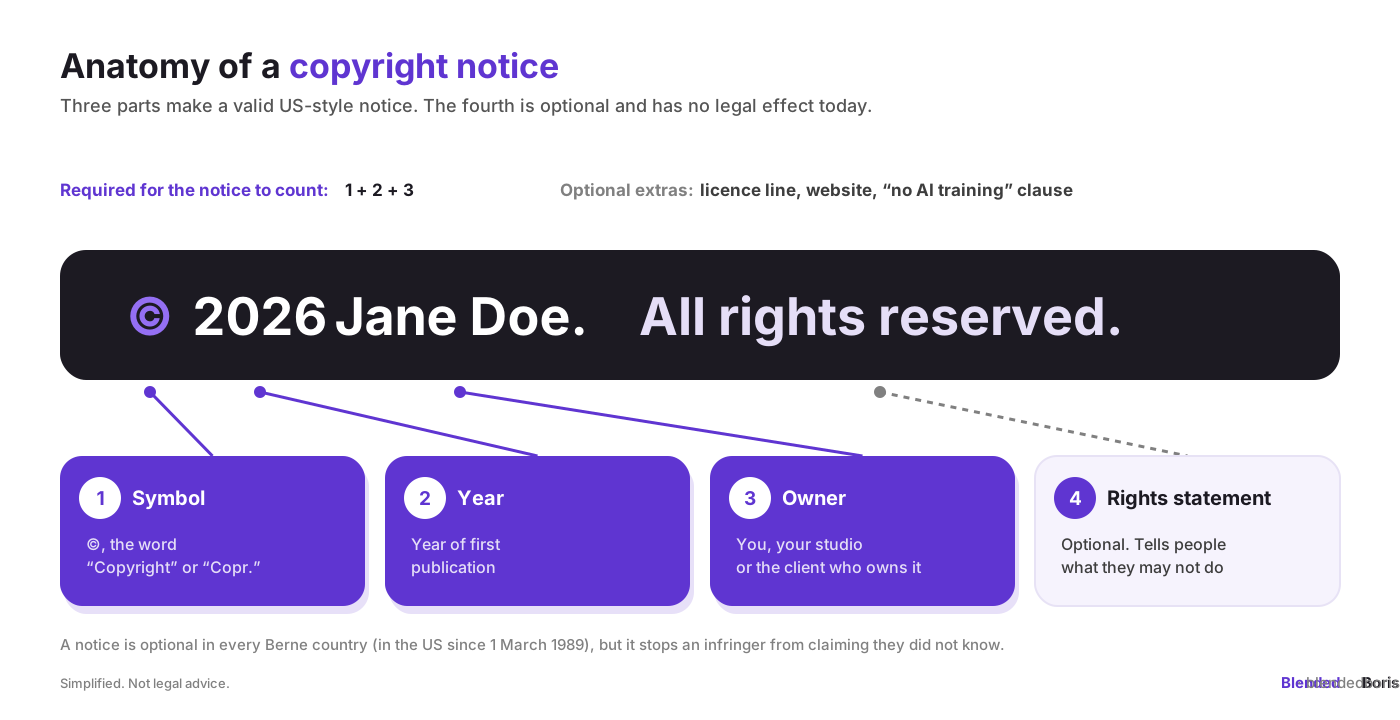
Under US law (17 U.S.C. § 401), these three elements make a notice valid. A notice has been optional for works published since 1 March 1989, and a few exceptions let you leave out the year, for example for artwork reproduced on toys, jewellery or useful articles. "All rights reserved" comes from an old treaty that no longer has any practical effect, but it is still a clear signal, so most artists keep it. The US Copyright Office explains the rules in its copyright notice circular.
Two other symbols you may see: ℗ is for sound recordings (useful if you also make the soundtrack for your animation), and ™ / ® are trademark symbols for names and logos, not copyright. The differences are explained in copyright vs trademark vs patent for Blender artists.
Copyright notice examples you can copy
Replace the name, year and title with your own. Use straight text: the © symbol works everywhere (on Windows type Alt+0169, on Mac Option+G, or simply write "Copyright").
Basic copyright notice examples
Copyright examples for 3D artists, by placement
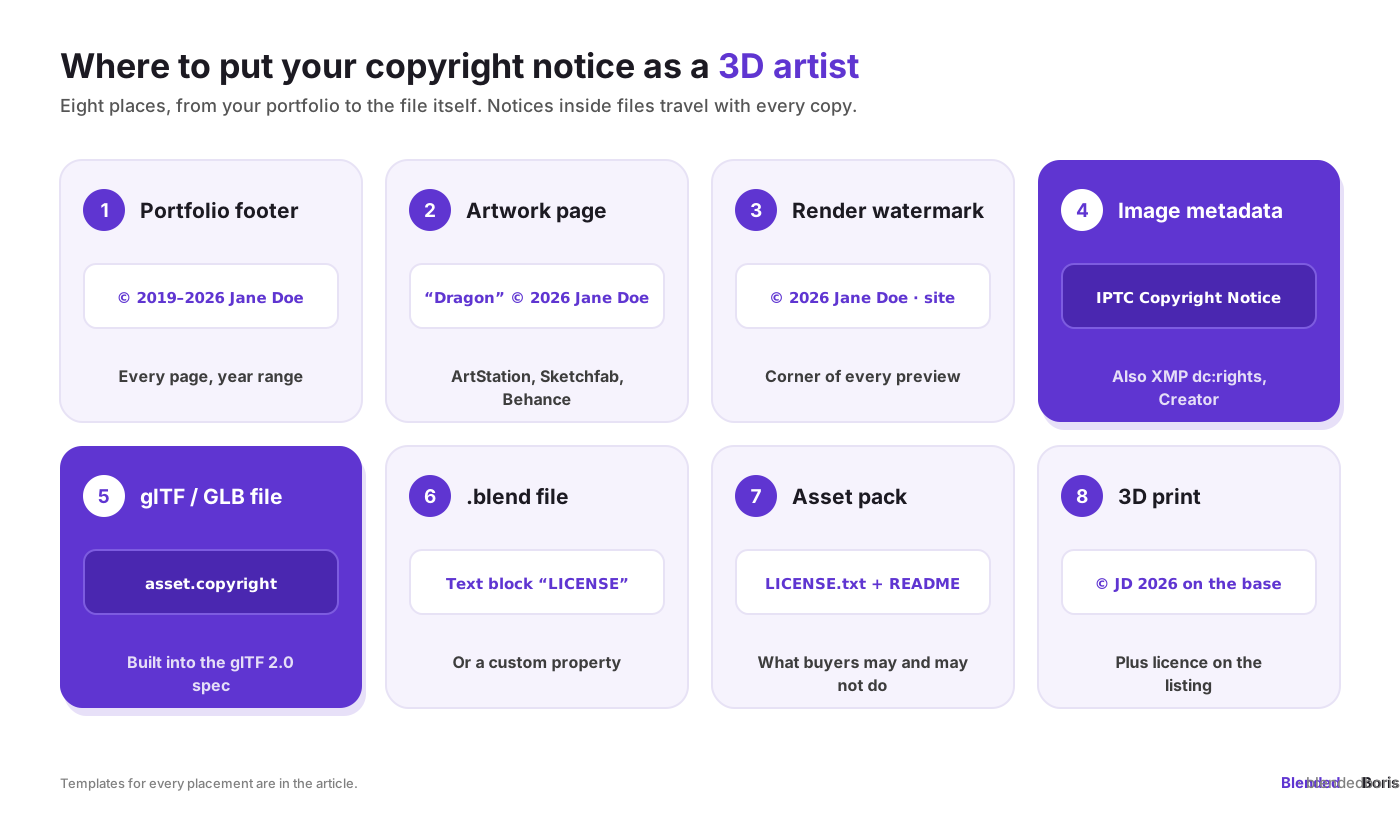
Portfolio, ArtStation and Sketchfab
Platforms add their own rules on top of your notice. Read Blender marketplace copyright policies and marketplace copyright policies before you choose the wording for a store page, and see how to build a professional 3D portfolio for where the footer fits.
Renders, image metadata and video
A visible watermark is easy to crop, so pair it with metadata. Good presentation still matters: photography and presentation tips for 3D models shows how to keep previews attractive with a mark on them, and how to protect Blender models from theft covers watermarks and metadata in more depth.
Inside the 3D file: glTF, .blend and asset packs
Blender has no dedicated copyright field, so a Text block or a custom property is the simplest way to keep the notice with the scene. The software itself is free, and Blender's open source licence does not apply to your artwork: the models you make are yours. For selling, see how to sell Blender 3D models online and the guide to selling 3D models online.
Client work, add-ons and 3D prints
Blender add-ons that use Blender's Python API are generally distributed under the GPL, so example 23 uses a GPL licence line. For STL files, selling STL files on Cults3D, Thingiverse and MyMiniFactory covers the licence options marketplaces offer.
All rights reserved vs some rights reserved vs no rights reserved
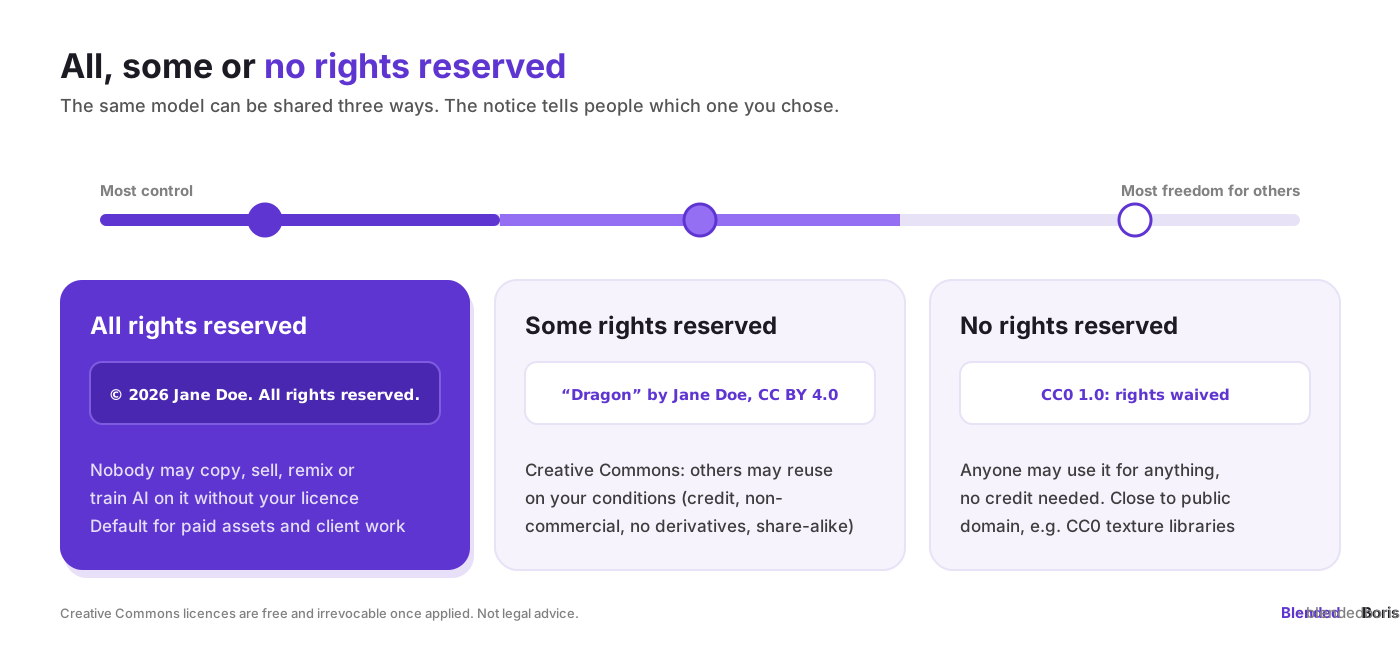
A good attribution names the title, author, source and licence, and says if you changed the work. Creative Commons licences are free, but you cannot take them back for copies people already have, so choose before you publish. Compare the options in Creative Commons vs copyright for Blender assets and copyright vs Creative Commons licensing, and read community guidelines for sharing Blender work for credit etiquette.
Copyright notice example with an AI-training clause
In the EU, a rights holder can opt out of commercial text and data mining, and the opt-out should be machine-readable for content published online, so add it to your site's terms and metadata, not only to a caption. A notice like this does not stop scraping on its own, but it removes the argument that you never said no. More templates for AI-assisted work are in copyright templates and examples for AI asset protection and copyright notices for AI protection.
Examples of copyrighted work in a 3D project
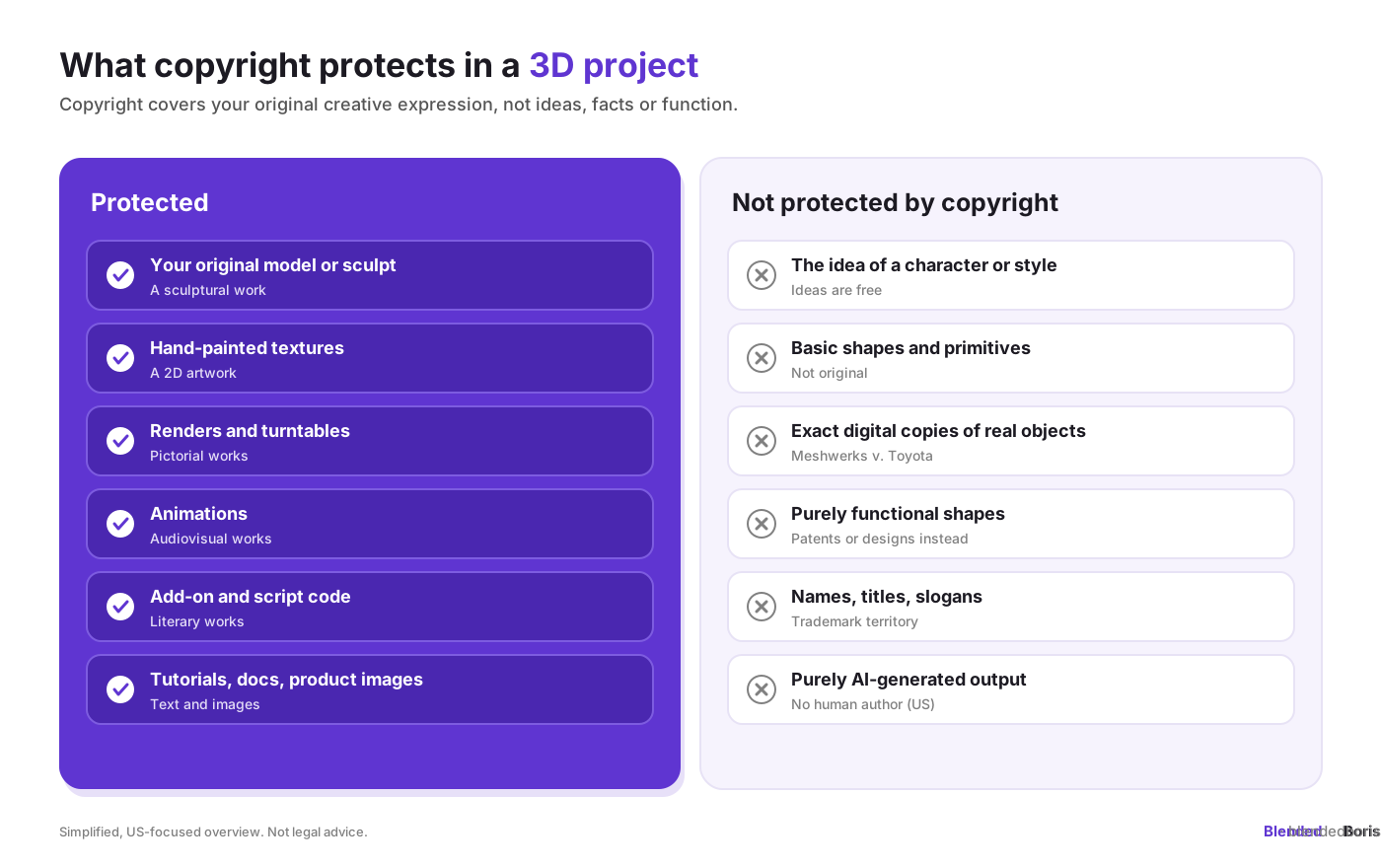
Two real-world copyright examples matter a lot for 3D artists. In Meshwerks v. Toyota (10th Circuit, 2008), wireframe models that faithfully copied Toyota cars were held not original enough for copyright, so a model is protected by the creative choices you add, not by the hours you spent. And in Star Athletica v. Varsity Brands (US Supreme Court, 2017), artistic features of a useful article were protectable only if they can exist as art on their own, which is why the decoration of a 3D-printed lamp can be protected but not its function.
Copyright does not last forever. In the US, works published in 1930 entered the public domain on 1 January 2026, and in the EU and UK most works stay protected for the author's life plus 70 years. See free from copyright for what becomes free next and how to use it. Details are in copyright duration and renewal. For everything else that has no copyright, from US government works to CC0 assets, see what no copyright means. When you work with AI tools, the line between your work and the machine's matters: see AI-generated art and copyright in 2026.
Copyright infringement examples (and what is not infringement)
For the limits of reuse, read fair use guidelines for Blender artists and fair use in digital art. If your work is copied, use the DMCA takedown guide for artists first, then legal remedies for digital art infringement.
Why a notice helps, and what it cannot do
A notice states a claim; it does not prove it. To prove that you created a model first, you need dated, independent evidence. To enforce in the US, you need a registration, explained step by step in how to register copyright. Together, the three cover each other: the notice warns, the proof of creation shows you were first, and the registration opens the courtroom. The copyright best practices for Blender artists put this into a routine, and blockchain copyright registration for Blender creators explains how a certificate works as proof.
Add proof to every copyright notice, for free. BlendedBoris is a free plugin for Blender that records your 3D model on the blockchain and gives you a lifetime ownership certificate. It creates a digital fingerprint that links the model to you, so the year in your notice is backed by dated proof that nobody can edit later. Share the certificate link in your listing or attach it to a takedown notice.
👉 Get the free BlendedBoris plugin
If you want the certificate in your notice, add a line like this: © 2026 Jane Doe. All rights reserved. Ownership certificate: [your BlendedBoris certificate link]. Setup takes a few minutes with the BlendedBoris plugin tutorial.
Common copyright notice mistakes
- Using a fake year. Use the year of first publication. Backdating a notice can hurt your credibility in a dispute.
- Naming the wrong owner. If a client bought all rights, the notice should name the client. If you only licensed the work, it should name you.
- Writing "(c)" instead of ©. US law names ©, "Copyright" and "Copr."; "(c)" is not on that list, so use one of those.
- Only putting the notice on the web page. Pages get stripped; files travel. Add metadata and in-file notices too.
- Claiming third-party assets. CC0 textures, bought kitbash parts and fonts are not yours. Credit them, as in example 20.
- Mixing up licences. "All rights reserved" and "CC BY" on the same file confuse buyers. Pick one per work.
- Using ® for copyright. ® means a registered trademark, and using it for something that is not a registered mark is not allowed in many countries.
For a broader checklist, see must-know copyright tips for digital artists and protecting Blender models from theft.
Copyright examples in numbers
Conclusion
A copyright notice takes ten seconds to write and works for years. Use © + year + your name on everything, add a clear licence line where people can download or buy your files, and put the notice inside the file as well as next to it. Then back it up: dated proof of creation shows you made the work first, and a registration lets you enforce it in the US. Copy the examples above, change the names and dates, and your work will carry its ownership with it wherever it goes.
This is general information, not legal advice. Rules differ between countries; check with a lawyer for important contracts and disputes.
This is general information, not legal advice. Rules differ between countries; check with a lawyer for important contracts and disputes.
FAQ: copyright examples
What is an example of a copyright notice?
© 2026 Jane Doe. All rights reserved. It contains the © symbol, the year of first publication and the owner's name, plus an optional rights statement.
How do I write a copyright notice for my 3D model?
Write © + year + your name, and add the model's title and a licence line if people can download it, for example: "Dragon Sentinel" © 2026 Jane Doe. Licensed under CC BY 4.0. Put it in the description, the file's metadata and the file itself.
Do I need a copyright notice to be protected?
No. Copyright is automatic in every Berne country. The notice is optional, but it informs people and, in the US, stops an infringer from claiming they did not know.
Is "All rights reserved" still needed?
No, it has no legal effect today. It is still useful as a clear signal that you do not allow reuse without a licence.
Which year should I put in a copyright notice?
The year the work was first published. For a website or portfolio you keep updating, use a range such as 2019–2026.
Can I put a copyright notice on fan art?
You can put a notice on your own contribution, but fan art of a protected character is usually a derivative work, and the notice does not give you rights in the original character.
Where do I put a copyright notice in a glTF file?
In the asset object's copyright field, which is part of the glTF 2.0 specification, for example "copyright": "© 2026 Jane Doe".
What are examples of copyrighted works?
Original 3D models and sculpts, paintings and textures, photos and renders, animations, music, books, software and add-on code. Ideas, facts, names and basic shapes are not protected.
What is not protected by copyright?
Ideas, styles, techniques, facts, names, titles and slogans, basic shapes, purely functional designs, exact copies of real objects and, in the US, purely AI-generated output.
Does a copyright notice prove I made the work?
No. A notice is a claim. Dated proof of creation, such as a blockchain certificate, and a registration are what back it up.


