

TL;DR: Geometry Nodes Deep Dive: Procedural Modeling Power shows you how Blender turns repeatable modeling into a rule-based system that saves time, cuts manual errors, and makes design logic reusable.
If you build product families, modular assets, interiors, fixtures, or manufacturing-ready variations, Geometry Nodes lets you change parameters instead of rebuilding meshes by hand. The article explains why this matters for engineers, designers, startups, and SMEs: faster revisions, cleaner handoff, better version tracking, and more control over the source graph that may hold more business value than the exported file.
It also makes the legal side clear: when one node setup can generate many sellable outputs, ownership, licensing, authorship proof, and controlled sharing matter much more. Start with one repeatable asset, build a small node group, test it on real jobs, and treat the graph like source code while keeping outputs separate.
👉 Want the next step? Read advanced Geometry Nodes workflows for more on VFX, simulation pipelines, and production use.
Geometry Nodes deep dive: how procedural modeling turns Blender assets into reusable systems
Geometry Nodes Deep Dive: Procedural Modeling Power starts with a blunt question: why are so many Blender users still building repeatable geometry by hand when the software can generate, vary, and update it for them in seconds?
Geometry Nodes is Blender’s node-based system for procedural geometry. In plain terms, it lets you define rules for how meshes, curves, points, instances, attributes, and simulations behave, then reuse those rules across assets. For engineers, designers, startups, manufacturing teams, and IP-sensitive studios, that means faster iteration, cleaner version control, and fewer expensive human mistakes.
From the point of view of Violetta Bonenkamp, co-founder of CADChain, the topic matters for one more reason. Procedural work is not just about speed. It changes who controls design logic. When value moves from a single exported mesh to a reusable system that can generate thousands of outputs, ownership, licensing, proof of authorship, and secure sharing become far more important. Dirk-Jan Bonenkamp, CADChain’s Chief Legal Officer, would add that a procedural node graph can become part of the evidence trail in an IP dispute, especially when teams need to show who built the system, when it changed, and under what license it was shared.
The real shift is simple: a 3D asset is no longer just an object. In Blender, it can be a repeatable production system, and production systems have legal, commercial, and security value.
Violetta Bonenkamp, CEO and co-founder, CADChain
Your node systems are worth protecting before they leave your studio.
A Geometry Nodes setup carries your design logic, not just a shape. BlendedBoris is a Blender plugin that adds blockchain timestamps to your Blender files from inside Blender, so every milestone version of a node-driven asset carries dated proof of who made it.
👉 Protect your Blender work with BlendedBoris
What is Geometry Nodes, and why does it matter now?
Geometry Nodes is a procedural system inside Blender that uses connected nodes to create or modify geometry. Each node performs a specific task such as distributing points, instancing objects, converting curves to meshes, sampling data, setting materials, or running a simulation. Blender’s own Geometry Nodes manual shows how broad the system has become, with nodes for mesh operations, curves, instances, volumes, simulation zones, and fields.
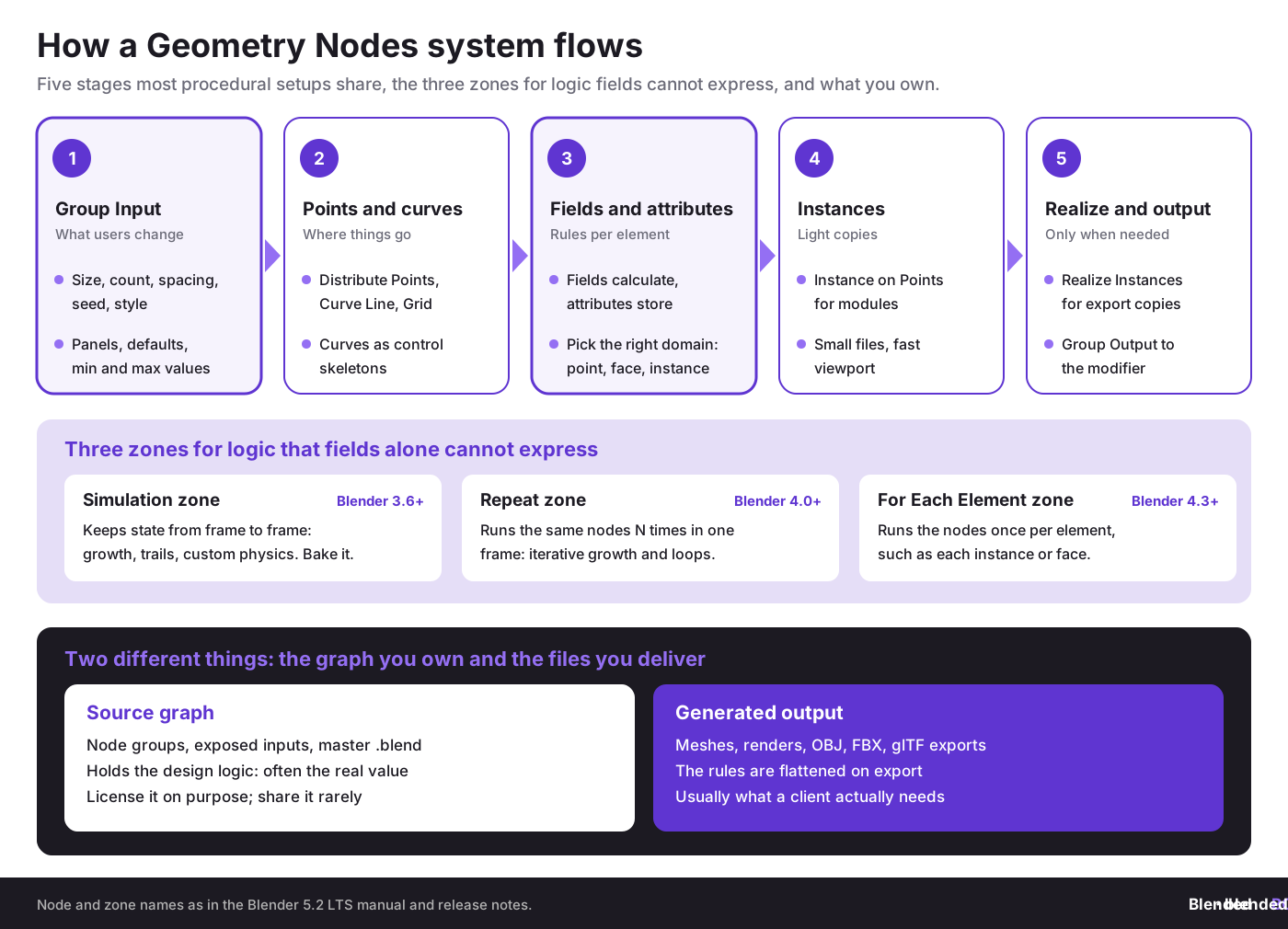
Why now? Because by 2026 the question is no longer whether procedural modeling is possible in Blender. The question is whether your team can afford not to use it on modular, repetitive, parametric, or variation-heavy work. Geometry Nodes first shipped in Blender 2.92 in 2021, and every release since has added production features: fields in 3.0, simulation zones in 3.6, the Repeat zone in 4.0, the For Each Element zone in 4.3, bundles and closures in 5.0, and lists in 5.2 LTS. The section below lists what changed. If you are completely new to nodes, start with our Geometry Nodes introduction.
That matters to startups and SMEs in Europe. Teams are lean, labor costs are high, and product customization is often a sales requirement. If a Dutch furniture startup needs ten table variants, or a German fabrication studio needs façade panel families driven by dimensions, procedural geometry cuts waste. It also creates a more defensible design process because the logic is visible, reviewable, and easier to document than a chaotic pile of manual edits.
What has Blender added to Geometry Nodes since 3.6?
Each release since Blender 3.6 has turned Geometry Nodes from a scattering tool into a full procedural system. These are the changes that matter most for production work, as listed in Blender’s release notes:
- Blender 3.6: simulation zones, which carry geometry from frame to frame.
- Blender 4.0: node tools, which run a node group as an operator from the 3D viewport menus, and the Repeat zone.
- Blender 4.1: the Menu Switch, Index Switch and Bake nodes, and node panels shown in the modifier interface.
- Blender 4.3: viewport gizmos for node group inputs, the For Each Element zone and the Warning node.
- Blender 5.0: bundles and closures, which let large node systems pass grouped data and reusable logic around.
- Blender 5.2 LTS: lists as a new data type, geometry bundles, a Mesh Bevel node, Geometry Nodes modifiers on empties, Sample Sound Frequencies, and an experimental hair and cloth physics system (see the Blender 5.2 Geometry Nodes release notes).
Blender 5.2 LTS (July 2026) is the current long-term support release, and this guide is written against it; Blender 5.3 is due in November 2026. If you also automate procedural work with code, Blender scripting with Python covers the scripted side.
Why does procedural modeling fit engineers, designers, and manufacturing SMEs so well?
Here is why. Most commercial 3D work is not a hero sculpt. It is repeatable structure plus variation. Corridors, shelving systems, trusses, cable runs, packaging inserts, exhibition stands, urban props, retail fixtures, machine housings, architectural modules, and product families all share the same pattern: stable rules, changing parameters.
A procedural pipeline fits that pattern because it separates design intent from one frozen output. That is the same mental model used in engineering configurators, CAD families, and manufacturing templates.
- Repeatability: You build the rule once, then generate many results.
- Variation at low marginal cost: Size, count, spacing, material assignment, and randomization become parameters, not rework.
- Non-destructive editing: You can revise the graph instead of rebuilding the object from scratch.
- Clearer handoff: Teams can inspect node logic and expose controls for non-specialists.
- Better fit for digital product sales: A reusable node setup can become a sellable tool, not just a one-off mesh.
On top of that, procedural systems support a business shift that Violetta Bonenkamp has talked about for years in the CAD and IP context: the valuable asset is often the rule set, not merely the exported file. In Blender terms, the node graph, the exposed parameters, the group interface, and the geometry logic may carry more commercial value than the final FBX or OBJ. That changes how creators should think about contracts, licensing, and proof of ownership. If you are still deciding between node systems, Animation Nodes vs Geometry Nodes compares the two.
What are the core concepts you need before Geometry Nodes starts making sense?
Fields and attributes
A field in Geometry Nodes is a value that Blender can evaluate across many elements of geometry, such as points, edges, faces, or instances. An attribute is stored data on geometry. If that sounds abstract, think of it this way: fields calculate, attributes store. Once you get that, many node setups become easier to read.
This matters because procedural control depends on where data lives and where it is evaluated. A random value per point gives different results than a random value per face. A selection based on curve length behaves differently from a selection based on instance index. Teams that ignore domains and data flow create broken systems that look random only because they are misunderstood.
Instances
Instances let Blender reference an object many times without fully duplicating its geometry in memory. This is one of the main reasons procedural scenes can stay workable. Godwin Jimoh’s 2021 Blender Artists write-up on a procedural modeling pipeline with Geometry Nodes explains the useful abstraction that many objects can be reduced to points in space, with modular components placed on those points.
That abstraction is gold for product teams. A warehouse rack system can be represented as point logic plus instanced parts. A light rig can be represented as curve logic plus instanced fixtures. A botanical pack can be represented as distribution rules plus instanced leaves, stems, and flowers.
Curves, points, and procedural placement
Curves often act like control skeletons for procedural models. Tracks, cables, fences, roads, conveyors, pipes, trims, and architectural ribs all benefit from curve-based generation. Points act like placement instructions. Once you understand that point generation and transformation often come first, mesh creation becomes much less mysterious. The classic Array modifier repeats along a line or curve too, but it cannot place parts by rules.
Node groups and exposed parameters
A serious Geometry Nodes system is rarely a single flat graph. It is usually a set of node groups with clean inputs and outputs. This is where procedural modeling becomes productizable. You can hand a node group to a teammate, a client, or even a marketplace buyer and expose only the controls they need.
That is also where legal clarity starts to matter. If the graph is the product, your license should say so (our copyright basics for 3D artists explain what copyright covers). If the user may generate unlimited outputs but cannot resell the node setup, the agreement should say so. Dirk-Jan Bonenkamp’s view from legal-tech is practical here: unclear digital rights create avoidable disputes, especially when a file contains both source logic and generated assets.
Simulation zones
Simulation zones push Geometry Nodes beyond static procedural modeling into stateful behavior over time. They open the door to growth systems, accumulated effects, motion behavior, scattering changes, and more advanced VFX workflows. For teams working on animated products, motion branding, or digital twins, this is where procedural modeling starts merging with broader scene logic. Our guide to Simulation Nodes in Blender covers caching and baking.
Which Geometry Nodes building block solves which problem?
Most procedural setups combine the same handful of building blocks. Here is how they compare in Blender 5.2 LTS, and the trap each one sets for new users:
Start with fields, instances and a clean node group interface; reach for zones only when the logic needs state, repetition or per-element steps. To keep finished node groups reusable across projects, store them in the Asset Browser.
What does Geometry Nodes do better than manual modeling?
Manual modeling is still the right choice for many tasks. Organic hero assets, bespoke sculpting, and irregular artistic detailing often need direct hand work. But on repetitive structural work, manual workflows break down quickly.
Let’s break it down.
- Arrays become smarter: Instead of a fixed modifier stack, you can add conditions, switches, selections, and multiple asset types.
- Randomness becomes controlled: Variation can be constrained by rules, scale limits, proximity, slope, density, or category.
- Changes propagate: One graph update can revise hundreds of outputs.
- Interfaces become reusable: Teams can expose dimensions, counts, seeds, spacing, and style presets.
- Animation hooks are closer: Procedural models can react to time, drivers, selections, or simulations.
Good beginner courses frame arrays of assets, custom curves, snapping, and procedural animation as reusable building blocks rather than isolated tricks. That is the correct mindset for business use. Our list of top Blender YouTube channels includes channels that teach Geometry Nodes step by step.
In Blender, the biggest cost saver is not the first procedural asset. It is the tenth client revision that no longer requires a rebuild.
Violetta Bonenkamp, CEO and co-founder, CADChain
How can you implement Geometry Nodes in a real startup or SME workflow?
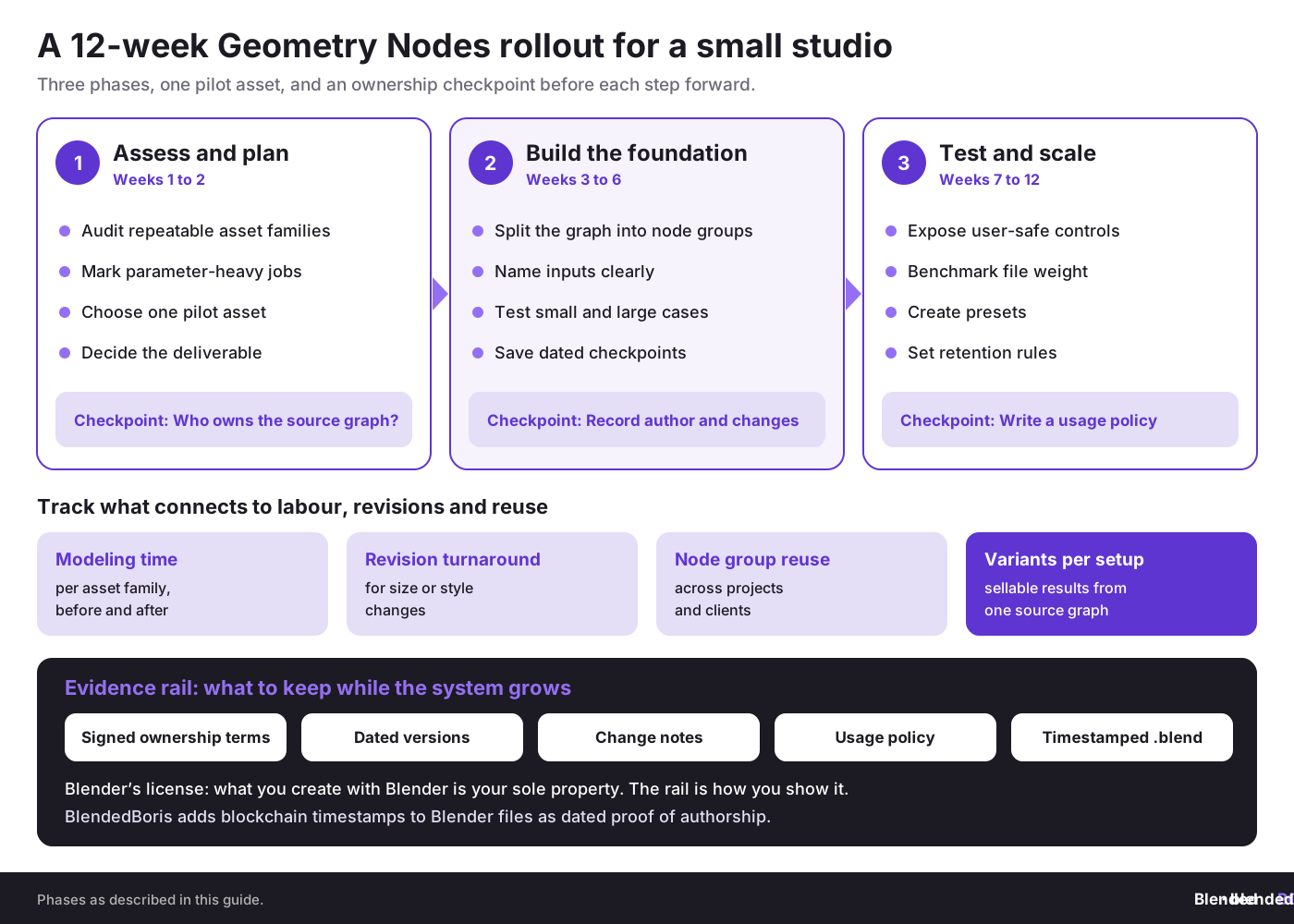
Below is a practical 12-week path for a small studio, hardware startup, design agency, or manufacturing SME that wants procedural modeling without chaos.
Phase 1: Assessment and planning, weeks 1 to 2
- Audit repeatable assets: List every object family you rebuild often. Think packaging inserts, railings, fixtures, bottle variations, trade show stands, shelving bays, façade modules, cable trays, or environment kits.
- Mark parameter-heavy jobs: Identify where clients change width, count, spacing, radius, height, material zones, logo placement, or pattern density.
- Choose one pilot asset: Pick a medium-value object with repeatable structure. Avoid the most chaotic job in your company.
- Decide what the deliverable is: Is it a node tool, generated meshes, a configurable library, or a protected internal production asset?
At this stage, document ownership as well. If a freelancer builds the graph for your company, who owns the source node system? The answer should live in the contract, not in Slack screenshots.
Phase 2: Foundation building, weeks 3 to 6
- Design the graph structure first: Break the setup into groups such as input controls, geometry generation, instance placement, material assignment, and output cleanup.
- Name inputs clearly: A future teammate should understand the interface without opening every internal node.
- Use sample scenes: Test the graph on small and large cases so you catch scale and topology issues early.
- Create version checkpoints: Save milestone files with dates and change notes.
- Record author and usage data: For IP-sensitive teams, keep proof of who authored the graph, when it was created, and what changed over time.
This is where the CADChain mindset becomes useful even inside Blender. A clean authorship trail and verifiable file history (see auto-save and version control in Blender) can matter later if a contractor resells internal tools, a client disputes scope, or a marketplace clone appears. Blockchain-backed certificates are not magic, but as CADChain argues, they can support a stronger evidence chain when combined with contracts, timestamps, and file fingerprints.
Phase 3: Testing and scaling, weeks 7 to 12
- Expose user-safe controls: Limit what non-technical users can break.
- Benchmark file weight and viewport behavior: Measure heavy scenes before rollout.
- Create presets: Offer standard product variants, style families, or regional defaults.
- Write a usage policy: Clarify whether staff may export, share, sell, or modify the node system.
- Decide retention rules: Keep source graphs, generated outputs, and version logs in a predictable archive.
Need another commercial angle on Geometry Nodes?
If your work touches animation, title systems, broadcast graphics, or branded procedural scenes, see how node logic extends into moving design systems.
👉 Use Geometry Nodes in motion graphics
Which use cases show procedural modeling power most clearly?
1. Modular architecture and interiors
Corridors, office layouts, retail shelving, acoustic panels, ceilings, seating rows, and façade elements are obvious wins. A single node system can generate many compliant variations, and the same thinking drives modular asset creation for level design. In Europe, where commercial spaces often have tight footprint constraints and many retrofit cases, procedural adjustment can save weeks across bids and revisions.
2. Product families and configurable SKUs
Think packaging trays, mechanical housings, knobs, display stands, furniture ranges, cable guides, or enclosure variants. If one product line exists in five sizes, three leg types, and four perforation patterns, manual editing becomes absurd. A node-driven system fits the commercial reality of catalog variation; creating parametric models with Geometry Nodes walks through one step by step.
3. Environment kits for games and visualization
Scatter systems, roads, fences, rocks, trees, power lines, industrial yards, and kitbash-based scene assembly all benefit from procedural control. Even a quick community example, such as power lines strung procedurally between poles placed along a curve, shows how one reusable graph can solve a repetitive scene problem elegantly. For ready-made scattering, compare the Scatter add-on for vegetation and asset distribution.
4. Motion systems and title geometry
Procedural logo arrays, typographic rigs, audio-reactive structures, and branded transitions fit Geometry Nodes well because they combine repeatable geometry with animation logic. This is useful for agencies that need multiple campaign outputs from one art direction system.
5. Educational and marketplace products
A polished Geometry Nodes setup can become a commercial asset by itself. Course sellers and marketplace creators already frame Geometry Nodes as a way to build reusable tools that save users time. On Nodegroup’s Procedural Modelling Masterclasses page, a customer testimonial puts it bluntly: models of that complexity “cannot be made any other way.” That message resonates because buyers are not paying only for geometry. They are paying for repeatable control. See passive income with Blender for the business side.
What are the best working habits for Geometry Nodes in 2026?
These are the habits that keep node setups usable in production, especially for teams that sell digital assets or share work across departments.
- Build with interfaces first: Decide which controls matter to users before adding fancy internal logic.
- Keep graphs modular: Break large systems into named node groups.
- Document assumptions: State expected scale, object orientation, input types, and naming conventions.
- Prefer instances until you need real geometry: Realize instances late.
- Test edge cases: Zero values, huge counts, tiny scales, open curves, and invalid inputs expose weaknesses quickly.
- Version visibly: Save graph milestones and maintain change notes.
- Separate source and output: Treat the node graph as source code and exported meshes as compiled outputs.
That last point is more than workflow advice. It affects IP. If you sell a generated mesh to a client, that does not automatically mean you sold the source node system. If you deliver both, the agreement should define what the client may change, resell, or sublicense. This is where the creative economy keeps making avoidable mistakes. Our guide to file organization for multi-asset product packs shows how to keep master and delivery folders apart.
What mistakes do Blender teams and CAD-heavy businesses make most often?
Mistake 1: Treating procedural graphs like disposable experiments
Teams often prototype a smart node setup, use it in production, then fail to document or archive it. Six months later nobody knows which version created the deliverable. In a dispute over scope, authorship, or bug responsibility, that is a self-inflicted wound.
How to avoid it: Use dated versions, changelogs, file ownership records, and access rules. If the work has commercial value, pair that with stronger proof tools such as timestamps, internal approvals, and where relevant a blockchain-anchored certificate.
Mistake 2: Overbuilding a graph before proving the use case
Procedural workflows tempt users into making giant universal systems. Most businesses do not need a universal system. They need one graph that works for one profitable asset family.
How to avoid it: Start with the smallest repeatable commercial problem. A configurable plant pot line, booth wall kit, or cable routing set beats a giant abstract node monster nobody can maintain.
Mistake 3: Ignoring legal ownership of node groups
A freelance Blender artist creates a procedural generator for a startup. The startup assumes it owns everything. The freelancer assumes the reusable node library remains theirs. Both parties discover the gap only when a second client appears. Dirk-Jan Bonenkamp would call this a contract design failure, not a software issue.
How to avoid it: Define ownership of source files, node groups, generated outputs, derivative works, resale rights, and portfolio rights in writing. Building a successful Blender freelance career covers the client side of that conversation.
Mistake 4: Sharing source setups too widely
In manufacturing and design supply chains, one shared file can spread quickly beyond the intended recipient. The same risk exists in Blender. A node-based generator may contain far more commercial logic than the final exported model.
How to avoid it: Share outputs when possible, not source graphs. Where source graphs must be shared, use access controls, named parties, clear license language, and recorded transfer history.
Mistake 5: Confusing visually clever setups with business-ready tools
A cool demo is not a production tool. A graph is business-ready only if it is readable, stable, documented, and safe for non-authors to use.
How should you think about copyright, licensing, and proof of ownership for procedural Blender work?
This is where the article gets slightly provocative. Many 3D creators still treat IP like an afterthought, then act shocked when copying, unauthorized resale, or scope abuse appears. Procedural work raises the stakes because the underlying graph can generate many monetizable outputs.
From the CADChain point of view, file-level rights matter because once a digital design leaves your control, contracts alone may not be enough. In Blender, the practical stack looks like this:
- Copyright: Protects original expression in the node setup, documentation, and generated works where legal standards are met.
- Contract: Defines who may use, alter, resell, or redistribute the graph and outputs.
- Trade secret controls: Matter when the procedural logic gives commercial advantage and should remain confidential.
- Technical controls: Access limits, storage rules, and managed sharing reduce accidental leakage.
- Evidence trail: Timestamps, version logs, certificates, and authorship records support claims later.
For EU SMEs, this is practical, not theoretical. Cross-border collaboration is normal. A Dutch creator may work with a German startup, a Polish freelancer, and a Spanish visualization team. If ownership terms are vague, conflict becomes expensive fast.
Violetta Bonenkamp’s recurring argument in CAD data protection applies neatly to Blender: if you cannot prove who created the source logic, when it changed, and under what terms it was shared, you are leaving money and legal position on the table.
The starting point for ownership is simple: Blender’s license page says that what you create with Blender is your sole property, including your .blend files and node groups. The open question is proof. When a client, freelancer or marketplace buyer disputes who built a procedural system, you have to show who made it and when. That is the gap BlendedBoris fills: it adds blockchain timestamps to Blender files from inside Blender, so each saved version of a node system carries dated proof of authorship.
What metrics should a business track when introducing Geometry Nodes?
Creative teams often measure the wrong thing. They celebrate visual cleverness and ignore commercial output. If you are a startup or SME, track metrics that connect to labor, revision speed, asset reuse, and risk reduction.
- Average modeling time per asset family before and after procedural adoption
- Revision turnaround time for dimensional or style changes
- Reuse rate of node groups across projects
- Error rate in repetitive geometry tasks
- Number of sellable variants generated from one source setup
- Revenue per procedural asset system if you sell tools or template-based services
- Documented ownership coverage for commercially valuable source files
If you want a more advanced governance layer, also track who accessed the source graph, when a version was approved for delivery, and whether outgoing files included source logic or only baked outputs. That kind of discipline feels boring until a dispute happens. Then it feels smart.
How does Geometry Nodes fit different business stages?
Pre-seed or solo creator stage
Use Geometry Nodes to create one commercial differentiator. That could be a procedural product pack, a configurable scene system, or faster client revisions. Keep scope tight. Focus on selling outcomes, not technical novelty.
Seed to early growth stage
Build internal libraries and standard interfaces. Train more than one person. Decide what is proprietary. Write contracts for freelancers and clients that define graph ownership and output rights.
Established SME or manufacturing team
Treat procedural setups as digital production assets. Add access control, audit routines, version governance, and secure collaboration rules. This is also the point where CADChain-style thinking around digital fingerprints, usage logs, and certificate-backed authorship starts to make business sense.
What does a strong Geometry Nodes action plan look like this month?
Here is a seven-step plan you can start this month.
- Pick one repeatable asset family that causes frequent revisions.
- Map the parameters clients or internal teams change most often.
- Build a minimum viable node group with a clean interface and only a few exposed controls.
- Test it on three real project cases, not a perfect demo scene.
- Measure time saved against your old manual method.
- Document ownership and usage rules for the source graph.
- Decide commercial strategy: internal tool, client deliverable, marketplace product, or licensed generator.
Glossary for non-specialists
- Geometry Nodes: Blender’s node-based system for procedural geometry creation and modification.
- Procedural modeling: Building 3D results through rules and parameters instead of manual edits alone.
- Field: A value Blender evaluates across geometry elements such as points or faces.
- Attribute: Stored data attached to geometry elements.
- Instance: A referenced copy of geometry used many times without full duplication.
- Node group: A reusable packaged set of nodes with defined inputs and outputs.
- Simulation zone: A Geometry Nodes zone (Blender 3.6+) that carries geometry and values from one frame to the next.
- Repeat zone: A Geometry Nodes zone (Blender 4.0+) that runs the same nodes a set number of times in one evaluation.
- For Each Element zone: A Geometry Nodes zone (Blender 4.3+) that runs the same nodes once for every element, such as each point, face or instance.
- Generated output: The mesh, curve, or scene result produced by the graph.
- Source graph: The editable node system that generates outputs and often contains the highest commercial value.
Closing thoughts: where does procedural modeling lead next?
Geometry Nodes has matured into a serious production method for Blender users. It gives designers a way to encode logic, give engineers more controllable variation, help SMEs reduce repetitive labor, and help digital artists turn one-off assets into reusable systems. The hidden lesson is bigger than modeling. Procedural design changes the economics of authorship. Once the graph becomes the asset, legal clarity, file governance, and proof of creation matter far more than many creators expect.
From Violetta Bonenkamp’s perspective, this is where Blender connects with a wider deeptech story. Design logic can be a company asset. Shared incorrectly, it leaks value. Shared correctly, it becomes licensable intellectual property. From Dirk-Jan Bonenkamp’s side, the practical message is simple: document rights early, track changes, and do not wait for conflict before deciding who owns the procedural source.
If this article made you look at Geometry Nodes as part modeling system, part business asset, and part legal object, the next logical step is to see how it connects with larger production pipelines, simulations, and visual effects. Continue with advanced Blender techniques with Geometry Nodes, VFX, and simulation pipelines.
Turn your node systems into assets you can prove you own.
Source graphs, master .blend files and delivery packages are only as defensible as the records behind them. BlendedBoris adds blockchain timestamps to your .blend files from inside Blender, so each approved version of a Geometry Nodes system has dated proof of authorship.
👉 Timestamp your Blender files with BlendedBoris
People Also Ask:
What are Geometry Nodes in Blender?
Geometry Nodes is Blender's visual scripting system that allows users to create and manipulate complex 3D models, animations, and procedural designs. It works through a node-based system where parameters can be adjusted interactively.
How do Geometry Nodes differ from traditional modeling techniques?
Geometry Nodes allow for procedural modeling, where changes and variations can be applied dynamically without manually editing assets. Traditional techniques involve altering geometry directly, which is less flexible for iterative design.
What are the main uses of procedural modeling in Geometry Nodes?
Procedural modeling with Geometry Nodes is used for creating reusable assets, dynamic visual effects, and generative structures like terrains, architectural elements, and objects that need pattern-based or scalable modifications.
Why are Geometry Nodes popular among 3D artists?
Geometry Nodes are popular due to their flexibility, as they reduce repetitive tasks and allow artists to experiment with variations quickly while maintaining non-destructive workflows. This speeds up production and opens creative possibilities.
Can beginners use Geometry Nodes effectively?
Yes, beginners can use Geometry Nodes effectively as there are numerous tutorials and breakdowns available. Starting with simpler projects and gradually exploring more complex procedures is a great approach for beginners; our Geometry Nodes introduction is a good first step.
What are some common challenges when learning Geometry Nodes?
Challenges include understanding data flow between nodes, mastering new concepts like attributes and fields, and adapting to a procedural mindset. Regular practice and exploring examples can help overcome these hurdles.
How do procedural workflows improve collaboration?
Procedural workflows enable teams to create standardized, adaptable assets. Changes can be made dynamically without disrupting the workflow, making iterative collaboration and versioning more efficient.
What software versions support advanced Geometry Nodes features?
Geometry Nodes arrived in Blender 2.92 (2021). Fields came in 3.0, simulation zones in 3.6, the Repeat zone and node tools in 4.0, the For Each Element zone and viewport gizmos in 4.3, bundles and closures in 5.0, and lists and geometry bundles in 5.2 LTS. For new production work, use Blender 5.2 LTS, which is supported until July 2028.
What industries benefit the most from procedural modeling?
Industries like gaming, film, architecture, and product visualization benefit significantly as procedural modeling enhances efficiency, scalability, and creates visually intricate assets suitable for large-scale or dynamic environments.
Are there any resources for advanced Geometry Nodes tutorials?
Yes, platforms like YouTube, Blender Artists forums, and learning hubs like CG Cookie and Skillshare offer advanced tutorials, and Blender Studio publishes Geometry Nodes training. See our top Blender YouTube channels. Specific examples include node group optimizations and large-scale procedural environments.
FAQ on Geometry Nodes and Procedural Modeling
What industries most benefit from procedural modeling with Geometry Nodes?
Industries like architecture, game development, and manufacturing thrive on procedural modeling. Geometry Nodes help automate repetitive tasks, create customizable product variants, and enable scalable environment design, saving time and offering creative flexibility. Learn how teams are leveraging these tools in Blender-based workflows to generate income.
How can I start integrating Geometry Nodes into my startup workflow?
Begin with small, repeatable asset projects that require variations. Focus on modular designs like shelving systems or product packaging. Learn fundamentals through practical tutorials and adapt setups to existing team workflows. Early adoption can lead to streamlined processes and better design revisions.
Do procedural workflows support artistic creativity or limit it?
Procedural workflows enhance creativity by offering flexibility to experiment with parametric variations without starting from scratch. Artists remain in control of design intent while leveraging automation for repetitive tasks. Explore their potential in the context of motion graphics through dynamic animations.
What skills do I need to use Geometry Nodes effectively?
Basic node-based logic understanding and familiarity with Blender’s interface are essential. Knowing geometric principles and concepts like instances, attributes, and data domains will make your setups efficient. Testing and expanding skills in a structured course can accelerate learning.
How can procedural modeling support IP protection in creative industries?
Procedural logic becomes a digital asset. By documenting rule sets and usage approvals, businesses can license repeatable systems and demonstrate authorship in IP disputes. Proof tools, like timestamps or contracts, further protect ownership and derivative rights. BlendedBoris adds blockchain timestamps to Blender files from inside Blender.
Can businesses monetize procedural assets created in Blender?
Yes! Node setups can become sellable tools. Offering customizable asset packs or generators to marketplaces can generate revenue. For example, procedural architecture kits or texture-ready environments make popular products for small studios or freelancers.
How do Geometry Nodes work with other Blender workflows?
Geometry Nodes run as a modifier, so they sit in the same stack as classic modifiers. Attributes they create can be read in shader nodes through the Attribute node, the Set Material node assigns materials, and inputs can be animated or driven. Simulation zones handle effects that change over time. For node basics on the material side, see Node Editor basics.
How can procedural modeling reduce production errors?
By encoding design logic into reusable rule sets, procedural modeling reduces manual errors and improves version control. Updates can propagate across assets, ensuring consistency without rework. This boosts reliability throughout iterative processes.
How scalable is procedural modeling for growing SMEs?
Procedural setups scale naturally. Businesses can quickly modify node graphs for evolving product lines without specialized teams. Standardized node groups can also streamline onboarding and collaboration, making them ideal for lean teams or SMEs scaling product variety.
What are the key pitfalls to avoid with Geometry Nodes?
Avoid overcomplicating node graphs before proving basic use cases. Document ownership and changes for IP clarity. Share output files rather than raw node systems to prevent unauthorized distribution. Adopt iterative testing to refine functionality at smaller scales before wider implementation.


