
TL;DR: Simulation Nodes in Blender: Physics Automation turns one-off effects into reusable production systems.
You can build frame-to-frame physics logic inside Geometry Nodes, then cache and bake it for repeatable results, faster team handoff, and fewer remakes. The article shows why this matters for studios, startups, engineers, and SMEs working on product visuals, digital twins, VFX, training content, and saleable assets. It also explains the real business side: state, attributes, baking, version control, file sharing, and proof of authorship all affect cost, rework, and IP risk. If your team sells or shares .blend files, the node setup itself may be as valuable as the final render.
👉 Want more pipeline ideas? Read advanced Blender techniques and start building a safer, reusable simulation workflow.
Simulation Nodes in Blender: physics automation inside Geometry Nodes
Simulation Nodes in Blender: Physics Automation starts with a simple question: why are so many teams still treating simulation like a one-off visual trick when it can be a repeatable production system?
Simulation Nodes in Blender are Geometry Nodes simulation zones that let one frame affect the next. For startups, studios, product teams, and engineering-led SMEs, that means you can build custom physics logic inside node trees instead of depending only on preset solvers or manual animation. The result is faster iteration, better control, and cleaner handoff between design, motion, and technical teams.
Why it matters for your company: if your Blender workflow touches product visualization, digital twins, training content, VFX, configurators, or marketplace assets, simulation logic becomes business logic. A procedural setup can cut remake work, reduce artist error, and create traceable versions of effects that clients may later ask you to reproduce.
By the end of this guide, you will understand how Simulation Nodes affect production speed, what Blender actually added in 3.6 LTS and later, how caching and baking fit into commercial work, what legal and IP issues appear once procedural assets are shared, and how European SMEs can build safer simulation pipelines around them.
Blender 3.6 LTS introduced Simulation Nodes into Geometry Nodes: a Simulation Input and a Simulation Output node, cached playback, and baking to disk so a simulation can be rendered in any frame order. The Blender 3.6 release notes on nodes and physics describe the feature in detail.
Protect your Blender work before it leaves your team.
If your procedural scenes, node groups, or simulation-heavy assets are sold, licensed, or shared with clients, ownership records and version evidence matter more than most artists expect. BlendedBoris is a Blender plugin that adds blockchain timestamps to your Blender files from inside Blender, so every approved version of a simulation rig carries dated proof of who made it.
👉 Protect your Blender work with BlendedBoris
What are Simulation Nodes in Blender and why do they matter now?
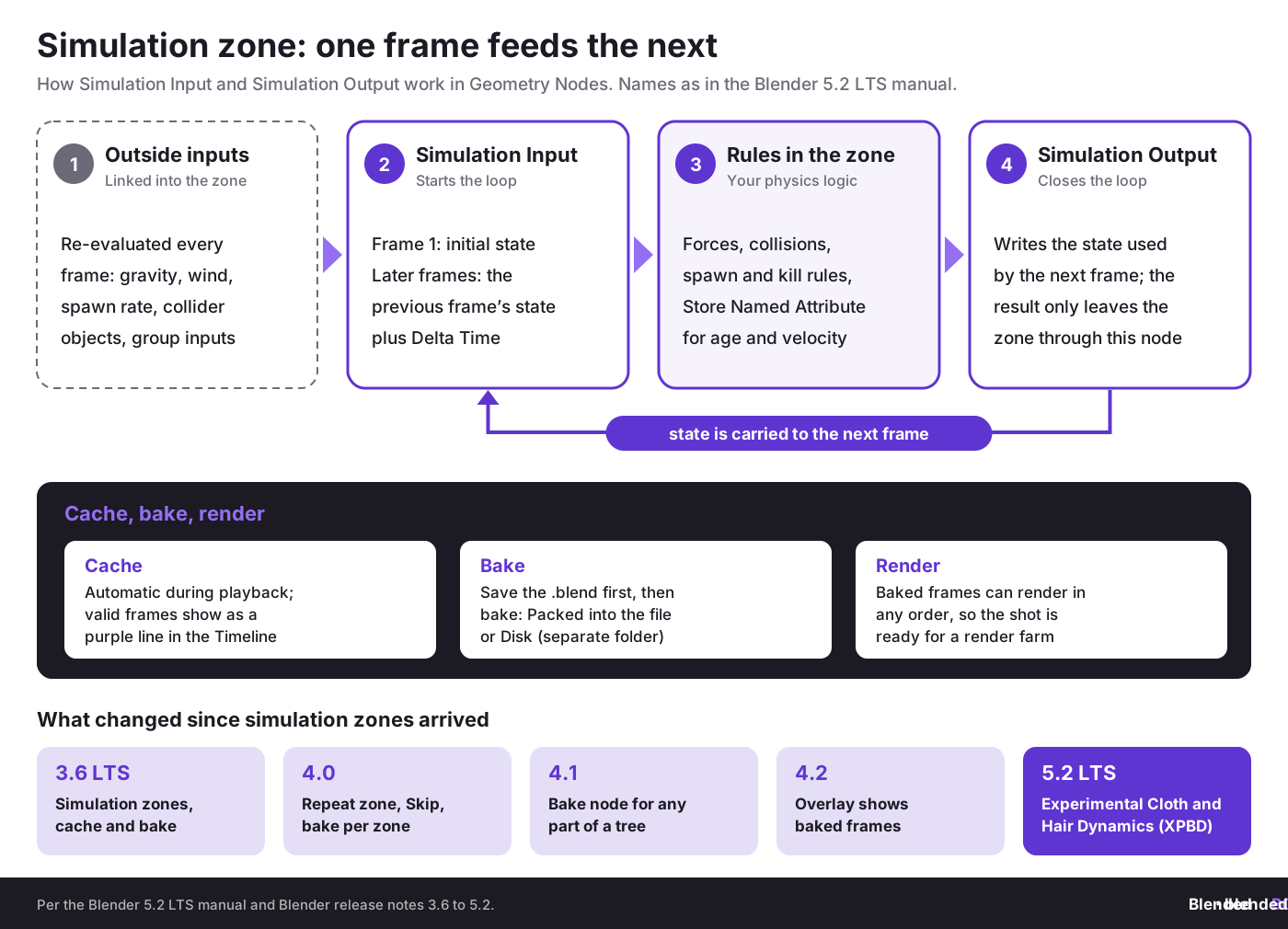
Simulation Nodes are Blender simulation zones inside Geometry Nodes. They store state from previous frames and feed it forward, so geometry can evolve over time according to rules you define. In plain language, they let you build custom procedural motion and physics-like behavior without keyframing every change.
This matters now because Blender moved simulation from a narrow effects workflow into a reusable node-based system. According to the Blender manual page on the Simulation Zone, simulations are cached automatically during playback (the valid cache shows as a purple line in the Timeline) and can be baked to disk when a shot is ready for a render farm. That shift is huge for teams that need repeatability, remote rendering, and client-approved outputs.
Violetta Bonenkamp often frames this kind of shift in a very practical way at CADChain: once a digital process becomes repeatable, it becomes valuable IP. Dirk-Jan Bonenkamp adds the legal side: if a company can prove who built a node system, when it changed, and under which license it was transferred, disputes get much easier to handle. That view is very relevant for Blender teams selling simulation-heavy assets in Europe, where cross-border contracts and subcontracting are normal.
What has Blender added to Simulation Nodes since 3.6 LTS?
Simulation zones arrived in Blender 3.6 LTS, and every release since has built on them. These are the changes that matter most for production work, as listed in Blender’s release notes:
- Blender 4.0: the Repeat zone, which runs nodes a dynamic number of times; simulation zones can be baked one by one; the Simulation Output node got a Skip input.
- Blender 4.1: the Bake node, which saves and loads any part of a node tree, not only simulations; bakes can keep references to materials.
- Blender 4.2: the simulation zone shows an overlay of which frames are baked.
- Blender 5.2 LTS (released 14 July 2026, maintained until July 2028): an experimental physics system built on Geometry Nodes, with Cloth Dynamics and Hair Dynamics node groups (also usable as modifiers) running on the new XPBD Solver node, plus Collider, Custom Force, Custom Effector and Set Effector nodes.
Blender calls the cloth and hair systems experimental: the design may still change in the next release, and Cloth Dynamics does not yet handle self-collision. For client work, test them on internal scenes first and keep a baked copy of anything you deliver. For hair, compare with the classic workflow in hair simulations and grooming in Blender.
Why does Simulation Nodes physics automation solve a real startup and SME problem?
The real problem is not just making particles move. The real problem is making a simulation setup predictable, editable, and reusable across products, campaigns, or client jobs. Small teams lose money when effects exist only inside one artist’s memory or one fragile file.
Research and documentation around Blender’s simulation zone behavior show three production facts that matter commercially:
- State persists across frames: the Simulation Input evaluates initial data on the first frame and later outputs the previous frame’s result, as described in Blender’s 3.6 release notes.
- Cache and bake are built into the workflow: the system supports disk baking, which is necessary for farm rendering and controlled delivery.
- Node logic is inspectable: unlike ad hoc hand animation, a node tree can be audited, copied, versioned, and reviewed by another team member.
For a startup building product videos, that means one approved simulation rig can serve ten SKUs. For a marketplace seller, one node-based setup can generate whole collections of looping assets. For a manufacturing SME, it can power technical explainers that show material flow, contact, pressure-like motion, or collision logic without rebuilding shots from zero. If you are new to node-driven motion, start with procedural animation with Geometry Nodes.
What fundamentals should you understand before using simulation zones?
Core concept 1: Simulation zone state
Definition: State is the stored result from the previous frame that the current frame reads. This is what makes a simulation a simulation rather than a static procedural graph.
Why it matters for commercial work: without understanding state, artists accidentally create setups that reset, pop, or drift. That is a technical issue and a delivery issue, especially when clients ask for revisions two months later.
Blender example: a shower of bolts falling onto a conveyor in a factory animation can store each point’s position and velocity from frame to frame, then apply drag, collision response, and kill rules over time.
Core concept 2: Simulation Input and Simulation Output
Definition: the Simulation Input node provides the starting values and then outputs the stored previous-frame result on later frames. The Simulation Output node writes the state that will be used next.
Why it matters for startups: this gives you a structured loop. Teams can reason about where data enters, where it changes, and where it gets saved. That makes debugging much easier and reduces dependence on a single senior artist.
Related terms: stateful system, previous frame feedback, cached simulation, baking, geometry attributes.
Core concept 3: Attributes as physics memory
Definition: attributes are values stored on points, instances, curves, or geometry elements. In simulation zones, they behave like memory. They can hold age, id, speed, direction, lifetime, or custom flags.
Why it matters for SMEs: if you sell 3D assets or create explainers for engineering clients, attribute-based simulation logic gives you rule-driven behavior that can be exposed as controls. That makes the asset more reusable and more valuable.
Blender example: in a debris sim, each piece can store a random mass multiplier, a contact count, and a "sleep" attribute that stops updates after settling.
Core concept 4: Cache versus bake
Definition: cache is the temporary result stored during playback, while bake writes the simulation to storage. In current Blender you must save the .blend file before you can bake, and the bake target is either Packed (stored inside the .blend file) or Disk (a separate folder, with an optional custom Bake Path). Blender’s manual also warns that baked data written with one Blender version is not guaranteed to load in another.
Why it matters: cached playback is fine for tests. Baked results matter when the file moves to another artist, render node, or archive. If your studio bills clients, a baked and versioned sim is often the only sane way to lock a shot.
"In digital production, the process itself becomes an asset. If you can prove authorship, sequence of changes, and transfer conditions, you are in a much stronger position when value or conflict appears later."
Violetta Bonenkamp, CEO and co-founder, CADChain
How can you implement Simulation Nodes in Blender step by step?
Here is the practical path. This version is written for engineering teams, startup content units, freelance technical artists, and marketplace sellers who need a repeatable setup rather than a demo scene.
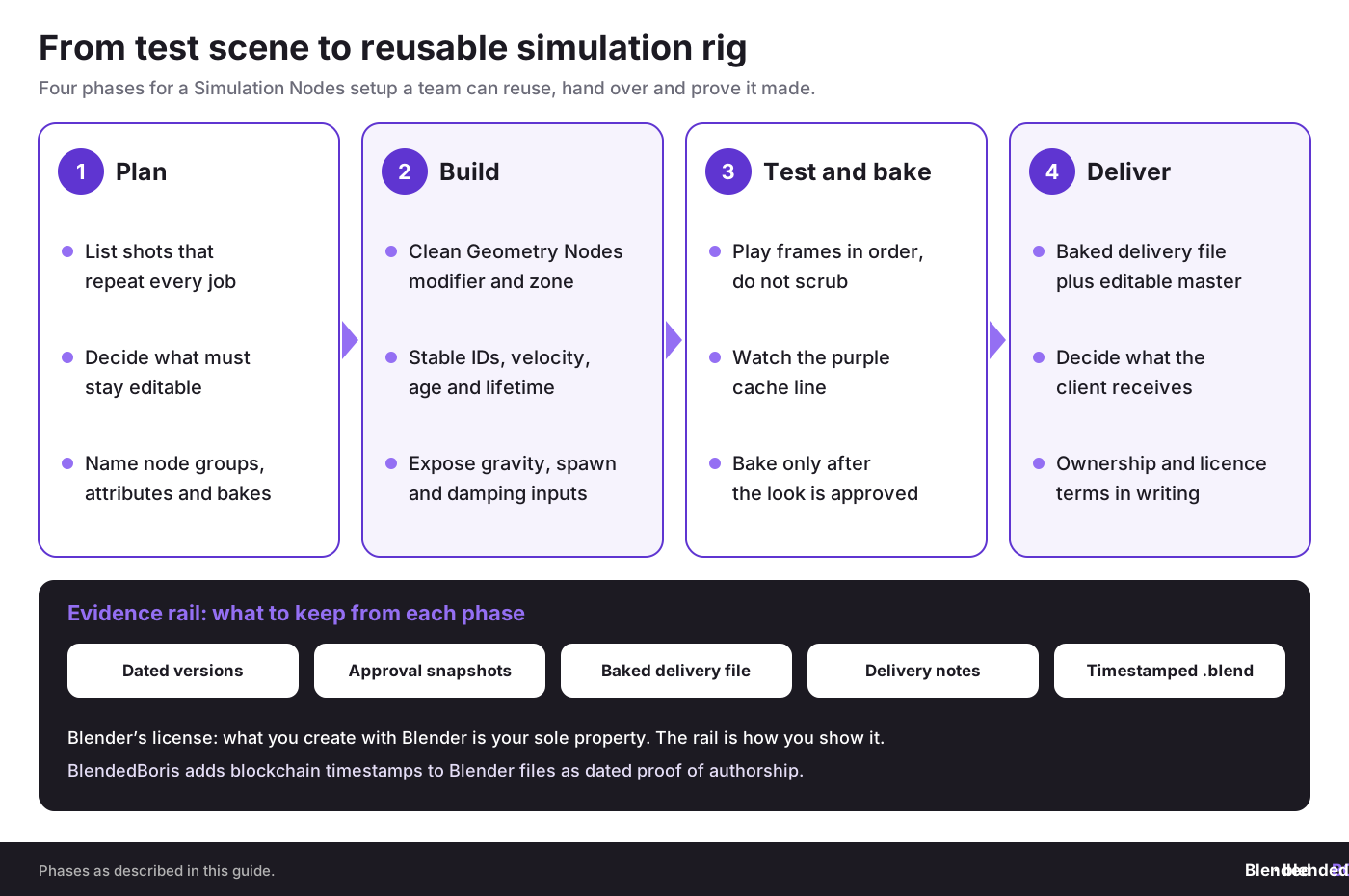
Phase 1: Assessment and planning
- Audit your current shots and assets. List which scenes rely on particles, rigid-body style behavior, growth, trails, or frame-to-frame accumulation.
- Define what must remain editable. Clients often change timing, density, scale, and collision objects. Put those in group inputs early.
- Choose your evidence trail. Save dated versions, internal notes, and client approval snapshots. If IP value is high, store proof of authorship and version history through your internal records or external certification tools.
- Set a naming rule. Name simulation node groups, attributes, and caches in a way another person can read in six months.
Phase 2: Build the simulation foundation
- Create a clean Geometry Nodes modifier. Keep non-sim setup outside the zone when possible.
- Add Simulation Input and Simulation Output. This defines the state loop.
- Store stable IDs. Stable ids help prevent flicker and broken behavior when points are born or die.
- Add core attributes. Start with position, velocity, age, and lifetime. For more technical scenes, add friction factor, collision count, rest state, or material tag.
- Expose controls. Put gravity strength, turbulence, spawn rate, and damping on the modifier interface.
Phase 3: Test, cache, and bake
- Play through sequentially. Simulations depend on frame order, so random scrubbing can mislead you during early tests.
- Inspect the timeline cache state. The valid cache shows as a purple line in the Timeline, and since Blender 4.2 the simulation zone also shows which frames are baked, which helps spot where a change invalidated earlier frames.
- Bake once the look is approved. Do this before render farm export, archiving, or client delivery.
- Duplicate the approved file. Keep one baked delivery file and one editable working version.
If you already work with painted interactions or mesh-driven triggers, compare this with the dynamic paint simulation workflow. It helps clarify when node-based state logic is the better choice and when surface interaction tools are still faster.
Need cleaner renders from heavy simulation scenes?
A good simulation setup can still fail in production if caching, baking, and file handling are sloppy. Teams lose hours on re-sims they could have avoided.
👉 See simulation baking tips
Which use cases benefit most from Simulation Nodes physics automation?
Not every job needs a simulation zone. But several use cases benefit a lot from it, especially when you need procedural variation, repeatability, and art direction.
1. Product visualization for engineering and manufacturing
Think of pellets flowing into a hopper, droplets moving across coated metal, fasteners scattering across a tray, or cable bundles reacting to motion. These scenes often need controlled behavior, not full scientific accuracy. Simulation Nodes give you enough rule-based motion to make the animation credible and editable. For hard objects that crack or shatter, compare this with destruction simulations in Blender.
2. Motion graphics and branded loops
For startups selling hardware, cosmetics, food-tech, or medtech products, looping procedural motion is everywhere. Node-based simulations can generate packs of social clips, website backgrounds, and tradeshow visuals from one setup. Motion graphics with Geometry Nodes shows the non-simulated side of the same toolset.
3. Environment effects and stylized VFX
Growth, trails, flocking-like movement, accumulation, and reactive surfaces all benefit from frame feedback. Blender Studio and community tutorials have shown practical examples, including introductory workflows at Blender Studio’s simulation nodes training and beginner walk-throughs such as MK Graphics’ Blender 3.6 beginner tutorial on Simulation Nodes.
4. Crowd-like and agent-like systems
Simulation zones can power lightweight swarms, traffic abstractions, or object flows where each point carries state and reacts locally. If your goal is many moving units with controllable variation, this approach can be a clean starting point before moving into more advanced agent systems. It connects well with advanced crowd simulation methods for teams building larger procedural scenes.
5. Marketplace assets and reusable toolkits
This is one of the most overlooked commercial uses. A well-designed simulation node group can be packaged as a reusable scene setup, loop generator, scatter-react system, or FX template. That is saleable value, but also IP exposure if the file is shared carelessly.
Simulation Nodes or Blender’s built-in physics: which tool fits the job?
Simulation zones do not replace Blender’s classic physics tools. Here is how they compare in Blender 5.2 LTS:
A common setup is to mix them: a Rigid Body or Fluid pass for the heavy physics, and a simulation zone for the procedural layer on top, such as debris trails or growth. For performance tips on the classic solvers, see simulation baking for cloth, fluid and smoke.
What are the best working methods in 2026?
Practice 1: Treat node groups as productized assets
What it is: build simulation systems as reusable node groups with exposed controls, documented inputs, and predictable outputs.
Why it works: teams can reapply the same logic across scenes, while sellers can create product lines from one well-structured system.
How to do it: use clear group names, expose the few controls clients actually change, and separate art-direction inputs from hidden technical logic.
Common pitfall: publishing a tangled node tree that only the creator understands.
How to avoid it: include notes, default values, and sensible attribute names.
Practice 2: Bake for approval, not for ideation
What it is: keep simulations live while exploring, then bake only when timing and look are approved.
Why it works: early baking freezes experimentation and creates version confusion. Late baking protects the approved result and supports remote render order.
How to do it: keep a live branch, an approved baked branch, and an archive branch.
Practice 3: Separate physically plausible from visually persuasive
Many commercial scenes do not need engineering-grade physics. They need motion that reads as credible to the viewer. Product ads often care more about clarity and rhythm than lab-level accuracy. Be honest with clients about that distinction.
This is where Violetta Bonenkamp’s startup lens helps: do not overspend production time solving the wrong problem. If the business goal is conversion or investor clarity, visual persuasion may beat physical purity.
Practice 4: Keep legal metadata and evidence from day one
Dirk-Jan Bonenkamp has long argued that digital evidence becomes most useful before a dispute, not during one. If your Blender simulation asset has commercial value, keep authorship notes, contract terms, delivery records, and version snapshots from the start (autosave and version control in Blender covers the file side). In Europe, especially for SMEs working across the Netherlands, Germany, Belgium, France, and Poland, subcontracting chains can get messy fast.
If you want added procedural context, Blender Studio published the same introduction as a video, “How to Use the New Simulation Nodes in Blender 3.6 LTS”, on its YouTube channel. Use it to compare your internal standards with Blender’s intended logic.
What mistakes do teams make with Simulation Nodes?
Mistake 1: Building without a reset strategy
Teams often forget that simulation zones are frame-dependent. They test by jumping around the timeline and then assume the system is broken. It may simply need recalculation, reset logic, or a cleaner first-frame setup.
Mistake 2: Letting attributes grow without control
Too many unnamed or undocumented attributes make node trees unreadable. This becomes a business problem when a freelancer leaves or a client requests derivatives later. Use names that reflect meaning, not just convenience.
Mistake 3: Confusing cache with long-term storage
A cached sim is not a safe archive. A baked, documented, versioned file is much closer. Blender’s documentation is very clear that bake-to-disk is the route for non-sequential rendering and persistent storage.
Mistake 4: Shipping editable IP by accident
This is the ugly one. Many studios send full .blend files that expose all node logic, source assets, and production shortcuts. If the client paid only for final renders or a limited-use asset, that may hand over more rights and know-how than intended.
From a CADChain-style legal view, the risk is not abstract. Once a digital file leaves your company, you often cannot truly "unshare" it. That is why file-level control, access logs, license wording, and authorship evidence matter so much in CAD and increasingly in 3D art pipelines too.
Mistake 5: Ignoring marketplace and subcontractor risk
A simulation-heavy asset can be resold, repackaged, or copied into a different project with tiny visible changes. If you sell on marketplaces or outsource setup work, define ownership of node groups, source files, previews, and derived files in writing.
How should EU SMEs think about copyright, trade secrets, and proof?
Here is where this topic gets more provocative. Many Blender users act as if the pretty output is the asset and the node tree is just a means. In commercial work, that is often wrong. The setup itself can be the high-value asset because it contains the know-how.
Under European practice, your protection picture may include copyright, contract, confidential information, and trade secret style controls, depending on what the file contains and how it is shared. Copyright may protect original expression in the scene or node arrangement. Contract determines what a client may actually do with the delivered file. Confidential workflow details may matter even if copyright questions are messy.
Dirk-Jan Bonenkamp’s legal position at CADChain has been consistent: courts care about evidence, chronology, identity, and tamper resistance. For Blender teams, that means you should keep:
- Dated source files and exports
- Client approvals and delivery records
- Contract clauses on ownership, license scope, and derivatives
- Version records that show who changed what and when
- Optional external proof systems if the asset has high commercial or dispute value
Violetta Bonenkamp’s contribution here is the strategic angle: blockchain should be treated as infrastructure, not hype. For high-value CAD and 3D content, anchored proofs, fingerprints, or certificates can support your evidence stack. They do not replace legal drafting, but they can strengthen it.
The starting point for ownership is simple: Blender’s license page says that what you create with Blender is your sole property, including your .blend files and node groups. The open question is proof. When a client, subcontractor or marketplace buyer disputes who built a simulation rig, you have to show who made it and when. That is the gap BlendedBoris fills: it adds blockchain timestamps to Blender files from inside Blender, so each saved version carries dated proof of authorship.
“The most expensive IP loss in 3D production is often not outright theft. It is uncontrolled sharing of editable source files that quietly transfers your production advantage to someone else.”
Violetta Bonenkamp, CEO and co-founder, CADChain
What metrics should you track when using Simulation Nodes in production?
A lot of teams track render time and stop there. That misses the business picture. Use a simple dashboard with production and legal-facing indicators.
- Setup reuse rate: how many shots or assets reuse an existing simulation group
- Revision count after approval: shows whether exposed controls are working
- Bake failure rate: catches pipeline weakness before deadline week
- Average scene handoff time: measures how readable your node trees really are
- Delivery file risk score: final render only, baked file, or full editable source
- Evidence completeness: contract, version log, delivery note, and archive all present or not
How does the approach change by company stage?
Pre-seed and small creative startup
Keep it lean. Build one or two reusable simulation rigs tied directly to sales content or marketplace output. Do not build a huge internal library before revenue proves demand. Protect the source files you actually monetize.
Growth-stage studio or Series A content team
Standardize. Create approved templates, naming rules, bake policy, and delivery rules. Handoff friction becomes expensive once more than three people touch the same procedural pipeline.
Established SME or manufacturing company
Treat simulation systems like engineering documentation. Record versions, assign ownership, define licensing in supplier agreements, and archive approved baked outputs. If Blender content feeds product communication or technical sales, that material may later matter in disputes, audits, or tender documentation.
What should your next 4 weeks look like?
- Week 1: identify one scene or asset type that repeats often and could benefit from frame-to-frame procedural logic.
- Week 2: build a minimal simulation zone with exposed controls for spawn, velocity, damping, and timing. Test sequential playback only.
- Week 3: document attributes, save versions, and bake an approved result. Compare rework hours with your old workflow.
- Week 4: add legal and delivery discipline. Decide what clients receive, who owns the source, and how your team stores proof of authorship and file history.
Want a stronger Blender pipeline, not just prettier effects?
Simulation work gets much more valuable when your team can repeat it, document it, and prove who built it. BlendedBoris adds blockchain timestamps to your .blend files from inside Blender, so each approved simulation rig and baked delivery file has dated proof of authorship.
👉 Timestamp your Blender files with BlendedBoris
Glossary of useful terms
- Simulation zone: a Geometry Nodes area where previous-frame results influence the current frame.
- State: stored data from one frame that affects the next frame.
- Attribute: a value stored on geometry elements such as points or instances, like age, id, or velocity.
- Cache: temporary stored simulation result generated during playback.
- Bake: writing simulation data to disk so it can be reused and rendered consistently.
- Bake node: a Geometry Nodes node (Blender 4.1+) that saves and loads any part of a node tree, as a still frame or an animation, packed into the .blend file or on disk.
- Repeat zone: a Geometry Nodes zone (Blender 4.0+) that runs the same nodes a set number of times within one frame; unlike a simulation zone it does not carry data to the next frame.
- XPBD Solver: the extended position-based dynamics solver node behind the experimental Cloth Dynamics and Hair Dynamics node groups in Blender 5.2 LTS.
- Procedural asset: an asset generated or controlled by rules rather than only manual edits.
- Digital evidence: records that help prove authorship, chronology, identity, and transfer conditions.
Closing thoughts
Simulation Nodes in Blender: Physics Automation matters because it turns visual effects into controlled systems. That change affects speed, quality, repeatability, and IP value all at once. For engineers, designers, startups, and EU SMEs, the smart question is no longer whether Blender can make physics-like motion. The smart question is whether your team can package that motion into a reusable, documented, commercially safe workflow.
From Violetta Bonenkamp’s point of view, the most interesting shift is strategic: procedural logic becomes part of your business asset base. From Dirk-Jan Bonenkamp’s point of view, the next step is legal discipline: authorship proof, contract clarity, and careful file sharing. Put those together and Simulation Nodes stop being a cool Blender feature and start becoming a serious production capability.
If this article sparked ideas beyond a single simulation setup, the natural next topic is process-level scaling. The best follow-up is Blender add-ons, automation, and productivity systems, where the discussion moves from one node graph to the wider production machinery that helps teams ship more work with fewer avoidable mistakes.
People Also Ask:
What are simulation nodes in Blender?
Simulation nodes in Blender allow users to create customizable physics-based simulations using geometry nodes. They support simulation zones, which enable the previous frame's results to influence the next frame, offering dynamic effects in animations.
How do simulation zones work in Blender?
Simulation zones are areas defined in the simulation nodes system where calculations carry over between frames. They enable iterative processes, allowing simulations like particle effects or soft-body dynamics to evolve organically through time.
Can simulation nodes automate physics simulations?
Yes, simulation nodes in Blender can be used to automate physics simulations. By defining rules and parameters, users can generate complex interactions such as particle systems, fluid-like movements, or soft-body effects without scripting.
What is the difference between simulation nodes and rigid body physics in Blender?
Simulation nodes are node-based tools for creating procedural physics effects, offering more customization and control. Rigid body physics, on the other hand, is a pre-defined system used for interactions between solid objects, with limited procedural flexibility.
How do I start using simulation nodes for soft-body effects?
To create soft-body effects with simulation nodes, you can configure vertex movement by calculating relative positions. Defining parameters for elasticity and gravity within the geometry nodes system enables the simulation of soft-body dynamics. Since Blender 5.2 LTS, the experimental Cloth Dynamics node group (pinning, stretchiness, bendiness and tearing) is a ready-made starting point for cloth-like behavior on a mesh.
Are there tutorials available for learning simulation nodes?
Yes, many tutorials are available online to help beginners and advanced users understand simulation nodes. Blender’s official manual documents the Simulation Zone and the newer physics nodes, Blender Studio has free training, and our list of top Blender YouTube channels includes channels that cover Geometry Nodes.
Can simulation nodes replicate particle systems?
Yes, simulation nodes can create and control particle systems by defining how particles interact, move, and behave. They enable both static and dynamic particle effects, providing extensive control over the simulation.
How do simulation nodes handle continuous effects across frames?
Simulation nodes manage continuous effects through simulation zones, retaining data such as position or velocity of objects across frames. This allows for realistic progression of animations over time.
Can automation with simulation nodes save time compared to manual animation?
Yes, using simulation nodes for automation significantly reduces the time required for manual animation. This is especially useful for repetitive or complex tasks, as the rules defined in nodes handle the calculations dynamically.
Are simulation nodes suitable for beginners in Blender?
Simulation nodes may appear complex to beginners at first, but numerous beginner-friendly tutorials and documentation make it accessible. Starting with basic setups before advancing to complex systems is highly recommended.
What are some practical applications of simulation nodes?
Simulation nodes are practical for custom particle effects, growth and trail effects, swarms, accumulation, product-visualization loops and procedural animation. Since Blender 5.2 LTS they also drive experimental cloth and hair dynamics. Liquids, smoke and fire still use Blender’s built-in Fluid simulation, covered in physics simulations in Blender. They are used in visual effects, game development, and 3D visualizations.
Frequently Asked Questions About Simulation Nodes in Blender
How can Simulation Nodes improve collaboration across teams?
Simulation Nodes enable clear procedural logic that teams can audit and edit collaboratively. Transparent node trees reduce dependence on individual artists and streamline handoffs between animation, design, and technical teams, improving efficiency and minimizing errors in client delivery workflows.
What are the best practices for caching and baking simulations?
Cache simulations during the testing phase for quick adjustments. Only bake when the scene is finalized and approved to ensure accurate rendering and archival. Ensure baked data is stored properly for long-term usability and consistency with your studio's pipeline.
Can Simulation Nodes handle highly custom setups?
Yes, Simulation Nodes allow users to define custom physics logic, attributes, and state persistence. This level of control makes it ideal for creating tailored effects for unique projects without relying on built-in solvers or manual animations.
How can Simulation Nodes benefit startups in product visualization?
Startups can leverage procedural logic to create repeatable simulations for product demonstration scenes, cutting production costs and increasing scalability. For durable setups across SKUs, nodes ensure consistent results while simplifying updates as products evolve.
What resources help newcomers learn Simulation Nodes efficiently?
Beginner-friendly tutorials like Blender Studio’s courses or YouTube guides provide foundational knowledge. Additionally, the article on Blender basics can support learning Simulation Nodes alongside broader 3D modeling workflows.
How can simulation-heavy assets be securely shared with clients?
Where the contract allows, send renders or a baked delivery file instead of the full editable source, and define in writing what the client may do with node groups and source files. Baking alone does not hide your node tree: the baked .blend still contains it. For proof of authorship, BlendedBoris adds blockchain timestamps to your Blender files from inside Blender; learn more about the BlendedBoris plugin.
How can SMEs integrate simulation logic into their workflows?
European SMEs can treat Simulation Nodes as extensions of engineering documentation. Standardize processes for caching, baking, and naming conventions, ensuring easy replication across projects while maintaining compliance with operational standards.
Are Simulation Nodes suitable for visual effects in motion graphics?
Yes, Simulation Nodes enhance procedural setups in motion graphics by enabling creative control over physics-based dynamics, growth patterns, and looping effects, all critical for ads, branded visuals, or abstract VFX projects.
How can teams manage rendering large simulation scenes efficiently?
Baking simulations ensures stable results for render farms while avoiding timeline cache issues. Optimize node setups using strategic data management and viewport performance tips from guides like this Blender preferences guide.
What should freelancers know about Simulation Nodes for asset creation?
Freelancers can design reusable simulation node groups as marketplace products or client-ready toolkits. Focus on clear attribute naming, exposed controls, and baked results to maximize commercial value while protecting intellectual property.


