
Blender 5.3, now in beta and planned for release on 10 November 2026, lets online asset libraries ask for an access token before anyone can browse or download their content. On 6 October 2026, developers also merged support for asset libraries that are installed and updated as Blender extensions. Together, these changes turn Blender's built-in Asset Browser into a channel that independent creators can use to deliver private or paid asset packs straight into Blender.
Online asset libraries first arrived in Blender 5.2 LTS, released on 14 July 2026. They let Blender connect to a web server, list the assets it offers and download each .blend file only when someone needs it. The Essentials library that ships with Blender already uses this to add online base meshes, materials, HDRIs and compositing effects without making the Blender download bigger. When the Blender developers introduced the system on 22 July, they listed authorization hooks only as an idea, with no concrete plans. Access token support was merged two weeks later, on 6 August, and it is part of the 5.3 release notes.
For Blender artists who sell, license or share assets, this matters for two reasons. It gives you a new way to deliver your work to customers, supporters or a studio team inside the tool they already use. And it raises an old question in a new form: once your files flow through an online library, what actually proves they are yours? Here is what the feature does, what it does not do, and how to set up your rights and records before you publish.
TL;DR: Blender 5.3 online asset libraries in one paragraph
Blender 5.2 LTS added online asset libraries that any static web server can host. Blender 5.3 (beta, release planned for 10 November 2026) adds an optional access token, so a library can be private, and lets an extension install an asset library that can share the extension repository's token. Every asset listing can carry author, licence and copyright fields plus a SHA256 hash for each file. But Blender says the licence and copyright fields are not used by Blender itself, and a downloaded .blend is an ordinary file in a local cache. The token controls access to your server, not what happens to your files afterwards. Fill in your metadata, choose your licence on purpose, and keep dated proof of your originals.
What changes for online asset libraries in Blender 5.3?
The 5.3 release notes list three changes for online libraries. The first is the access token: asset library servers can now require authentication to access and download their content. In Blender, the user enters the token in the library's advanced settings. The manual compares it to extension repositories, where Blender passes the token to the server with each request.
The second change is extension integration. Developer Campbell Barton's change, merged on 6 October 2026, lets an extension define a remote asset library that is added to the Preferences when the extension is installed. Dropping the extension's ZIP file into Blender installs and enables it together with its library. A repository can share its access token with the asset libraries of its extensions, or leave each library to authenticate on its own. From any asset, a new menu item shows the extension it came from.
The third change helps creators maintain a library over time. An asset can now have replacement files for newer Blender versions, saved next to the original with a version suffix, for example my_asset@b5_3.blend. Blender 5.2 keeps using the original file, and Blender 5.3 and later use the replacement. Work is also under way to let Blender projects include remote asset libraries; that change was opened for review on 15 October and has not been merged yet.
How does an online asset library work?
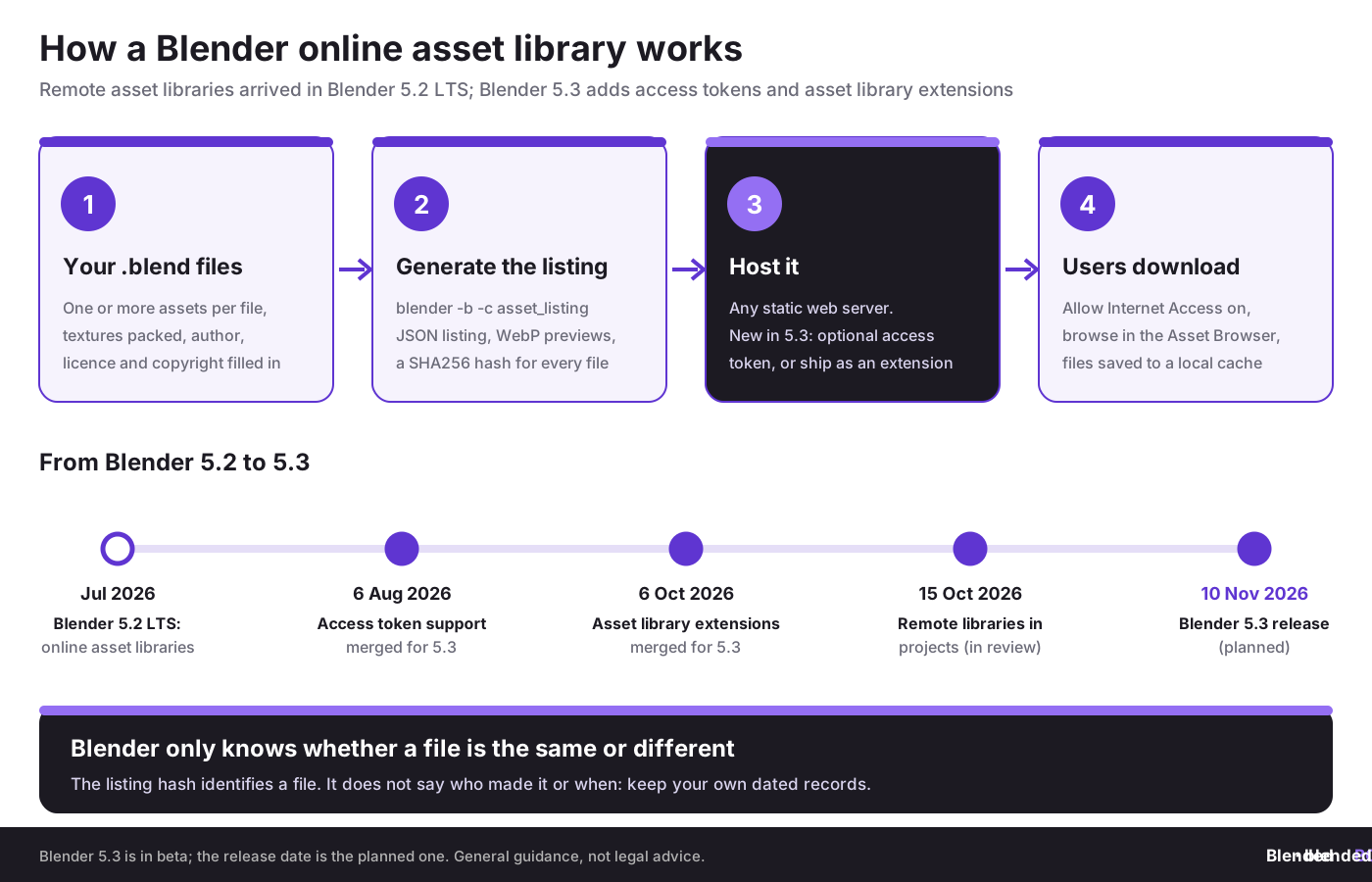
According to the Blender manual's page on remote asset libraries, a library is an ordinary folder of .blend files plus a few extra files that Blender generates. You run one command, blender -b -c asset_listing generate, in the library folder. It writes JSON listing files that describe every asset and catalog, exports preview images as WebP files, and records a SHA256 hash for each file. You then add the library's name and your contact details to one small JSON file, and upload everything to any static web server, such as nginx or Apache.
Each .blend file has to stand on its own. Textures and other external files must be packed into it, and files cannot link to each other. That is good practice for any asset pack anyway; our guide to file organization for multi-asset product packs covers the same discipline for marketplace sales, and the overview of the Asset Browser in Blender explains catalogs and metadata if you have not used them yet.
Users need Allow Internet Access switched on in their Preferences. The Blender developers were clear about the design principle in their July announcement:
“Internet access should never be required to use Blender.”
Julian Eisel, Blender developer, Blender Developers Blog, 22 July 2026
Switching internet access off disables all remote libraries, and users can download assets for offline use. Downloaded files go to a local cache folder, and the manual notes they are typically stripped down to keep downloads small.
Who can use access tokens, and for what?
The manual's own examples of remote libraries include the online part of Blender's Essentials library, a set of Geometry Nodes assets published by an independent creator for their supporters, and a furniture store's inventory for kit-bashing. Access tokens make the private versions of these practical. Some realistic uses for Blender artists:
- Supporter libraries. If you run a membership on a platform such as Patreon, you can give paying members a token and a library URL instead of a ZIP file every month. Our guide to Patreon for 3D artists covers the business side.
- Client and studio libraries. A freelancer can share a project's approved assets with a client team, and a studio can keep an internal library of characters, props and materials behind a token.
- Paid asset packs. A seller can deliver updates to customers inside Blender. Blender itself has no payment system, so selling still happens on your own store or a marketplace; see how to sell Blender 3D models online and our guide to selling 3D models.
- Course and workshop materials. Teachers can give students one token that works for a whole term, then replace it.
This sits next to existing options rather than replacing them. Add-on based services such as the one in our review of the BlenderKit add-on already bring online assets into Blender, and our round-up of Blender asset packs lists where artists buy them today. What Blender 5.3 adds is a built-in, open format that any creator can host without writing an add-on.
Publish assets with dated proof that they are yours.
BlendedBoris is a Blender add-on that records a blockchain timestamp of your Blender files, so you can show what existed and when before you upload, share or sell.
👉 See how BlendedBoris works
What does an access token not protect?
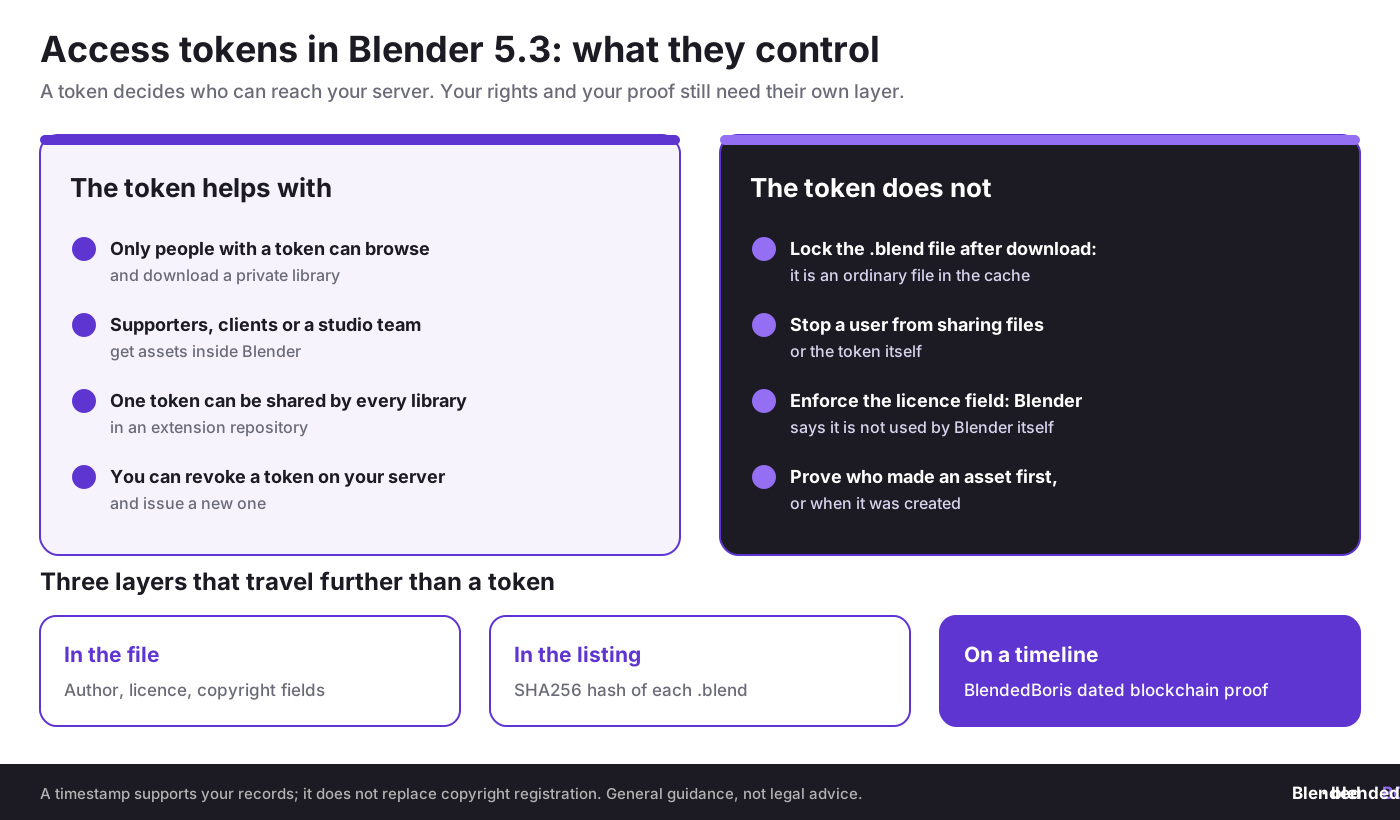
A token is a key to your server. It is not a lock on your files. The developer documentation for the asset listing and the manual make the limits clear, and they matter for anyone planning to sell through a private library.
- Downloaded files are ordinary files. Once a user downloads an asset, it sits in their local cache as a normal .blend file. Nothing in the feature stops them copying it, sharing it or uploading it elsewhere.
- A token can be shared. Anyone who has the token can use it. Plan to issue tokens per customer where you can, so you can revoke one without affecting everyone else. How you issue and revoke tokens depends on your server; Blender only sends the token you enter.
- The licence field is information, not enforcement. The Blender manual describes the License, Copyright and Author fields of an asset as optional and says they are not used by Blender itself. They tell users your terms; they do not apply them.
- Blender does not track versions. The manual says Blender can only detect whether a file on the server is the same as the one downloaded or different. It cannot tell an update from a rollback, or know whether a downloaded file was changed afterwards.
None of this is a flaw in the design; it is how file delivery works. But it means the legal and evidential side of your work still needs its own layer. Our guide on how to protect Blender models from theft and the overview of protecting Blender models from theft cover the practical options.
Why do the licence and copyright fields still matter?
Even though Blender does not enforce them, the metadata fields travel with your assets in a way a store page does not. Each asset in a listing can carry an author, a description, a licence, a copyright notice, tags and custom properties. The example in Blender's developer documentation shows how the Essentials library fills them in: a galvanised metal material with Blender Studio as author, CC0 - Public Domain as the licence and Blender Foundation as the copyright holder.
For your own library, these fields are where a user sees your terms at the moment they drag an asset into a scene. Choose the licence on purpose. CC0 gives up most of your rights, which is why Blender uses it for Essentials; for a commercial pack you will usually want your own licence text. Compare the options in Creative Commons vs copyright for Blender assets, see what CC0 really means in our guide to works free from copyright, and check marketplace rules in Blender marketplace copyright policies.
Fill in the same information inside the file as well. Our guide to Blender metadata and watermarking shows how to add author and licence information to renders and exports, so it survives even when a file leaves your library.
Is a SHA256 hash proof of authorship?
Not on its own. A SHA256 hash is a fingerprint of a file: change one byte and the hash changes. The listing uses it so that Blender, proxies and caches know when a file has changed. That makes a hash useful evidence that two copies of a file are identical. But a hash in your own listing does not show who created the file, and you can regenerate the listing at any time, so it does not show when the file first existed either.
This is the gap that dated records fill. If you record the hash of your original .blend file with an independent timestamp before you publish it, you can later show that this exact file existed at that time. In the United States, registering important works is a separate step that unlocks court remedies; our step-by-step guide explains how to register copyright. A timestamp supports registration; it does not replace it.
What should Blender artists do before publishing an online library?
- Test on the beta. Build your library with Blender 5.3 beta and check it in 5.2 LTS as well, since many users stay on the LTS release.
- Fill in metadata for every asset. Author, licence, copyright and a short description, plus tags so users can find things.
- Pack everything. Make each .blend self-contained, with textures packed, and keep the unpacked working files privately.
- Write a clear licence. Put a short licence name in the asset field and the full text on your website, and link to it from the library's contact details.
- Issue tokens per customer or group. Keep a record of who received which token and when, so you can revoke one if it leaks.
- Keep dated originals. Save your .blend versions with dates; see how to save and back up Blender projects. Timestamp the files that matter before they go online.
- Know your takedown route. If paid assets appear elsewhere, start with our DMCA takedown guide for Blender artists.
If you are new to extensions in general, our explainer on Blender add-ons and extensions covers how they install and update, which now applies to asset libraries too.
How does this fit the bigger picture of data, delivery and control?
Online asset libraries are about delivering creative files through a trusted channel. Our sister sites covered the same question of who controls valuable files, and through which channels, this week.
- Trade secrets and sanctions. The US State Department sanctioned five China-based entities connected to a former Google engineer convicted of stealing AI trade secrets. Read what the PAIPA sanctions mean for protecting design files on cadchain.com.
- AI that writes code inside CAD. Dassault Systèmes highlighted SOLIDWORKS AI features that can write macros from plain-language requests and convert imported geometry into editable parts. See what SOLIDWORKS AI macros mean for CAD managers on solidboris.com.
- Backup tools as an attack path. Two incidents showed that trusted backup software can become the way in. Read what the backup supply chain attacks mean for Inventor teams on borisinventor.com.
Whether it is an asset library, a CAD macro or a backup service, the pattern is the same: a convenient channel is only as trustworthy as the records behind it. For more on how AI tools and marketplaces are changing that picture for 3D artists, see our recent news on Meshy Edit and AI part-editing, AI copies on Etsy and the Midjourney copyright report.
Conclusion
Blender 5.3 turns online asset libraries from a public sharing feature into something creators can use for private and paid distribution: access tokens decide who can download, extensions make installation simple, and version-specific files keep libraries working across releases. What the feature does not do is protect your files once they are downloaded, enforce your licence or prove your authorship. Treat the token as access control, the metadata fields as your published terms, and dated records of your originals as your evidence.
Prove your Blender assets are yours.
BlendedBoris adds a blockchain timestamp to your Blender files from inside Blender, giving you dated proof of authorship to sit alongside your licence, your online library and your copyright registration.
👉 Get started with BlendedBoris
FAQ: Blender 5.3 online asset libraries
What are online asset libraries in Blender?
They are asset libraries hosted on a web server that Blender can browse and download from. They were introduced in Blender 5.2 LTS, released on 14 July 2026, and need Allow Internet Access to be enabled in the Preferences.
What is new in Blender 5.3 for online asset libraries?
Blender 5.3 adds an optional access token, so a library can require authentication, support for asset libraries installed as extensions, and version-specific replacement files for newer Blender releases. Blender 5.3 is in beta and its release is planned for 10 November 2026.
Can I sell Blender assets through an online asset library?
You can deliver paid assets through a private library protected by access tokens, but Blender has no payment system. You still need your own store or a marketplace to take payments and issue tokens.
Does an access token stop people sharing my assets?
No. The token controls who can download from your server. A downloaded .blend file is an ordinary file in the user's cache, and anyone with a token can use it, so issue tokens per customer and keep records.
Does Blender enforce the licence field on an asset?
No. The Blender manual describes the License, Copyright and Author fields as optional and says they are not used by Blender itself. They show users your terms; enforcement still depends on copyright law and your licence.
Is the SHA256 hash in the listing proof that I made an asset?
No. The hash shows whether two files are identical, which helps with evidence, but it does not show who created the file or when. An independent timestamp of the hash adds the date.
Do I need a special server to host a Blender asset library?
No. Any static web server such as nginx or Apache will do, as long as it reports file sizes and ignores query parameters. Blender generates the listing files with the asset_listing command.
How can BlendedBoris help?
BlendedBoris records a blockchain timestamp of your Blender files from inside Blender. That gives you dated proof that a file existed at a certain time. It supports your records and licence but does not replace copyright registration.


