

TL;DR: Grease Pencil 2D Animation in Blender is a full production system, not just a sketch tool.
You can use it to turn storyboards, explainers, branded motion, and hybrid 2D/3D scenes into publishable assets inside one Blender workflow. The big win is faster content creation with better file control, cleaner version history, and stronger proof of who made what when. For startups, studios, and EU SMEs, that means lower tool sprawl, more reusable assets, and fewer rights disputes when files move between freelancers, teams, and clients.
The article also shows that layers, keyframes, onion skinning, naming rules, saved versions, and written contracts matter just as much as drawing skill. If your animation may become sales content, training media, or licensable IP, treat the source file like business evidence, not clutter. Want to go deeper into advanced Blender workflows? Check out advanced Blender techniques and start building a cleaner, safer animation pipeline now.
Grease Pencil 2D animation in Blender: drawing, timing and staging in one file
Grease Pencil 2D Animation in Blender looks deceptively simple, but are most teams treating it as a sketch toy when it is actually a production tool with business, legal, and pipeline consequences? For creative founders, design studios, engineering-led startups, and EU SMEs, Grease Pencil sits at a rare intersection of drawing, animation, 3D staging, and digital asset ownership. That mix matters when your storyboard becomes a pitch asset, your motion explainer becomes part of a sales funnel, or your stylized animation turns into licensable IP.
Grease Pencil in Blender is Blender’s native system for drawing strokes in 3D space, animating them with keyframes, editing them by layer, and mixing 2D art with cameras, lights, rigs, and geometry. For startups and production teams, that means one environment can cover concept frames, animatics, cut-out motion, frame-by-frame animation, motion graphics, and hybrid 2D and 3D scenes without paying for a separate 2D pipeline.
Why it matters for your business: if you create educational content, product demos, game assets, design visualizations, or branded explainers, Grease Pencil shortens the distance between idea and publishable output. Unlike a split workflow where drawings live in one app and staging lives in another, Blender keeps the art, timing, scene logic, and export inside one file structure, which also makes version control and IP traceability easier.
Blender itself puts no claim on your work: its license page says that what you create with Blender is your sole property, including the .blend files. The open question is proof. Copyright arises automatically, but when a dispute starts you still have to show who drew the frames and when. That is the gap BlendedBoris fills: it adds blockchain timestamps to Blender files from inside Blender, so each saved version carries dated proof of authorship.
By the end of this guide, you will understand:
- How Grease Pencil 2D Animation in Blender works in real production terms
- Which features matter most for artists, startups, and SME teams
- How to set up a workable pipeline from rough boards to final render
- What mistakes waste time, money, and ownership clarity
- How Violetta Bonenkamp and Dirk-Jan Bonenkamp would frame Grease Pencil through the lens of IP, audit trails, and file control
Blender’s own manual describes the main goal of Grease Pencil as a 2D animation tool fully immersed in a 3D environment: you can draw frame by frame, move whole objects, deform stroke points, or let a drawing inherit motion from a parent, hook or armature.
Protect your Blender work before it starts circulating.
If your Grease Pencil files, renders, or production drafts leave your studio, ownership proof and version history start to matter fast. BlendedBoris is a Blender plugin that adds blockchain timestamps to your Blender files from inside Blender, so every rough pass and approved version carries dated proof of who made it.
👉 Protect your Blender work with BlendedBoris
Why does Grease Pencil 2D Animation in Blender matter more in 2026?
The challenge for many startups and SMEs is brutal but familiar. They need motion content for investor decks, training, onboarding, product education, social channels, or internal simulation. They also need low software overhead, flexible hiring, and assets they can reuse. Traditional 2D pipelines can become fragmented fast. One tool for drawing, another for compositing, another for 3D camera moves, and another for asset storage.
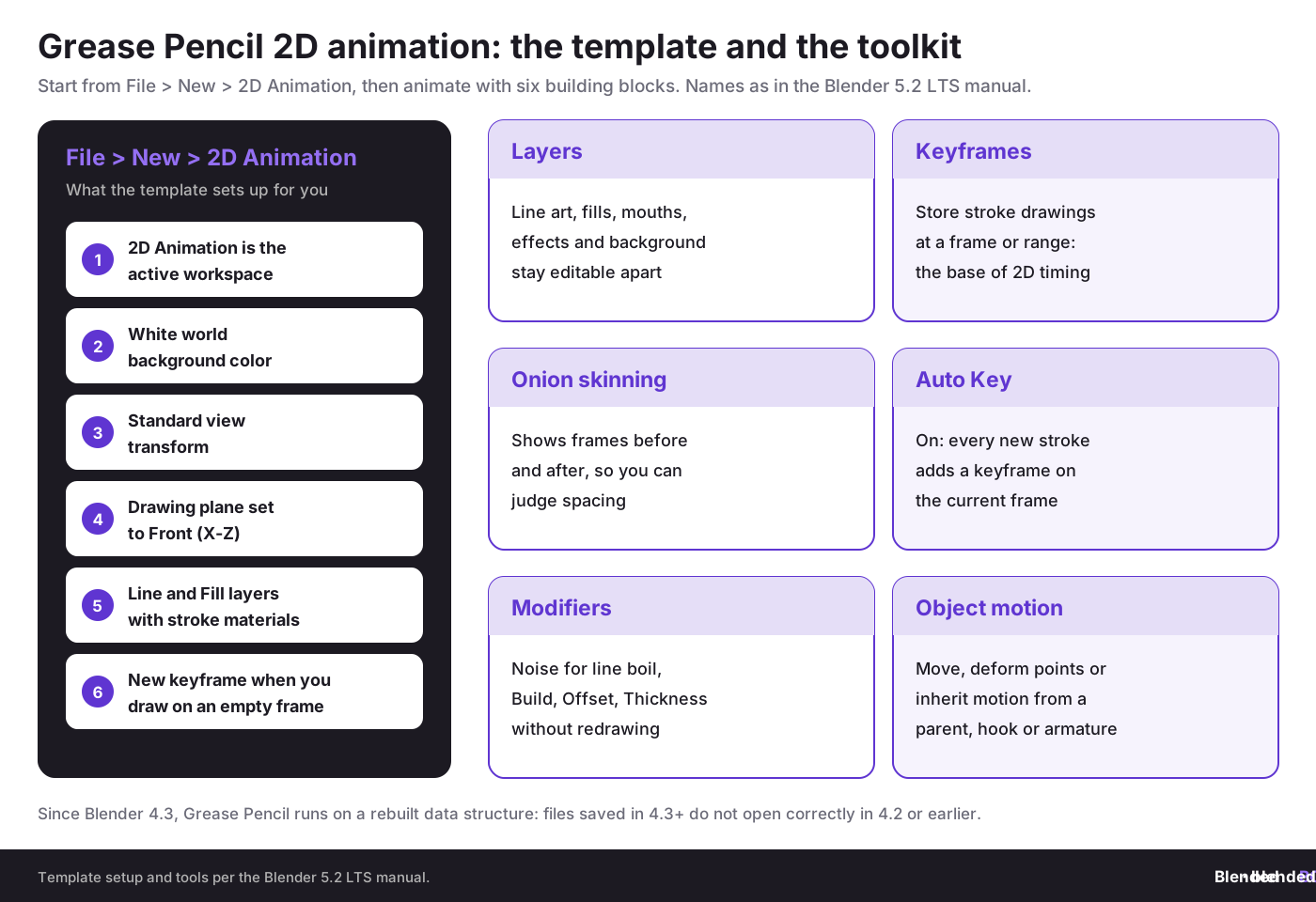
Grease Pencil changes that equation because it gives you 2D drawing with 3D placement, camera control, layer logic, onion skinning, modifiers, materials, and Blender’s wider scene system. The Blender manual introduction to Grease Pencil lists what the 2D Animation template (File › New › 2D Animation) sets up for you: the 2D Animation workspace, a white world background, the Standard view transform, a Front (X-Z) drawing plane, Line and Fill layers with stroke materials, and a new keyframe whenever you draw on an empty frame. That lowers setup time, which matters when teams need repeatable output.
There is also a strategic business angle. Violetta Bonenkamp has long argued through CADChain’s work that file-level evidence and workflow-level control matter far earlier than companies expect. In a Blender context, the issue appears when concept art, storyboards, animatics, and final assets pass between freelancers, agencies, and clients. If the asset becomes commercially useful, the question stops being artistic and becomes legal: who authored what, when, under which terms, and with which versions?
Dirk-Jan Bonenkamp’s legal framing is even sharper. In Europe, copyright usually arises automatically upon creation, but proving authorship, scope of rights transfer, and chain of custody is where many disputes get expensive. A Grease Pencil production file can contain roughs, revisions, hidden layers, and timing edits that tell the history of creation. If you fail to preserve that history, you weaken your evidence.
Here is why companies are paying more attention now:
- Hybrid content is rising: marketing teams want 2D style with 3D camera motion
- Freelance collaboration is normal: files cross borders inside the EU every day
- Short-form video demands speed: rough to polished must happen fast
- Ownership disputes are easier to trigger: one reused animation pack or unlicensed brush workflow can create risk
- Blender has matured: Grease Pencil is no longer a novelty inside the Blender ecosystem
What are the fundamentals you need to understand first?
1. What is a Grease Pencil object in Blender?
A Grease Pencil object is a Blender object that stores strokes as collections of points placed in 3D space. This matters because the drawing is not just a flat bitmap pasted on screen. You can position it in the scene, animate it, deform it, parent it, light it in some styles, and combine it with cameras and meshes.
For startup teams, that means a single asset can move from sketching to storyboard to animation to product explainer without rebuilding the whole scene. If you need a fast primer on hybrid scene logic, read combining 2D and 3D art with Grease Pencil.
2. Why do layers, keyframes, and onion skinning matter so much?
Layers separate visual elements such as line art, fills, facial features, effects, and background components. Keyframes store stroke information at a given frame or frame range. Onion skinning shows neighboring frames so you can judge motion, spacing, and continuity. The Blender manual page on Grease Pencil animation describes keyframes as the basis of traditional animation in Grease Pencil, next to object movement, deformation and inherited motion. If timing and spacing are new to you, start with animation principles for 3D artists and keyframes and the timeline in Blender.
In production, these are not small features. They determine whether your team can revise a shot without destroying adjacent work. They also affect legal clarity. Separate layers and organized keyframes create cleaner authorship evidence. If a freelancer animated only mouths and another artist handled line art, a structured file shows that division far better than a flattened export.
3. How is Grease Pencil different from a pure 2D animation package?
It works inside Blender’s 3D space. That means you can stage 2D drawings with cameras, depth, parallax, empties, armatures, modifiers, compositing, and 3D assets. It also means artists must think spatially. Strokes can sit on different planes, which is powerful but can also create scene clutter if unmanaged.
This is where many newcomers get overconfident. They think Grease Pencil is just digital paper. It is not. It is more like a 2D animation system embedded in a 3D production environment. That is why it can support traditional animation, motion graphics, cut-out rigs, and product storytelling in one place. Since Blender 4.3, Grease Pencil also runs on a rebuilt data structure with layer groups, Geometry Nodes support and multithreaded modifiers. Files saved in 4.3 or later do not open correctly in 4.2 or earlier, so agree on one Blender version per project.
What do Blender’s manual and tutorials say about Grease Pencil features?
Across Blender’s manual, Blender Studio training and community tutorials, the same practical features appear again and again: keyframes, layers, onion skinning, stylus pressure sensitivity, object motion, frame-by-frame drawing, deformation, and modifiers. The official manual confirms the 2D Animation template includes a ready-made setup. Blender Studio’s Grease Pencil resources page points users to the free Grease Pencil Fundamentals course by Matias Mendiola, example files and add-ons, and notes that Grease Pencil needs a mid to high-end graphics card (it suggests an NVIDIA GTX 1050 or higher, or an AMD equivalent).
Independent tutorials also expose how artists actually work. The Micah Buzan Grease Pencil tutorial emphasizes Auto Key, object separation for parallax, transform keyframes, onion skinning controls, and modifiers such as Noise for line boil. These workflow details matter more than broad feature lists because they affect daily shot production.
Stylized community guides go further, with separate expression layers, anime-style shading, orthographic cameras for flat art, and effects like speed lines and glow. That makes Grease Pencil especially relevant for stylized marketing content, game cinematics, educational explainers, and anime-inspired branded work.
From a CADChain perspective, the dangerous moment is not publication. It is the messy middle, when drafts, revisions, previews, and source files circulate without structure. That is where ownership memory starts to decay.
Violetta Bonenkamp, CEO and co-founder, CADChain
How can a startup or SME set up Grease Pencil production step by step?
Let’s break it down into a practical 12-week rollout that suits a small studio, startup content team, design agency, or technical education unit.
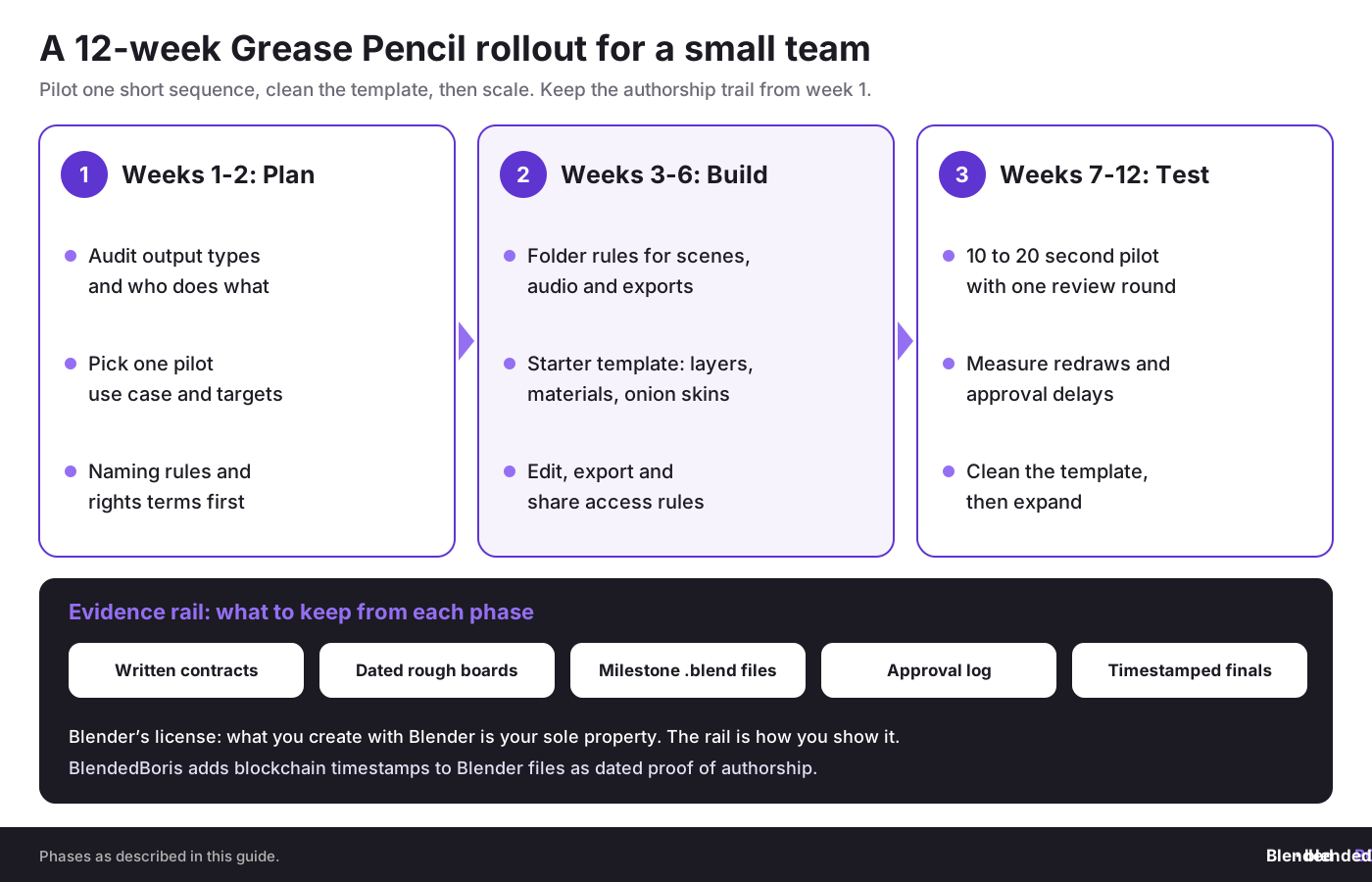
Phase 1: Assessment and planning, weeks 1 to 2
Step 1. Audit your current state
- List your output types such as explainers, reels, motion graphics, internal training clips, or game scenes
- Identify who draws, who animates, who reviews, and who owns final approvals
- Check whether you need frame-by-frame animation, cut-out rigs, or hybrid 2D and 3D shots
- Review where source files are stored and whether versions are preserved
- Document rights terms for employees, contractors, and agencies, especially in cross-border EU work
Step 2. Define your Grease Pencil strategy
- Choose a clear use case for the pilot project
- Set targets such as render turnaround, revision count, and reusability of assets
- Decide whether source files must remain in-house
- Set naming rules for shots, layers, and versions
- Define proof-of-authorship and rights-transfer requirements before production starts
Tools for this phase: Blender 2D Animation template, shared asset register, contract templates, and a file log with timestamps.
Phase 2: Foundation building, weeks 3 to 6
Step 3. Build the file structure
Create folder rules for scene files, linked assets, audio, previews, exports, approvals, and archived versions. This sounds dull, but Violetta Bonenkamp would call it non-negotiable. In legal disputes, tidy chronology beats emotional claims.
Step 4. Create a starter Grease Pencil template
- Preload line and fill materials
- Set frame rate and output dimensions
- Turn on onion skin defaults
- Prepare layer naming conventions such as BG, Character_Line, Character_Fill, FX, Mouth, Eyes
- Set camera type based on style, often orthographic for flatter work
Step 5. Establish rights and access rules
This is the part most creative teams skip. Set who may edit source files, who may export only, and who may share previews with clients. If your business relies on freelance animators, embed transfer terms, moral rights handling where lawful, and reuse limits in written agreements. Dirk-Jan Bonenkamp’s legal view is practical here: if access rules are vague, your ownership story will also be vague.
Phase 3: Testing and scale, weeks 7 to 12
Step 6. Produce one short pilot
Pick a 10 to 20 second sequence. It should include at least one character or animated object, one camera move (see camera animation in Blender), one effects layer, and one revision round. This exposes bottlenecks early.
Step 7. Measure what happened
- How long did rough boards take?
- How many redraws happened because of poor layer planning?
- Did artists lose time because Auto Key or frame navigation was misused?
- Were review notes tied to exact versions?
- Can you prove which file state was approved by the client?
Step 8. Expand only after template cleanup
Do not scale a messy pilot. Clean the template, revise the naming rules, and standardize export presets first. A shaky pipeline multiplied by ten is still a shaky pipeline.
Want your Blender assets to stay commercially usable?
Marketplace uploads, client handoffs, and collaboration files all need ownership clarity, not guesswork after the fact. BlendedBoris timestamps your Blender files on a blockchain from inside Blender, so each milestone gets a dated, tamper-evident record of authorship.
👉 Start timestamping your Blender files with BlendedBoris
Which production approaches work best with Grease Pencil?
Frame-by-frame animation
Best for expressive motion, hand-drawn acting, stylized loops, and short narrative scenes. It gives full control, but labor cost rises quickly. If your startup sells high-feel brand content, this can be worth it. If you need weekly product explainers, it may be too slow unless the style is very minimal.
Cut-out and rig-based motion
Best for repeat characters, educational content, and internal training sequences. You prepare components once and animate them through transforms, parenting, hooks, or armatures (rigging basics in Blender covers bones and armatures). This reduces redraw volume and supports reuse across episodes or product updates.
Hybrid 2D and 3D scenes
Best for technical communication, stylized product walkthroughs, architectural mood pieces, and game trailers. Grease Pencil can sit over meshes, trace forms, add annotations, or create 2D characters inside 3D sets. If your visual style leans flat, cel-like, or sketch-based, also review toon shading and anime-style rendering in Blender.
Motion graphics and explainer design
Best for startups and manufacturing firms explaining processes, machinery logic, software flows, or product benefits. Grease Pencil works well for arrows, callouts, annotations, icon motion, scribble emphasis, and branded diagrams. That makes it attractive for industrial storytelling where hard 3D realism would be overkill. For abstract, brand-driven loops, combine it with motion graphics in Blender.
Here is how the four approaches compare in day-to-day production:
What are the best practices that actually work in 2026?
Practice 1: Start with a visual style charter
What it is: a one-page document that fixes line weight, fill behavior, frame rate, color palette, camera logic, and effects rules before production.
Why it works: style drift kills speed. Teams waste hours polishing scenes that no longer match earlier shots.
How to do it:
- Make one approved reference frame and one approved motion test
- Define which modifiers are allowed and which are banned
- Lock output settings before the first real shot
Common pitfall: approving style from still images only.
How to avoid it: always approve one moving sample, because line boil, camera motion, and readability can change the feel completely.
How to avoid it: always approve one moving sample, because line boil, camera motion, and readability can change the feel completely.
Practice 2: Separate authorship by layers and shots
What it is: organizing work so each contributor handles defined elements or shots, with versioned saves and clear ownership metadata.
Why it works: creative clarity and legal clarity improve together. This is exactly the kind of workflow logic that CADChain’s founders keep pushing in industrial CAD. The same logic applies to digital art.
How to do it:
- Assign per-shot responsibility in writing
- Use consistent layer prefixes and approval labels
- Archive milestone files instead of overwriting everything
Common pitfall: one giant master file edited by everyone.
How to avoid it: split work into manageable units and merge later.
How to avoid it: split work into manageable units and merge later.
Practice 3: Use modifiers carefully, not lazily
What it is: using effects such as Noise, thickness variation, or deformation to add motion character without redrawing every frame.
Why it works: modifiers can create appealing movement fast, especially for line boil and subtle energy.
How to do it:
- Test the modifier on a copy first
- Compare it against hand-drawn timing
- Render short previews before approving the effect globally
Common pitfall: using procedural noise to fake all craft.
How to avoid it: let modifiers support motion, not replace thinking.
How to avoid it: let modifiers support motion, not replace thinking.
Practice 4: Plan for proof, not just output
What it is: preserving dated source files, review exports, approval logs, contract terms, and rights assignments from day one.
Why it works: your most valuable asset may be the source file history, not the MP4. That is the file trail that supports authorship, ownership, and licensing.
How to do it:
- Save milestone versions at concept, animatic, blocking, polish, and final stages
- Attach author and date details to internal records
- Register or certify priority works where commercial value is real
Common pitfall: keeping only final exports.
How to avoid it: preserve source states because that is where your evidence lives.
How to avoid it: preserve source states because that is where your evidence lives.
What mistakes do teams make with Grease Pencil and why are they costly?
Mistake 1: Treating Grease Pencil like a doodle layer
Teams often sketch loosely, never clean the file, and then try to turn the same scene into production output. The impact is messy timing, broken scene logic, and hard-to-reuse assets. If you know the piece may become client-facing or licensable, build it as a production asset from the start.
Mistake 2: No version control for creative files
This is one of the biggest failures in both CAD and digital art teams. A file gets overwritten, approved changes vanish, and authorship becomes murky. In an EU SME with outsourced work, this can trigger contract disputes fast. Keep staged saves and immutable logs where possible, and set up auto-save and version control in Blender before the first shot.
Mistake 3: Flattening rights into vague freelancer agreements
A short invoice note saying “full rights transferred” may not solve everything, especially across jurisdictions. Europe is not one legal monoculture. Moral rights, scope of use, derivative rights, and sublicensing can all matter. Dirk-Jan Bonenkamp would almost certainly ask the first boring question everyone else avoids: what exactly was transferred, by whom, and when?
Mistake 4: Relying on exports instead of source evidence
A rendered video proves publication, not always authorship. The layered Blender file, revision history, and internal approvals can be far more persuasive in a dispute.
Mistake 5: Overbuilding style before validating business use
Startups especially waste time polishing festival-grade animation for content that only needs to explain a workflow in 30 seconds. Match production effort to commercial purpose. If the video supports a product launch, sales page, or investor narrative, clarity matters more than ornamental motion.
How should EU SMEs think about copyright, contracts, and evidence?
Here is the uncomfortable truth. Many SMEs invest in visual content and still have weak ownership hygiene. They assume that paying an artist equals owning everything. That assumption is risky.
Under European practice, copyright usually exists automatically when the work is created, but exploitation rights, assignments, licensing scope, and moral rights treatment can depend on contract wording and jurisdiction. If your Grease Pencil animation was built by a contractor in one country, edited by a post team in another, and sold by a Dutch or German company to a French client, paperwork matters. If you need the basics first, read copyright basics for 3D artists.
A practical checklist for EU SMEs:
- Use written contracts before production begins
- Define authorship, ownership, and permitted reuse separately
- Record who created source files and who approved each stage
- Preserve milestone files and exports with dates
- Avoid sending editable source files unless the contract and payment model justify it
- Store evidence in a way that supports later verification
This is where CADChain’s philosophy becomes relevant to Blender users. Blockchain-backed certificates, file fingerprints, and event logs are not magic replacements for law, but they can support a stronger evidence package when combined with contracts and disciplined file handling. Violetta Bonenkamp’s position has been consistent for years: technology should reinforce legal proof, not pretend to replace it.
Good IP protection is rarely about one dramatic lawsuit. It is about small, boring, repeatable habits that preserve the truth of creation.
Violetta Bonenkamp, CEO and co-founder, CADChain
Which metrics should you track if you use Grease Pencil for business output?
Creative teams often track the wrong things. Likes and applause are fine, but for startups and SMEs the better metrics are operational and commercial.
Foundational metrics to track first:
- Time from storyboard to first animatic
- Revision rounds per shot
- Export error rate
- Reuse rate of rigs, templates, and scene assets
- Percentage of files with clear source ownership records
Advanced metrics after three months:
- Revenue influenced by animated content
- Cost per finished minute by content type
- Average approval delay by client or department
- Dispute rate over revisions, rights, or reuse
- Library growth of reusable visual assets
Your dashboard should include: live project status, version history, approval timestamps, content cost, and asset reuse. That gives you a production view and an evidence view at the same time.
How does Grease Pencil fit different business stages?
Pre-seed and seed stage
Your reality: limited budget, fast pivots, and urgent need for product explanation.
Grease Pencil approach:
- Use simple explainers, rough animatics, and stylized promos
- Favor reusable rigs and minimal frame-by-frame work
- Keep all source files under founder control
Prioritize: speed and proof of concept.
Defer: highly polished cinematic sequences.
Success looks like: one clear visual language that helps sales, fundraising, or onboarding.
Defer: highly polished cinematic sequences.
Success looks like: one clear visual language that helps sales, fundraising, or onboarding.
Series A stage
Your reality: more campaigns, more stakeholders, and increasing brand consistency pressure.
Grease Pencil approach:
- Create templates, style bibles, and reusable scene packs
- Split creative ownership by shot and role
- Formalize contracts with freelancers and agencies
Prioritize: repeatability and review discipline.
Defer: custom one-off experiments that cannot be reused.
Success looks like: consistent output with lower revision waste.
Defer: custom one-off experiments that cannot be reused.
Success looks like: consistent output with lower revision waste.
Series B plus and mature SME stage
Your reality: heavier brand exposure, more legal risk, and distributed creative teams.
Grease Pencil approach:
- Standardize asset governance and rights assignments
- Build internal libraries for characters, scenes, and motion systems
- Tie source file access to role-based permissions and archive milestones formally
Prioritize: governance, reuse, and evidentiary record.
Defer: ad hoc sharing of editable files.
Success looks like: lower legal ambiguity and faster campaign production.
Defer: ad hoc sharing of editable files.
Success looks like: lower legal ambiguity and faster campaign production.
What are the next steps if you want to start this month?
Week 1: choose one use case, install or update Blender, review the 2D Animation template, and define output format.
Week 2: create a starter file with named layers, approved materials, camera defaults, and save conventions.
Week 3: produce a 10 to 20 second pilot that includes rough boards, animation, effect pass, and one review round.
Week 4 and beyond: document what broke, revise the template, lock your file and contract rules, and then expand to a small series.
If your visual direction leans stylized, graphic, or illustration-heavy, it also helps to review non-photorealistic rendering styles in Blender so your Grease Pencil work fits a broader art direction instead of living as an isolated trick.
Glossary of key terms
- Grease Pencil: Blender’s stroke-based drawing and animation system that places 2D art in 3D space.
- Onion skinning: a display mode that shows nearby frames to help judge motion and spacing.
- Keyframe: a saved state of drawing or transformation at a specific point in time.
- Auto Key: when it is on, every new stroke in Draw Mode adds a keyframe at the current frame; when it is off, new strokes go onto the active keyframe.
- Cut-out animation: animation built from reusable parts such as heads, mouths, limbs, or props.
- Orthographic camera: a camera setting that removes perspective distortion, often useful for flat 2D work.
- Noise modifier: a Grease Pencil modifier that randomizes stroke position, thickness or strength over time, often used for line boil.
- Line boil: subtle animated variation in line appearance that makes digital strokes feel less static.
- Authorship evidence: records that support who created a work and when.
- Rights assignment: a contract-based transfer of certain copyright interests from creator to buyer or employer.
Key takeaways
- Grease Pencil 2D Animation in Blender is a real production system, not a side feature, and it supports drawing, timing, object motion, deformation, and hybrid scene work.
- The business value is speed plus reuse, especially for explainers, stylized promos, branded content, and educational animation.
- The legal value sits in the source file trail, including versions, layers, approvals, and clear contracts.
- EU SMEs should treat source history as commercial evidence, not just technical clutter.
- The smartest next move after Grease Pencil mastery is stronger animation structure, whether that means deeper character control or a better learning path for your team.
Need a stronger business layer around your Blender output?
If your studio sells 3D models, animation, or digital art, better licensing and proof workflows can save painful disputes later. BlendedBoris adds blockchain proof of authorship to Blender work, so your rough boards, animatics and finals can be tied to a date and a creator.
👉 See how BlendedBoris protects Blender creations
Closing thoughts
Grease Pencil rewards artists who think like directors and rewards businesses that think like archivists. That sounds less romantic than “just create,” but it is far more useful. A good Grease Pencil pipeline gives you speed, stylistic range, reusable assets, and stronger ownership memory. Those are not artistic luxuries. They are commercial advantages.
From Violetta Bonenkamp’s point of view, the bigger lesson is clear: digital creation becomes more valuable when the chain of creation stays visible. From Dirk-Jan Bonenkamp’s side, the warning is just as clear: if your files move faster than your legal structure, your rights story weakens.
So if this guide helped you understand how to draw and animate with more structure, the logical next subject is deeper motion control through animation and rigging in Blender. And if your bigger challenge is building team capability over time, the smartest follow-up is a broader Blender learning roadmap that helps artists and companies move from experimentation to dependable production.
People Also Ask:
Is Blender Grease Pencil good for 2D animation?
Blender's Grease Pencil is an effective tool for 2D animation. It allows users to draw within the 3D space, making it suitable for traditional 2D animation, cut-out animation, storyboarding, and motion graphics. Its flexibility appeals to both beginners and advanced animators.
How to use Grease Pencil in Blender for animation?
To use Grease Pencil, start by adding a Grease Pencil object in Object Mode using Add ‣ Grease Pencil ‣ Blank. Switch to Draw Mode, then either create keyframes manually or enable Auto Key. Use the drawing tools in the viewport to create strokes and animate based on your timeline.
Is Blender suitable for 2D animation?
Yes. Blender supports 2D animation through Grease Pencil, which covers traditional frame-by-frame animation, cut-out animation, storyboarding and motion graphics. It keeps improving: Blender 4.3 rebuilt Grease Pencil with layer groups, Geometry Nodes support and faster modifiers, and Blender 5.2 LTS is the current long-term support release.
How to get started with 2D animation in Blender?
Select File › New › 2D Animation. The template opens the 2D Animation workspace with a Grease Pencil object, Line and Fill layers with stroke materials, a Front (X-Z) drawing plane, onion skinning, and auto keyframing that adds a new keyframe when you draw on an empty frame, so you can start drawing right away.
What are the main features of Blender's Grease Pencil?
The Grease Pencil includes features such as customizable brushes, multi-layer support, Onion Skinning for frame tracking, and compatibility with Blender's 3D tools for hybrid animations.
Can I combine 2D and 3D animation in Blender?
Yes, Blender allows seamless integration of 2D (Grease Pencil) and 3D elements, enabling creators to produce hybrid animations within the same project environment.
What hardware is recommended for 2D animation with Blender?
Blender’s own minimum for Windows and Linux is a four-core CPU with SSE4.2, 8 GB of RAM and a GPU with 2 GB of VRAM that supports OpenGL 4.3 and Vulkan 1.3; Blender 5.0 and later need Apple Silicon on a Mac. For Grease Pencil, Blender Studio suggests a mid to high-end graphics card (an NVIDIA GTX 1050 or higher, or an AMD equivalent). A pen tablet with pressure sensitivity makes drawing far easier, because Grease Pencil reads stylus pressure.
Are there tutorials for using Blender's Grease Pencil?
Blender's official documentation (see our guide to Blender documentation and learning resources), video tutorials on platforms like YouTube, and community forums provide extensive resources to learn and improve Grease Pencil animation skills.
Is Blender free for 2D animation?
Yes, Blender is an open-source, free-to-use software. This includes all features required for 2D animation, like the Grease Pencil and hybrid 2D/3D tools.
How does Blender compare with dedicated 2D animation software?
Blender stands out for its ability to combine 2D and 3D animation workflows, but it might have a steeper learning curve compared to software designed solely for 2D animation, such as Toon Boom or OpenToonz.
FAQ on Blender's Grease Pencil for 2D Animation
How do startups use Blender Grease Pencil effectively?
Startups use Grease Pencil to streamline animation pipelines. Combining storyboard, keyframe animation, and camera placement in one file avoids workflow fragmentation. Additionally, reusable 2D assets and template-based projects reduce costs and speed up production. For more ways to turn Blender skills into income, see ways to make money with Blender.
What industries maximize Grease Pencil’s potential?
Grease Pencil is ideal for explainer videos, technical education, game cinematics, and branded animations. Its 2D-on-3D integration transforms complex concepts into digestible formats, appealing to creators in marketing, gaming, and manufacturing. Stylized outputs shine in industries prioritizing visual impact.
Can Grease Pencil animations scale for large productions?
While effective for small teams, scaling Grease Pencil productions requires disciplined file structuring, clear layer management, and standardized templates. Teams often use external storyboards and asset libraries for consistency as they scale across projects. For the file side, read our guide to auto-save and version control in Blender projects.
Does Grease Pencil support hybrid animation?
Grease Pencil bridges 2D and 3D with features like object parenting, modifiers, and spatial depth for multi-dimensional shots. It’s instrumental in hybrid content such as stylized product renderings or layered motion explainers, where mixed aesthetics define storytelling impact.
What common mistakes should teams avoid with Grease Pencil?
Mistakes include poor layer organization, skipping version control, and misusing modifiers. Teams often fail to structure files or preserve the source history, leading to legal disputes and inefficiency. Proper planning and archiving practices ensure smooth production workflows.
How do Grease Pencil layers enhance animation control?
Layers separate elements like characters, backgrounds, and effects, facilitating revisions and animation tuning. Organized layers improve efficiency, allowing different artists to manage specific components without affecting adjacent work. Structured files also support legal clarity in SMEs.
What file structure rules are essential for production teams?
Teams should standardize folders for assets, scene files, previews, and exports while maintaining immutable logs for version history. Clear naming conventions and layer prefixes are crucial to avoid collaboration chaos. Legal proof often relies on systematic archiving.
Why are modifiers a game-changer for quick animation tweaks?
Grease Pencil modifiers like Noise, Offset or Thickness enable subtle enhancements, like line boil effects, without manual redrawing. While effective for rapid iterations, they work best when supporting carefully planned motion rather than replacing craftsmanship entirely.
How can SMEs ensure ownership with Grease Pencil animations?
Ownership clarity requires well-documented creation stages and rights assignments. Address source file custody, milestone archiving, and contract terms upfront to prevent disputes. Experts recommend prioritizing file control through both technical and contractual means.
Is Blender’s Grease Pencil suitable for beginners?
Grease Pencil’s intuitive drawing mode and preconfigured templates make it approachable for beginners. However, a basic understanding of 3D spatial logic and animation principles boosts efficiency when working with complex features such as hybrid scene setups.


