
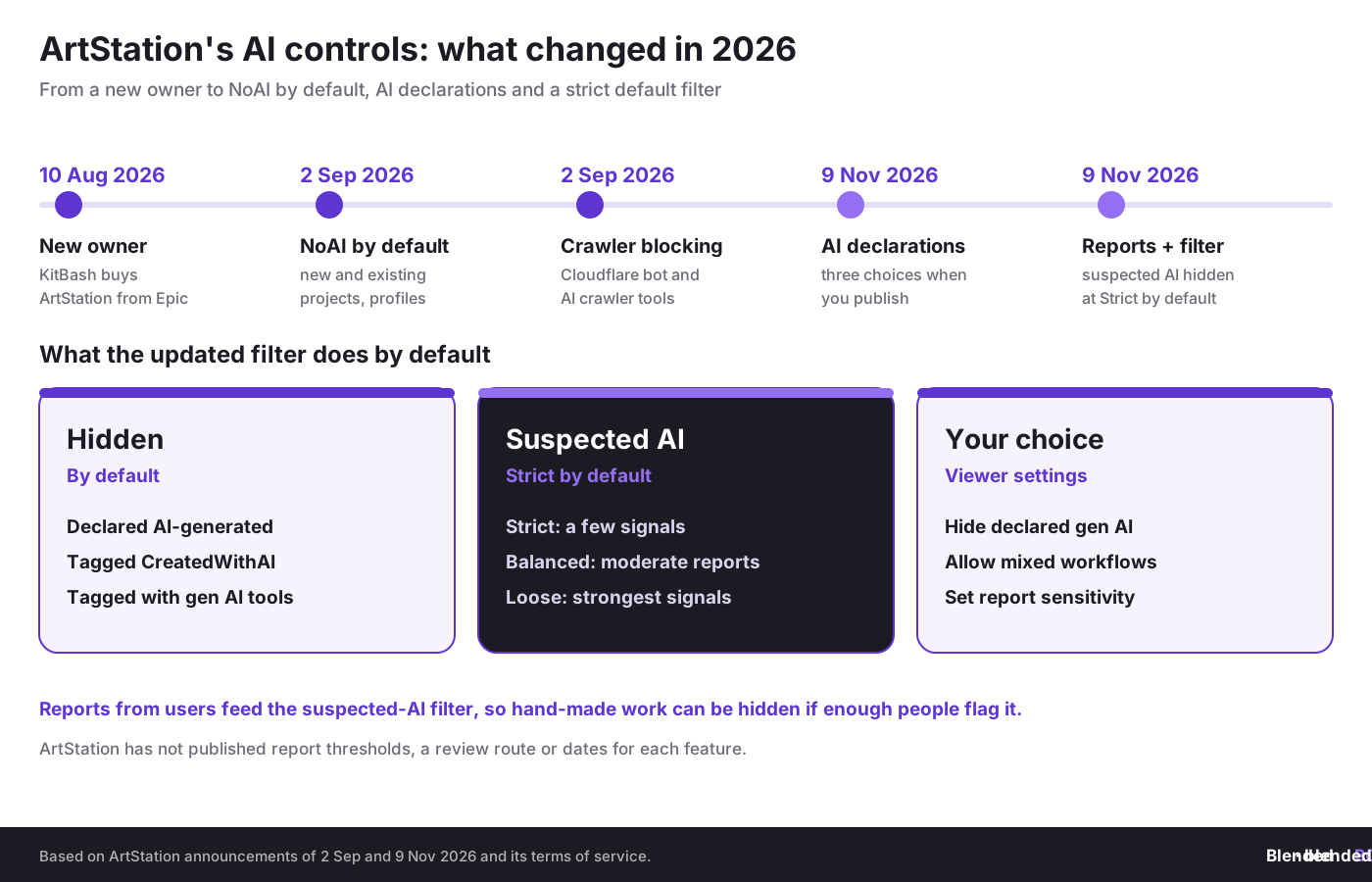
On 9 November 2026, ArtStation announced the next phase of its generative AI controls. Creators will now be asked to declare whether generative AI was used when they publish a project, anyone can report artwork they think is unlabelled AI, and the browsing filter will by default hide projects declared or tagged as AI-generated. Work that users report as suspected AI is filtered at the strictest setting unless viewers change it.
This is the second step since KitBash, the company behind KitBash3D and Greyscalegorilla, took over ArtStation and Sketchfab from Epic Games in August. On 2 September, ArtStation switched its NoAI tag on by default for new projects, applied it to existing uploads and profiles, and began using Cloudflare's bot management and AI crawler tools to block scrapers. At the time it said its old #CreatedWithAI label and filters were not enough to keep generated images from burying human work. The new controls are its answer.
For Blender artists, ArtStation is often the main portfolio: the place where studios, recruiters and clients look first. A filter that hides AI work by default should help hand-made renders get seen. But the same filter relies on user reports, and clean, stylised CG is exactly the kind of work people sometimes mistake for AI. This article explains what ArtStation changed, what is still unclear and how Blender artists can label their work correctly and protect it from false reports.
TL;DR: ArtStation's new AI controls for Blender artists
Since 9 November 2026, ArtStation asks creators to declare each new project as primarily generative AI, mixed, or 100% non-generative, lets anyone report suspected unlabelled AI, and hides declared and suspected AI work by default, with the suspected-AI filter set to Strict. AI art is not banned. NoAI has been on by default for all projects since September. For Blender artists, the practical points are: declare honestly, know that a Cycles denoiser or upscaling alone does not make work AI under ArtStation's terms, show your process on the project page, and keep dated records in case your work is reported.
What did ArtStation announce on 9 November?
In a post on ArtStation Magazine, the ArtStation Team described three changes. It said the goal is to provide clearer information about how work was created and give people more control over what they see.
- AI reporting. If you come across artwork you think is AI-generated and unlabelled, you can now report it directly. ArtStation says every report helps improve AI filtering for the whole community.
- AI declarations. When publishing a project, creators will be asked to declare whether generative AI was used in its creation. The three choices are primarily generative AI, mixed generative AI and non-generative methods, and 100% non-generative.
- New viewer filters. People browsing ArtStation can choose whether to hide declared generative AI content, whether to allow mixed workflows, and how aggressively ArtStation filters work based on user reports of suspected AI.
The report-based filter has three levels. At Strict, artwork is filtered when a few signals suggest it may be AI-generated. At Balanced, it is filtered when there is a moderate level of reports. At Loose, it is filtered only when user signals are strongest. By default, the updated filter does not show any project declared as AI-generated, tagged CreatedWithAI or tagged with generative AI tools, and the suspected-AI setting starts at Strict.
The post explains the reason in one line: "Most artists on ArtStation are upfront about how they make their work, but not everyone is." It ends by saying there is more to do on content filtering. 80 Level reported the changes on 10 November.
What is still unclear?
The announcement is short, and several questions that matter to working artists are not answered in it:
- Older projects. The post says creators will be asked to declare when publishing. It does not say whether existing projects need a declaration, or how undeclared older work is treated by the new filter.
- What counts as "mixed". The three choices are not defined in the post. The question asks whether generative AI was used in a project's creation, which is broader than asking what is in the final image.
- Mixed work by default. The post says declared AI-generated work is hidden by default and that viewers can choose to allow mixed workflows. It does not spell out whether projects declared as mixed are shown to people who never change their settings.
- Report thresholds. "A few signals" and "a moderate level of reports" are not numbers. ArtStation has not said how many reports trigger filtering, whether reports are reviewed by people, or how an artist can challenge a wrong result.
- Penalties. The post does not say what happens to creators who declare falsely.
What do ArtStation's terms say about AI?
ArtStation's terms of service, now with KitBash AS Operations LLC as the contracting party, already contain an artificial intelligence section. It answers some of the questions the announcement leaves open.
NoAI. Projects tagged NoAI may not be used in datasets for generative AI programs, in developing them or as inputs to them. The terms say the tag is applied by default and that you must actively remove it to switch it off. Other users may not scrape or use NoAI content for those purposes. Separately, ArtStation promises not to use or license your content to third parties for generative AI datasets, development or inputs, whether or not it carries the NoAI tag. ArtStation does say it uses your content to improve its own safety and discovery tools, such as spam and fraud detection, search and recommendations.
CreatedWithAI. The terms say content counts as created with generative AI where generative AI produced all or a material portion of the final work, including characters, environments, backgrounds, objects, textures or other material visual or creative elements. Content does not count as created with AI merely because you used AI-enabled tools that work on existing content without adding material generative elements. The examples given are content-aware fill, noise reduction, image upscaling, colour correction and sharpening. ArtStation may apply the CreatedWithAI tag itself, and sellers are responsible for tagging products in the Marketplace.
That definition is useful for Blender users. The denoisers in Cycles, Intel's OpenImageDenoise and NVIDIA's OptiX denoiser, use neural networks, but they clean up a render you made rather than generate new content, which is the kind of noise reduction the terms exclude. Our guide to denoising in Blender explains how they work. An AI-generated texture, HDRI, background plate or base mesh is different: it adds generative material to the final work.
The terms describe the CreatedWithAI tag, not the new declaration form, so the two may not line up exactly. If you used AI for any visible part of a project, mixed is the honest answer. If you used a generator only for private reference images and none of that material appears in the final work, the terms' definition suggests the work is not created with AI, but the declaration question is broader, so add a short note about your process if you are unsure.
Your renders. Your process. Your dates.
BlendedBoris adds a blockchain timestamp to your Blender work from inside Blender, so you hold dated proof of how and when you built each model, sculpt and scene, which helps if anyone ever claims your portfolio piece was made by AI.
👉 Protect your Blender work with BlendedBoris
Which declaration fits your Blender project?
ArtStation has not published examples for its three choices. This is our reading of how common Blender workflows map to them, based on the announcement and the definition in the terms:
Two points stand out. First, the honest answer is the safe answer. A false 100% non-generative label may get through for a while, but if the work is reported, it can end up filtered anyway, and a misleading label weakens your position in any later dispute. Second, mixed is not a penalty box. ArtStation chose to let viewers allow mixed workflows precisely because AI-assisted pipelines vary.
Our reports on the Hi3D image-to-3D model and Meshy's AI part-editing explain who owns generated meshes.
Could your hand-made work be hidden by mistake?
Yes, and this is the main risk for Blender artists. The suspected-AI filter is driven by user reports, and the default is Strict, where a few signals are enough. Clean product renders, smooth stylised characters, perfect lighting and soft painterly NPR looks are all things people sometimes read as AI. A competitor or an annoyed commenter could report a project. ArtStation has not described how a creator learns that a project is being filtered, or how to ask for a review.
The best protection is to make your process visible. ArtStation projects can hold several images, so add a wireframe, a clay render, a viewport screenshot or a short breakdown next to the beauty shot. Our tips for building a professional 3D portfolio with Blender already recommend breakdowns because studios want to see how you work. They now also serve as evidence for viewers who doubt a render.
Behind the page, keep dated records: incremental .blend saves, sculpt stages, texture source files and work-in-progress renders. Courts treat this kind of material seriously. In the Frankfurt "it was AI" decision, a songwriter kept copyright in lyrics in interim proceedings because sworn statements about the human raw version were enough. Our report on the Content Credentials timestamp flaw explains why a label inside a file is not the same as independent dated proof.
Does NoAI by default protect your work from AI training?
It helps, within limits. Since September, every project and profile carries the NoAI tag unless the artist removes it, and ArtStation's terms promise that ArtStation will not use or license your work for generative AI. Cloudflare's tools are meant to block known AI crawlers before they reach content at scale. ArtStation was clear about the limits on 2 September: "No system can make publicly shared work impossible to scrape."
A tag is a statement, not a lock. Its legal weight depends on where you are and who scrapes. In the EU, a machine-readable opt-out matters under the text and data mining exception, as our report on the Advocate General's opinion in the Google Gemini case explains. In the US, the courts are still working out fair use. Our story on the Roblox NoAI tag ruling looked at what a NoAI tag did and did not achieve in court.
The tag also covers only the copy on ArtStation. The same render on your own site, social media or another platform needs its own protection. KitBash also owns Sketchfab, where the NoAI tag was still something you switched on yourself when we looked at the Sketchfab terms in October. Our guide to the shared robots.txt AI training opt-out covers your own website, and the sister blog explains how to protect your art from AI training across platforms.
How does ArtStation compare with other platforms?
ArtStation now goes further than most places where Blender artists show or sell work. Steam, itch.io, Nexus Mods and Fab all rely on creator disclosure. ArtStation adds hidden-by-default filtering and a report-driven filter for work that is not labelled. We covered the others in the fight over Steam's AI labels, itch.io's AI cleanup and the Nexus Mods AI disclosure rules. The sister blog keeps an overview of marketplace copyright policies for Blender artists.
ArtStation has still not banned AI art. When an artist asked in September why it did not simply do that, ArtStation replied that it was working through how to handle complex workflows without hurting artists. The new controls follow the same line: label, filter and let viewers choose. For artists who use AI as one tool among many, the sister blog's piece on how human and AI art can coexist covers the wider debate.
What should Blender artists do now?
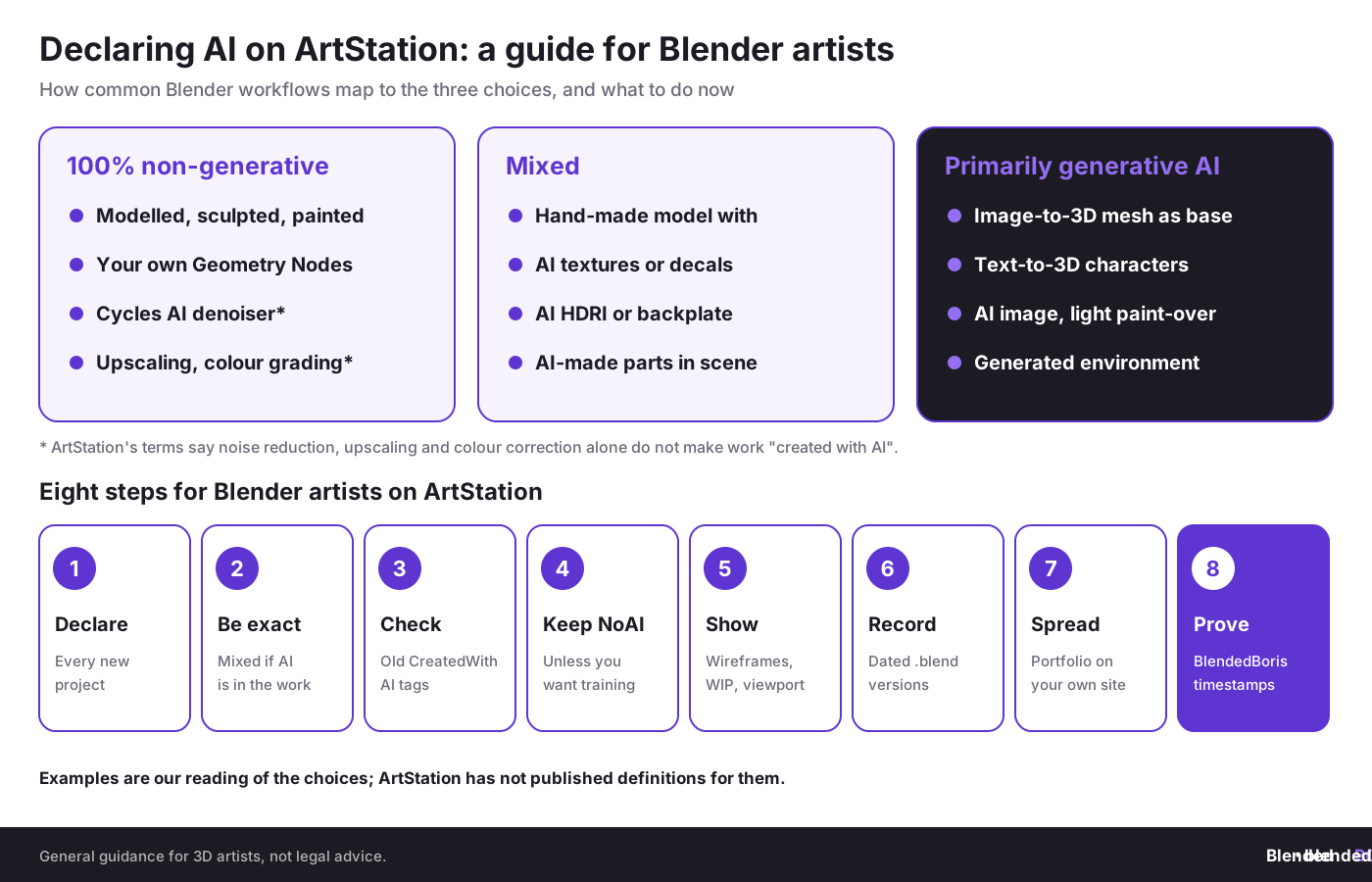
- Declare every new project. Answer the generative AI question when you publish, and pick the choice that matches the whole process, not just the final render.
- Be exact about AI parts. If any visible texture, HDRI, background or mesh came from a generator, choose mixed or primarily generative AI, even if you edited it.
- Review older projects. Check which of your projects carry CreatedWithAI or AI tool tags, and whether they are still accurate.
- Keep NoAI on. Leave the default unless you actively want your work available for AI training, and check your profile setting.
- Show your process. Add wireframes, clay renders, viewport captures or breakdowns to each project so viewers and reviewers can see how it was made.
- Keep dated records. Save incremental .blend files, sculpt stages and texture sources for every portfolio piece.
- Spread your portfolio. Keep a copy of your portfolio on your own website so a filtering mistake on one platform does not make you invisible.
- Timestamp key work. Dated proof of authorship helps if a project is reported as AI or copied by someone else. For important pieces, see our guide to registering artwork, 3D models and renders.
Where does this fit in the bigger picture?
Today our sister sites looked at other cases where control over access and files decided what happened next:
- A ransom demand at a tunnel project. Attackers reached a server used to exchange data with contractors on the Brenner Base Tunnel: what the Brenner Base Tunnel cyberattack means for shared project data on cadchain.com.
- Zero-days in remote management software. A researcher published alleged N-able N-central flaws before a fix, and N-able took the hosted service offline: what the N-central zero-days mean for SOLIDWORKS teams on solidboris.com.
- Espionage through business contacts. Nvidia's board opened an independent investigation into reports that its CEO was targeted by a foreign intelligence effort: what the Nvidia investigation means for Inventor teams on borisinventor.com.
Conclusion
ArtStation's new controls are good news for artists who make their work by hand. Declared and suspected AI work is hidden by default, NoAI is on for everyone, and ArtStation has promised in its terms not to use or license your work for generative AI. The weak point is the report-driven filter: at the Strict default, a few reports may be enough to hide a project, and there is no published review route yet. Declare honestly, show your process on every project, keep your portfolio in more than one place and keep dated records of how you made each piece.
Make your process provable.
BlendedBoris records a blockchain timestamp of your Blender work from inside Blender, giving you dated proof of authorship for your models, sculpts and renders, so you can show they were made by you, and when.
👉 Get started with BlendedBoris
FAQ: ArtStation's AI declarations and filter
What did ArtStation change on 9 November 2026?
It added a way to report suspected unlabelled AI work, asked creators to declare generative AI use when they publish, and expanded viewer filters. By default, projects declared or tagged as AI-generated are hidden, and the suspected-AI filter is set to Strict.
What are the three AI declaration choices?
Primarily generative AI, mixed generative AI and non-generative methods, and 100% non-generative.
Has ArtStation banned AI art?
No. AI-generated work can still be posted. It has to be labelled, and viewers can hide it.
Does using the Cycles denoiser count as AI?
Not under ArtStation's terms, which say noise reduction, upscaling, colour correction and similar tools that work on existing content do not make work created with generative AI. AI-generated textures, backgrounds, objects or characters do count.
Can my hand-made work be hidden because of reports?
Yes. The suspected-AI filter uses user reports and starts at Strict, where a few signals can be enough. ArtStation has not published thresholds or a review process, so show your process on the project page and keep dated records.
Is NoAI switched on for my older projects?
Yes. Since 2 September 2026, ArtStation applies the NoAI tag by default to new projects and has applied it to existing uploads and profiles. You can switch it off if you want your work available for AI training.
Who owns ArtStation now?
KitBash, the company behind KitBash3D and Greyscalegorilla, announced on 10 August 2026 that it had acquired ArtStation and Sketchfab from Epic Games. The terms of service now name KitBash AS Operations LLC.
How can BlendedBoris help?
BlendedBoris adds a blockchain timestamp to your Blender work from inside Blender, giving you dated proof of what you made and when.


